
Multimedia & graphics Windows
Mazaika for Windows
Build a photo mosaic from your own picture collection with Mazaika for Windows. Adjust individual tiles and color blending; the 30-day trial limits export size and format.
- Operating system
- Windows Vista, 7, 8, 8.1, 10 and 11, according to publisher text
- Architecture
- 64-bit
- Download package
- EXE installer
Selected package is the 64-bit trial. A separate older 32-bit download exists. Publisher download-page text requires Vista or later, conflicting with image alt text that says XP SP3 or later; do not assume XP support.
Link checked · Download guidance
What is Mazaika?
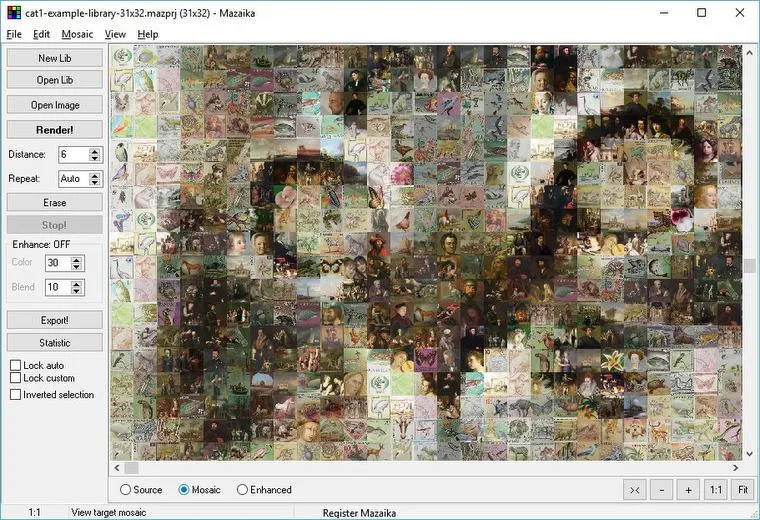
Mazaika turns a source picture into a mosaic assembled from smaller photos. It matches regions of the main image against a picture library using color and brightness patterns. Use it to compose a mosaic from personal photos or start with the example library bundled with the Windows trial. The variety of colors and subjects in the library affects how closely the finished mosaic resembles the source.
A wizard guides the process, while tile-repetition controls, individual tile replacement and color blending let you refine the result. These controls are useful when an automatically chosen tile distracts from a face or another important part of the image.
This download is the 64-bit Windows trial, which the publisher labels version 5.0; the paid full version is listed separately as 5.1. The trial lasts 30 days and exports JPG images up to 2500 × 2500 pixels with tiles up to 32 × 32 pixels. It cannot render saved projects. Larger output and additional export formats belong to the paid edition, not this trial.
What it offers
- Compose a larger picture from a library of smaller photos, matched by color and brightness.
- Replace individual mosaic tiles and control tile repetition.
- Adjust tile colors and blend tiles with the original image.
- Use a wizard, zoom controls and Library Inspector to organize and refine a mosaic.
- Start with the Windows trial’s bundled example picture library.
Good to know
- Continued use after the 30-day trial requires purchase and registration.
- Trial exports are JPG only, capped at 2500 × 2500 pixels with tiles no larger than 32 × 32 pixels; rendering saved projects is unavailable.
- Mosaic quality depends on the source picture and the variety of images in the tile library.
- Publisher compatibility text requires 64-bit Windows Vista or later for this package, but its Windows image alt text says XP SP3 or later. XP compatibility is not confirmed.
Product images
Sources
References used for this listing. Retrieval dates do not indicate hands-on testing.
More in multimedia & graphics
View category ↗
1by1 2.17
Play music directly from folders with 1by1, a free Windows audio player with resume, gapless playback and file tools. Formats beyond MP3 need additional decoders.
3DVista Virtual Tour Pro
Build interactive 360° virtual tours from panoramas, videos and 3D models with 3DVista Virtual Tour Pro for Windows. Commercial software with a 30-day trial.


4DDiG Video Repair
Repair corrupted or unplayable videos in batches with the Video Repair tool in 4DDiG File Repair for Windows. A free trial is available; advanced features require a paid license.