

Multimedia & graphics Windows
MIDI Command Studio for Windows
Map MIDI controller buttons, knobs and faders to Windows shortcuts, multi-step macros and audio volume controls. The free edition has preset, mapping and active-device limits.
What is MIDI Command Studio?
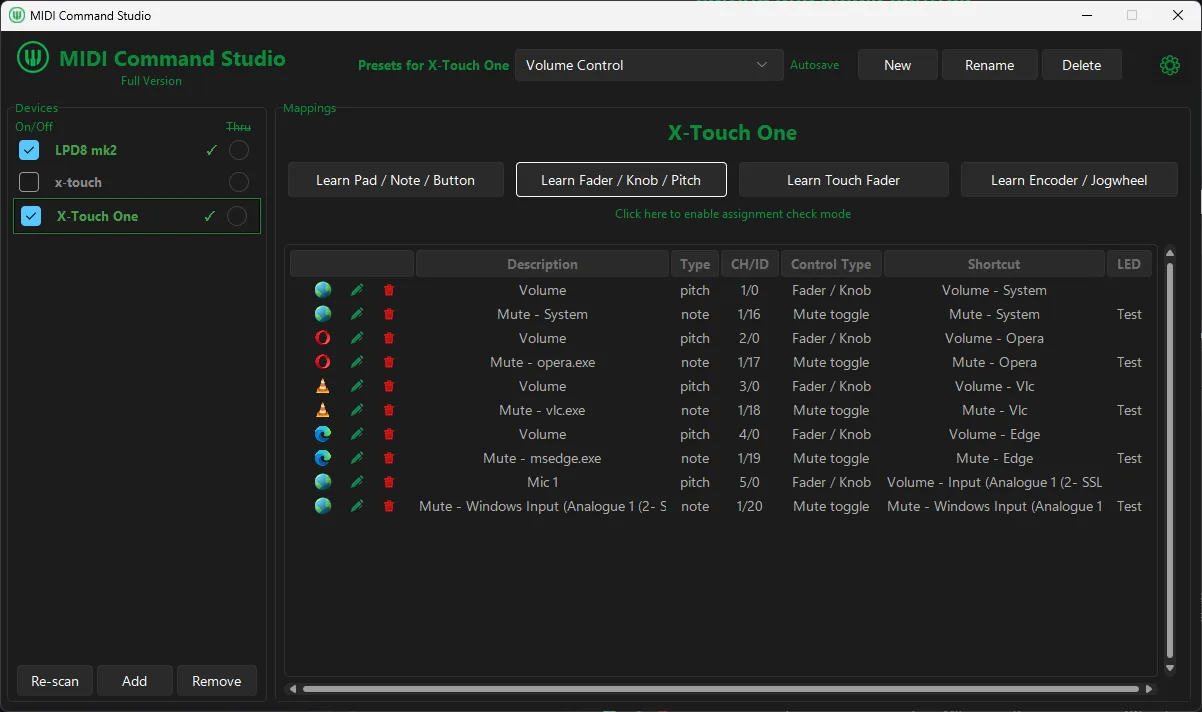
MIDI Command Studio turns a MIDI controller or keyboard into a control surface for Windows applications. Assign physical controls to keyboard shortcuts, app-specific actions or Windows audio targets, then switch presets for different workflows. It can control system volume, individual application volume and supported audio inputs without treating every control as a musical note.
The Mapping Editor assigns actions to incoming MIDI controls, while the Shortcut Palette provides built-in commands. For longer sequences, macros combine shortcuts, waits, mouse actions, text input and program or file launches. LED, display and motorised-fader feedback depend on compatible controller hardware.
Meltopia lists Windows 10 or 11 and a MIDI controller or MIDI keyboard as requirements. The free edition has no time limit but allows only two presets per device, six mappings per preset and one active device at a time. A paid licence removes those limits and enables audio sample playback. The publisher also warns that Windows Smart App Control can block the unsigned installer; this listing does not establish installer safety or recommend disabling Windows protections.
What it offers
- Map MIDI buttons, pads, knobs, faders, encoders and jog wheels to shortcuts and application actions.
- Control system volume, application volume and supported Windows audio input volume or mute.
- Build macros containing shortcuts, waits, mouse actions, text input and program or file launches.
- Switch presets from a MIDI controller and choose commands from a built-in Shortcut Palette.
- Use LED, LCD and motorised-fader feedback on compatible hardware; audio sample playback requires a paid licence.
Good to know
- Free use is limited to two presets per device, six mappings per preset and one active device at a time; audio sample playback requires a licence.
- Requires Windows 10 or 11 and a MIDI controller or MIDI keyboard; advanced feedback needs compatible hardware.
- The publisher states that Smart App Control on some Windows 11 systems can block the unsigned installer.
Product images
Sources
References used for this listing. Retrieval dates do not indicate hands-on testing.
More in multimedia & graphics
View category ↗
1by1 2.17
Play music directly from folders with 1by1, a free Windows audio player with resume, gapless playback and file tools. Formats beyond MP3 need additional decoders.
3DVista Virtual Tour Pro
Build interactive 360° virtual tours from panoramas, videos and 3D models with 3DVista Virtual Tour Pro for Windows. Commercial software with a 30-day trial.

4DDiG Video Repair
Repair corrupted or unplayable videos in batches with the Video Repair tool in 4DDiG File Repair for Windows. A free trial is available; advanced features require a paid license.