
Multimedia & graphics Windows
MidiPiano
Play a virtual piano, record MIDI performances and study notes with color-coded keys and a piano roll. This Windows download is the legacy 2.2.1 release.
Version 2.2.1 · Direct publisher file
Link checked · Download guidance
What is MidiPiano?
MidiPiano turns a computer keyboard into a virtual piano and provides MIDI playback, recording and editing. It suits trying a melody, saving a performance as a MIDI file or studying an existing piece without treating the program as a full recording studio.
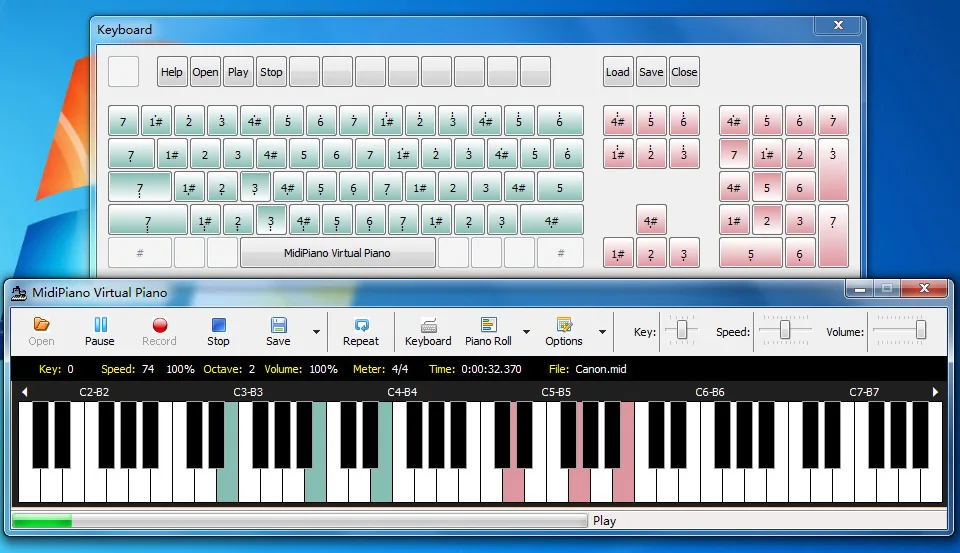
During MIDI playback, colored keys distinguish tracks associated with the left and right hands, while the piano roll shows the music graphically. The publisher describes slowing playback and muting the hands separately for practice. A customizable keyboard layout and MIDI input/output device support offer alternatives to the default computer-key mappings.
The linked EXE comes from the publisher’s GitHub release tagged 2.2.1, whose notes are dated June 8, 2014. Softonic lists a different version, 2.26, and Windows XP; those listing details are not proof of the linked installer’s build or modern Windows support. Windows 10/11 compatibility and processor architecture are not established by the inspected sources. Softonic also describes keyboard customization and MIDI editing as tricky, so expect a basic MIDI tool rather than a polished recording workstation.
What it offers
- Play and record MIDI files using a virtual piano keyboard.
- Edit MIDI notes in a visual piano roll.
- Follow color-coded keys for different tracks and left/right-hand parts.
- Slow playback and mute hands separately to study a piece.
- Customize the computer-keyboard layout and use MIDI input/output devices.
- Use the 88-key mode documented in the 2.2.1 release notes.
Good to know
- The selected download is the legacy GitHub 2.2.1 release, not the 2.26 version listed by Softonic.
- Modern Windows compatibility and installer architecture are unconfirmed; Softonic’s product listing names Windows XP.
- Softonic reports that keyboard customization and MIDI editing can be difficult; this is not a full recording application.
Product images
Sources
References used for this listing. Retrieval dates do not indicate hands-on testing.
- MidiPiano - Download — retained product observation ↗Retrieved
- mantousoft/MidiPiano — retained publisher README ↗Retrieved
- MidiPiano 20140608 — retained release notes ↗Retrieved
- MidiPiano 2.2.1 — official release assets ↗Retrieved
- MidiPiano 2.2.1 — newly inspected publisher screenshot source ↗Retrieved
More in multimedia & graphics
View category ↗
1by1 2.17
Play music directly from folders with 1by1, a free Windows audio player with resume, gapless playback and file tools. Formats beyond MP3 need additional decoders.
3DVista Virtual Tour Pro
Build interactive 360° virtual tours from panoramas, videos and 3D models with 3DVista Virtual Tour Pro for Windows. Commercial software with a 30-day trial.


4DDiG Video Repair
Repair corrupted or unplayable videos in batches with the Video Repair tool in 4DDiG File Repair for Windows. A free trial is available; advanced features require a paid license.