

Multimedia & graphics macOS
MKVToolNix for macOS
Combine video, audio and subtitles into MKV files, inspect tracks and edit chapters with MKVToolNix for Mac, a free, open-source Matroska toolkit.
- Operating system
- macOS 13 Ventura or newer
- Architecture
- Universal: Apple silicon (arm64) and Intel (x86_64)
- Download package
- DMG disk image; package revision 1
Publisher-hosted DMGs are built by Graham Thompson from version 98 onward. Separate architecture-specific DMGs are also available.
Link checked · Download guidance
What is MKVToolNix?
MKVToolNix organizes the contents of Matroska files. Use its multiplexer to put video, audio and subtitle tracks into an MKV container, or use its information, chapter and header tools to inspect and adjust an existing file. It is useful when you need to change which tracks a file contains or how they are labeled, rather than edit the footage itself.
The graphical interface provides source-file and track settings that can be saved and restored. The suite also includes command-line tools: mkvmerge creates Matroska files, mkvinfo reports their structure, mkvextract extracts tracks and data, and mkvpropedit changes supported properties. Track extraction is a command-line capability; the GUI manual does not list it as an implemented GUI feature.
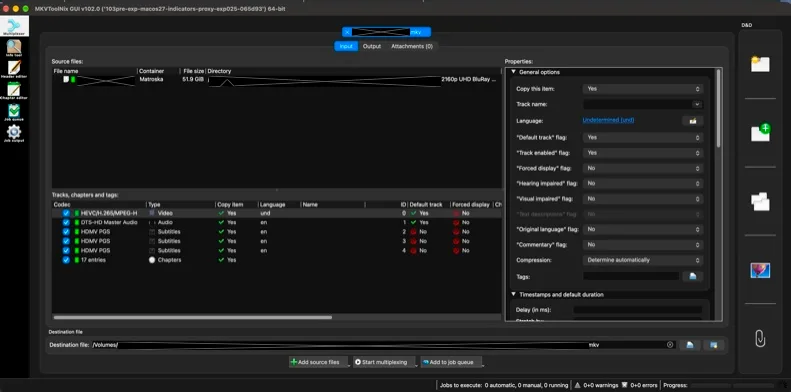
This entry links to the publisher-hosted 103.0 revision-1 universal DMG for Intel and Apple silicon Macs. The publisher lists macOS 13 Ventura or newer and credits Graham Thompson with building the DMGs from version 98 onward. The screenshot shows an earlier 102.0 development build on macOS in dark mode, not the linked 103.0 package.
MKVToolNix is not a video transcoder. When splitting video, mkvmerge can split only immediately before a keyframe, so the actual boundary can differ from the requested timestamp. Use a tool with re-encoding support when you need an arbitrary frame-accurate cut.
What it offers
- Multiplex supported video, audio and subtitle sources into Matroska files with mkvmerge or the graphical interface.
- Inspect Matroska file structure and track information with mkvinfo and the GUI information tool.
- Edit chapters and supported header properties through the GUI's dedicated editors.
- Extract tracks and data with the separate mkvextract command-line tool.
- Save and restore GUI configurations, including source files and track options.
Good to know
- Video splitting is restricted to keyframe boundaries; a requested timestamp is not a guarantee of a frame-exact cut.
- The tools do not encode or decode audio or video, so they do not replace a transcoder.
- Track extraction is provided by the command-line tool; the GUI manual describes GUI extraction as a future capability.
Product images
Sources
References used for this listing. Retrieval dates do not indicate hands-on testing.
- MKVToolnix for Mac - Download ↗Retrieved
- MKVToolNix news and product introduction ↗Retrieved
- MKVToolNix Downloads — macOS requirements and build provenance ↗Retrieved
- Publisher macOS release 103.0 directory ↗Retrieved
- Graham Thompson's package-mkvtoolnix-for-mac README ↗Retrieved
- MKVToolNix 103.0 README — tools and license ↗Retrieved
- mkvtoolnix-gui manual ↗Retrieved
- Publisher FAQ — Why does mkvmerge not split where I want it to? ↗Retrieved
- Publisher issue 6307 — corticalcode's macOS GUI patch demonstration ↗Retrieved
More in multimedia & graphics
View category ↗
1by1 2.17
Play music directly from folders with 1by1, a free Windows audio player with resume, gapless playback and file tools. Formats beyond MP3 need additional decoders.
3DVista Virtual Tour Pro
Build interactive 360° virtual tours from panoramas, videos and 3D models with 3DVista Virtual Tour Pro for Windows. Commercial software with a 30-day trial.

4DDiG Video Repair
Repair corrupted or unplayable videos in batches with the Video Repair tool in 4DDiG File Repair for Windows. A free trial is available; advanced features require a paid license.