
Multimedia & graphics Windows
Moo0 Video Resizer
Reduce a video's file size or change its screen dimensions with Moo0 Video Resizer, also known as VideoMinimizer. Free for non-commercial use on the Windows versions listed by Moo0.
- Operating system
- Windows XP, Vista, 7, 8.1 and 10, as listed by Moo0
- Architecture
- Not specified by the publisher source
- Download package
- EXE installer
The official page does not establish Windows 11 support. The linked installer was checked through HEAD requests only; it was not downloaded or run.
Link checked · Download guidance
What is Moo0 Video Resizer?
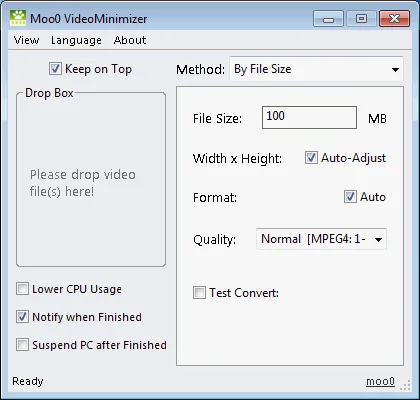
Moo0 Video Resizer, also known as Moo0 VideoMinimizer, focuses on making video files smaller or changing their screen dimensions without working through a full converter's detailed settings. Its drop-box interface includes a file-size target, automatic dimension and format options, and quality selection. The publisher says it creates a separate resized file in the original folder by default, leaving the source video unchanged.
Before committing to a full conversion, use Test-Convert only a Part to inspect a short sample, such as the first or middle 15 seconds. The publisher warns that older players may not support the x265 option. Version 1.29 is dated July 2, 2019, and the official compatibility list ends at Windows 10; Windows 11 support is not established. The free license covers non-commercial use only.
What it offers
- Resize video by file size or screen dimensions.
- Drop video files into the application's drop box and choose conversion settings.
- Preview a short section with Test-Convert only a Part before converting the whole video.
- Create a separate resized file in the source folder by default rather than altering the original.
- Choose a quality setting, including the publisher-documented x265 option.
Good to know
- Free use is restricted to non-commercial purposes.
- The publisher lists Windows versions only through Windows 10; Windows 11 compatibility is unconfirmed.
- Older video players may not support x265 output. The publisher directs users needing more detailed conversion options to Moo0 Video Converter.
Product images
Sources
References used for this listing. Retrieval dates do not indicate hands-on testing.
More in multimedia & graphics
View category ↗
1by1 2.17
Play music directly from folders with 1by1, a free Windows audio player with resume, gapless playback and file tools. Formats beyond MP3 need additional decoders.
3DVista Virtual Tour Pro
Build interactive 360° virtual tours from panoramas, videos and 3D models with 3DVista Virtual Tour Pro for Windows. Commercial software with a 30-day trial.

4DDiG Video Repair
Repair corrupted or unplayable videos in batches with the Video Repair tool in 4DDiG File Repair for Windows. A free trial is available; advanced features require a paid license.