

Multimedia & graphics macOS
Movavi Video Editor for macOS
Edit video on Mac with a multitrack timeline, titles, transitions and automatic subtitles. The free version has export restrictions; paid activation removes trial limits.
- Operating system
- macOS 12.0 or later
- Architecture
- 64-bit Intel; Apple M1 or later
- Download package
- DMG installer
Publisher lists 4 GB RAM, a 1280 × 800 display, 400 MB for installation and 600 MB for ongoing operations. Native ARM support is advertised.
Link checked · Download guidance
What is Movavi Video Editor?
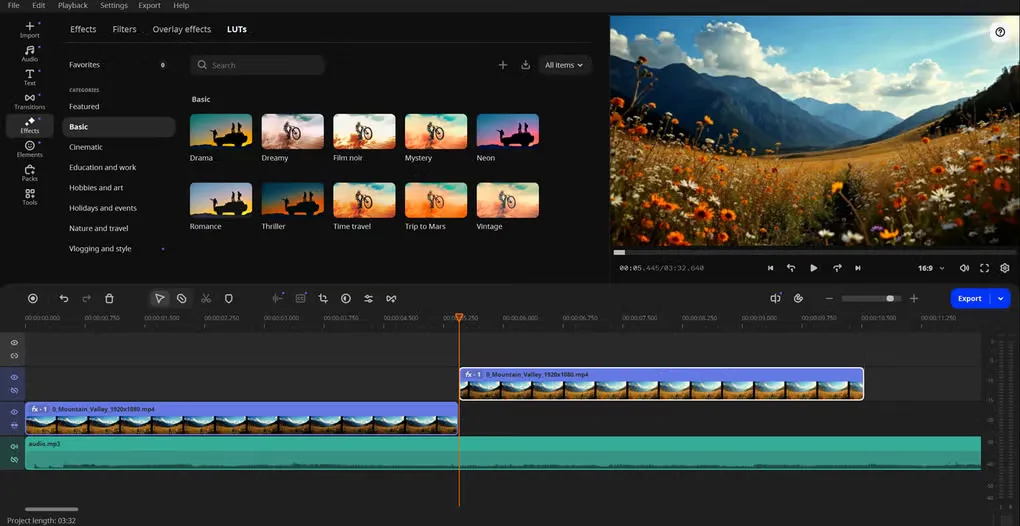
Movavi Video Editor assembles clips, photos, music and text into videos for social posts, tutorials and family projects. Its timeline lets you arrange footage and audio, cut unwanted sections, crop the frame and adjust colors or playback speed. Templates provide a starting structure that can be customized with your own media.
Automatic subtitles, silence removal and subject-tracking crops reduce repetitive editing tasks. Filters, transitions, overlays and picture-in-picture tools add visual elements without moving to a separate effects application. The publisher lists support for both 64-bit Intel Macs and Apple M1 or newer processors.
The free download is not unrestricted editing software: Movavi lists a trial watermark on exported videos and additional export limits, including a 60-second video or half-length audio limit and/or unavailable advanced features. The product page says the restrictions depend on the build. Check these limits before preparing a finished video; removing trial restrictions requires a purchased activation key.
What it offers
- Arrange video clips, photos and audio on a multitrack timeline.
- Cut and crop footage, adjust colors and change playback speed.
- Generate automatic subtitles and remove unwanted pauses.
- Reframe clips with subject-tracking cropping.
- Add templates, titles, transitions, filters, overlays and picture-in-picture compositions.
Good to know
- Free-version exports have a trial watermark; depending on the build, a 60-second video or half-length audio limit and/or advanced-feature export restrictions may also apply.
- Removing trial restrictions requires buying and activating a license.
Product images
Sources
References used for this listing. Retrieval dates do not indicate hands-on testing.
More in multimedia & graphics
View category ↗
1by1 2.17
Play music directly from folders with 1by1, a free Windows audio player with resume, gapless playback and file tools. Formats beyond MP3 need additional decoders.
3DVista Virtual Tour Pro
Build interactive 360° virtual tours from panoramas, videos and 3D models with 3DVista Virtual Tour Pro for Windows. Commercial software with a 30-day trial.

4DDiG Video Repair
Repair corrupted or unplayable videos in batches with the Video Repair tool in 4DDiG File Repair for Windows. A free trial is available; advanced features require a paid license.