
Multimedia & graphics Windows
MP3 Tag Express
Batch-edit audio tags and rename files across folders with MP3 Tag Express for Windows. Supports MP3, M4A, M4B, WMA and FLAC, with a free trial and paid license.
What is MP3 Tag Express?
MP3 Tag Express edits audio metadata and renames files in batches across multiple folders. It is aimed at DJs and music collectors who need to organize track titles, artists, albums and numbering without editing each file separately. The publisher lists support for MP3, M4A, M4B, WMA and FLAC files.
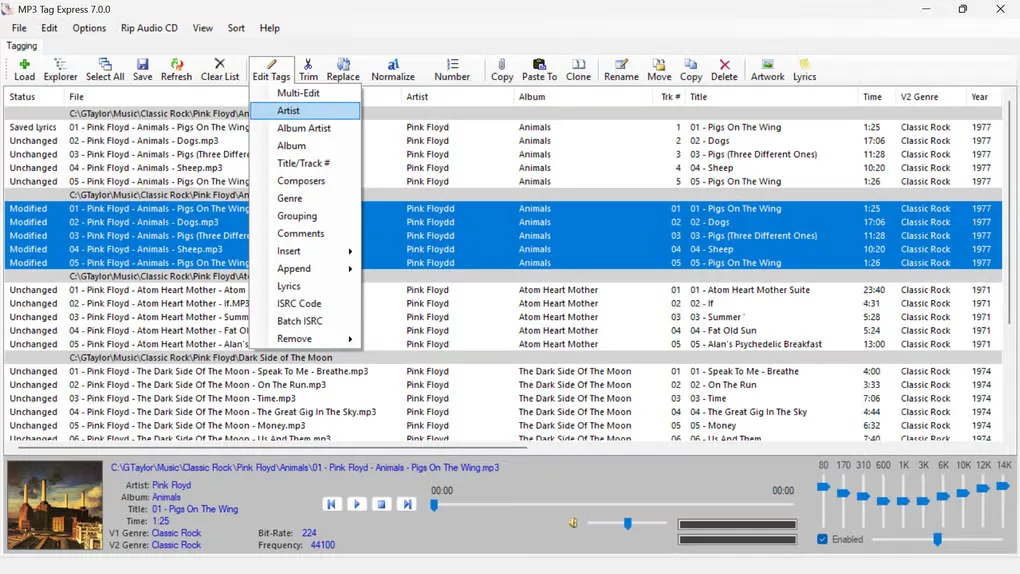
You can build filenames from tags or generate tags from file and folder names. Text tools normalize capitalization, replace words and apply a saved dictionary of substitutions. Other functions include bulk cover-art pasting, a built-in audio player, CSV export and multi-level undo.
The Windows download is a publisher-hosted ZIP offered as a free trial, not a freeware license. The publisher sells a lifetime license for the purchased major version, including minor updates. Permanent gain adjustment and batch ISRC assignment are documented for MP3 files only; do not assume those functions work with every supported audio format.
What it offers
- Edit common audio tags across files and folders, with support for MP3, M4A, M4B, WMA and FLAC.
- Rename files from tags, generate tags from file or folder names and renumber tracks in batches.
- Normalize text and replace words using saved substitution dictionaries.
- Bulk-paste cover art, export file information to CSV and play tracks through the built-in player.
- Adjust MP3 gain permanently and assign ISRC codes to MP3 files in batches.
Good to know
- The download is a free trial of paid software. The observed publisher page does not specify trial duration or feature restrictions.
- Permanent gain adjustment and batch ISRC assignment are documented for MP3 files only.
Product images
Sources
References used for this listing. Retrieval dates do not indicate hands-on testing.
More in multimedia & graphics
View category ↗
1by1 2.17
Play music directly from folders with 1by1, a free Windows audio player with resume, gapless playback and file tools. Formats beyond MP3 need additional decoders.
3DVista Virtual Tour Pro
Build interactive 360° virtual tours from panoramas, videos and 3D models with 3DVista Virtual Tour Pro for Windows. Commercial software with a 30-day trial.


4DDiG Video Repair
Repair corrupted or unplayable videos in batches with the Video Repair tool in 4DDiG File Repair for Windows. A free trial is available; advanced features require a paid license.