

Multimedia & graphics Windows
MP3Resizer for Windows
Reduce MP3 file sizes by lowering the bitrate with MP3Resizer for Windows. Preview output and process folders of music, podcasts or audiobooks; a 30-day trial is available.
- Operating system
- Windows 7, 8, 10, 11; Windows Server 2008(R2), 2012 (publisher-listed)
- Architecture
- Not specified by the retrieved publisher pages
- Download package
- EXE installer
Publisher-listed compatibility, not independently tested. Homepage lists 2.2 dated 21 October 2015; Windows history lists 2.2.1 without a release date. Installer version not inspected.
Link checked · Download guidance
What is MP3Resizer?
MP3Resizer recompresses MP3 audio at a lower bitrate to make files smaller. It is intended for fitting more music, podcasts or audiobooks onto a portable player or phone, or reducing the amount of data needed to send audio files. Add individual files or folders, choose an output bitrate and destination, and preview the audio before processing a batch.
The Windows application includes variable-bitrate and joint-stereo encoding options, an option to preserve the original folder structure, and an optional setting to copy embedded cover art. Lowering the bitrate trades audio quality for smaller files: recompression is not lossless, so previewing a sample helps assess that trade-off.
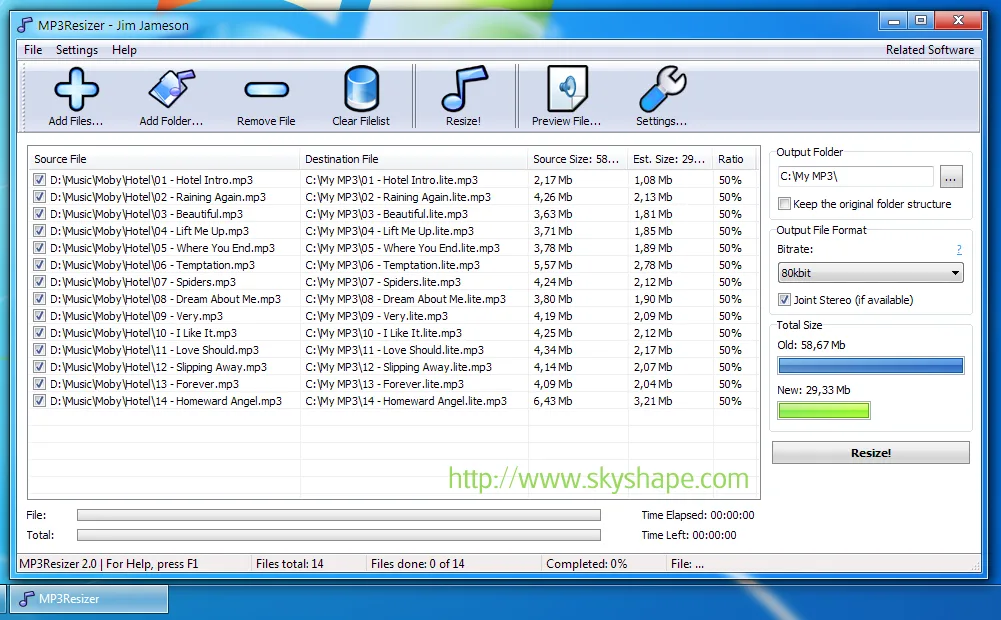
Skyshape offers a fully functional 30-day Windows trial. Its Windows version history lists 2.2.1, while the product homepage still advertises 2.2 dated 21 October 2015. The exact version inside the linked installer has not been inspected. The publisher lists Windows 7, 8, 10 and 11 and Windows Server 2008(R2) and 2012; this entry does not claim independent compatibility testing. The publisher screenshot below is historical and shows MP3Resizer 2.0, not proof of the current installer interface.
What it offers
- Recompress MP3 files at a lower bitrate to reduce their size.
- Add individual files or entire folders, with optional subfolder processing.
- Preview audio before resizing a batch.
- Choose variable-bitrate or joint-stereo encoding and optionally preserve the original folder structure.
- Optionally copy embedded cover art; the publisher says this is off by default to reduce output size.
Good to know
- Lower-bitrate recompression can degrade audio quality; it is not lossless compression.
- The Windows trial is limited to 30 days; continued use requires a paid license.
- Publisher pages differ on the displayed version: the history lists 2.2.1, but the homepage advertises 2.2 from 2015. The linked installer's version and architecture have not been independently verified.
Product images
Sources
References used for this listing. Retrieval dates do not indicate hands-on testing.
More in multimedia & graphics
View category ↗
1by1 2.17
Play music directly from folders with 1by1, a free Windows audio player with resume, gapless playback and file tools. Formats beyond MP3 need additional decoders.
3DVista Virtual Tour Pro
Build interactive 360° virtual tours from panoramas, videos and 3D models with 3DVista Virtual Tour Pro for Windows. Commercial software with a 30-day trial.


4DDiG Video Repair
Repair corrupted or unplayable videos in batches with the Video Repair tool in 4DDiG File Repair for Windows. A free trial is available; advanced features require a paid license.