
Multimedia & graphics Windows
mtPaint for Windows
Draw pixel art, edit colour palettes and adjust digital photos with mtPaint, a free, open-source painting program. This download is the Windows 64-bit installer.
- Operating system
- Windows 7 and later, according to the publisher
- Architecture
- 64-bit
- Download package
- EXE installer
Selected w64 installer includes translations and the handbook. A separate w32 installer is available. No software was installed or run for this entry.
Link checked · Download guidance
What is mtPaint?
mtPaint is a painting and image-editing program for pixel art and digital photos. It works with indexed-palette and RGB images, pairing drawing tools with palette editing, layers and a pixel grid for detailed work at high zoom. Photo adjustments include brightness, contrast, saturation and hue, with a preview before applying changes.
The linked package is mtPaint 3.50 for 64-bit Windows. The publisher describes this installer as supporting Windows 7 and later and including translations and the handbook; a separate 32-bit package is also listed. The publisher announced 3.50 on December 31, 2020, while SourceForge lists the Windows packages as uploaded on January 1, 2021. Compatibility here follows that publisher statement, not a new installation test.
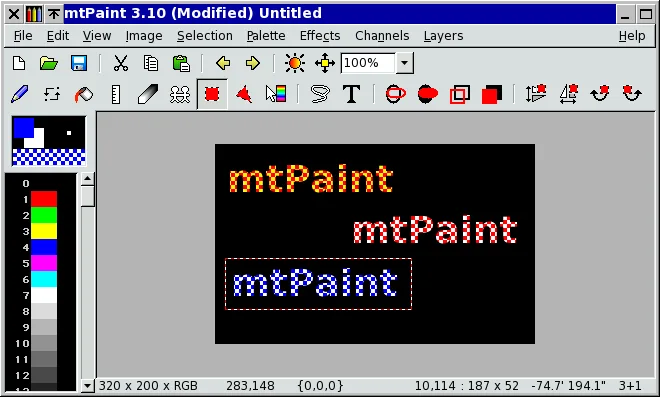
For animation work, the publisher describes moving layers or shifting palettes and creating animated GIFs using Gifsicle. Do not assume GIF export is a self-contained workflow without that external tool. The screenshot illustrates the publisher's older mtPaint 3.10 interface; it is not a capture of version 3.50 running on Windows.
What it offers
- Edit indexed-palette and RGB images with palette sorting, quantization and unused-colour removal.
- Use a pixel grid, zoom controls, drawing tools and up to 100 layers for detailed artwork.
- Adjust brightness, contrast, saturation, hue and gamma with a live preview in the adjustment dialog.
- Crop and rescale images, and apply effects such as sharpen, Gaussian blur and greyscale.
- Load and save formats including PNG, JPEG, BMP, GIF, TIFF and WebP.
Good to know
- The publisher's animated GIF creation workflow uses Gifsicle, an external tool; do not assume standalone GIF animation export.
- Windows compatibility is based on the publisher's Windows 7-and-later statement for the 64-bit installer; this entry does not establish a fresh Windows 10 or 11 installation test.
Product images
Sources
References used for this listing. Retrieval dates do not indicate hands-on testing.
More in multimedia & graphics
View category ↗
1by1 2.17
Play music directly from folders with 1by1, a free Windows audio player with resume, gapless playback and file tools. Formats beyond MP3 need additional decoders.
3DVista Virtual Tour Pro
Build interactive 360° virtual tours from panoramas, videos and 3D models with 3DVista Virtual Tour Pro for Windows. Commercial software with a 30-day trial.

4DDiG Video Repair
Repair corrupted or unplayable videos in batches with the Video Repair tool in 4DDiG File Repair for Windows. A free trial is available; advanced features require a paid license.