

Multimedia & graphics macOS
MuseScore Studio for macOS
Write, play back and print sheet music on Mac with MuseScore Studio, a free, open-source notation editor with MIDI input and MusicXML exchange.
Version 4.7.6 · Direct publisher file
Link checked · Download guidance
What is MuseScore Studio?
MuseScore Studio is a music notation editor for composing and arranging sheet music on Mac. Enter notes on a page-like score, use a MIDI keyboard for note input, and listen to the result with its built-in sequencer and synthesizer. Print the finished score or create a PDF; MusicXML and MIDI import and export help move music between supported programs.
This entry links to the publisher's MuseScore Studio 4.7.6 DMG without MuseHub, rather than the separate MuseHub installer. The publisher lists macOS 11 or higher, 8 GB RAM and 500 MB of free storage in its system requirements; MuseSounds needs substantially more storage, listed as 15 GB. These are publisher requirements, not results of a local installation test.
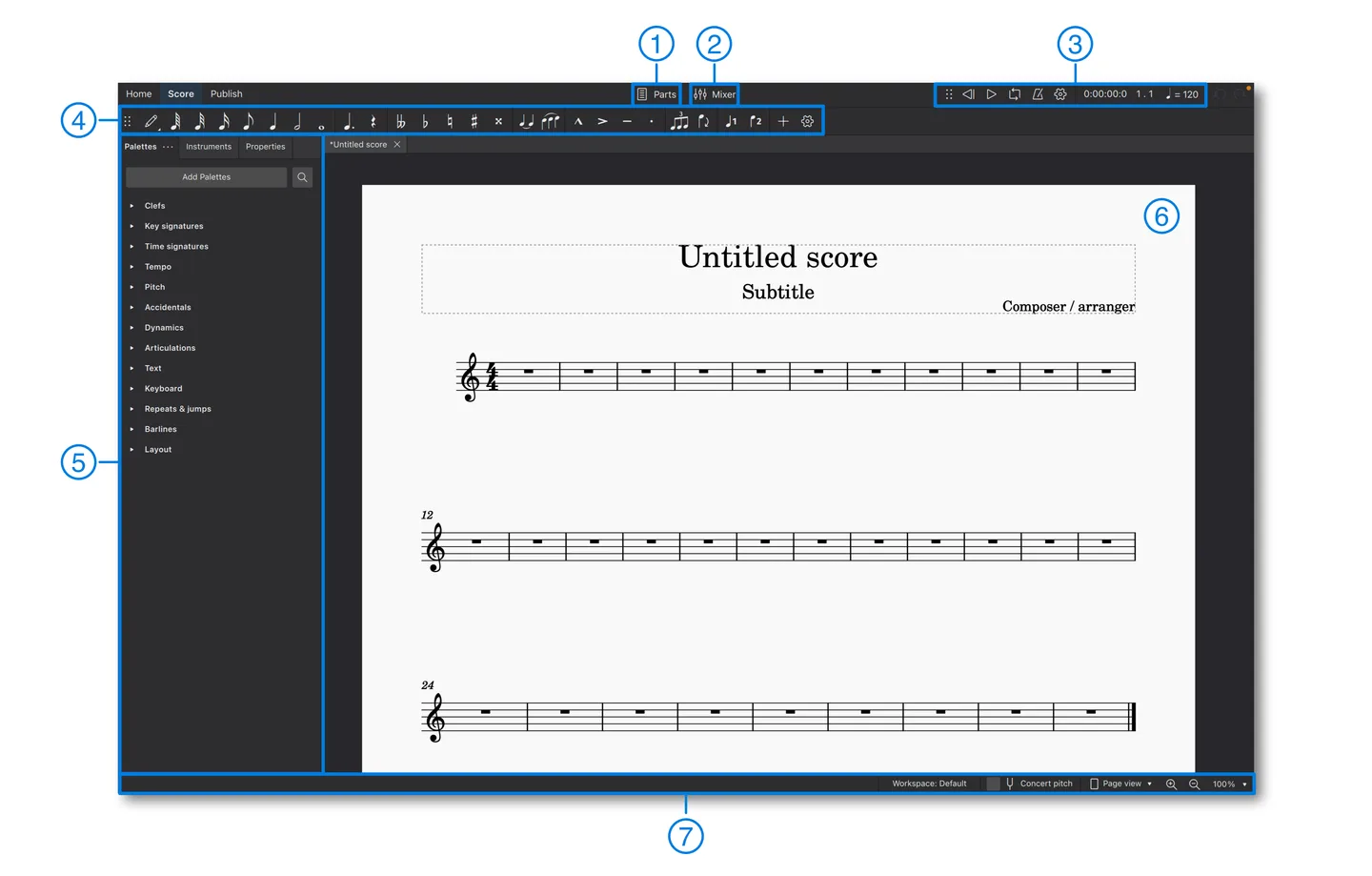
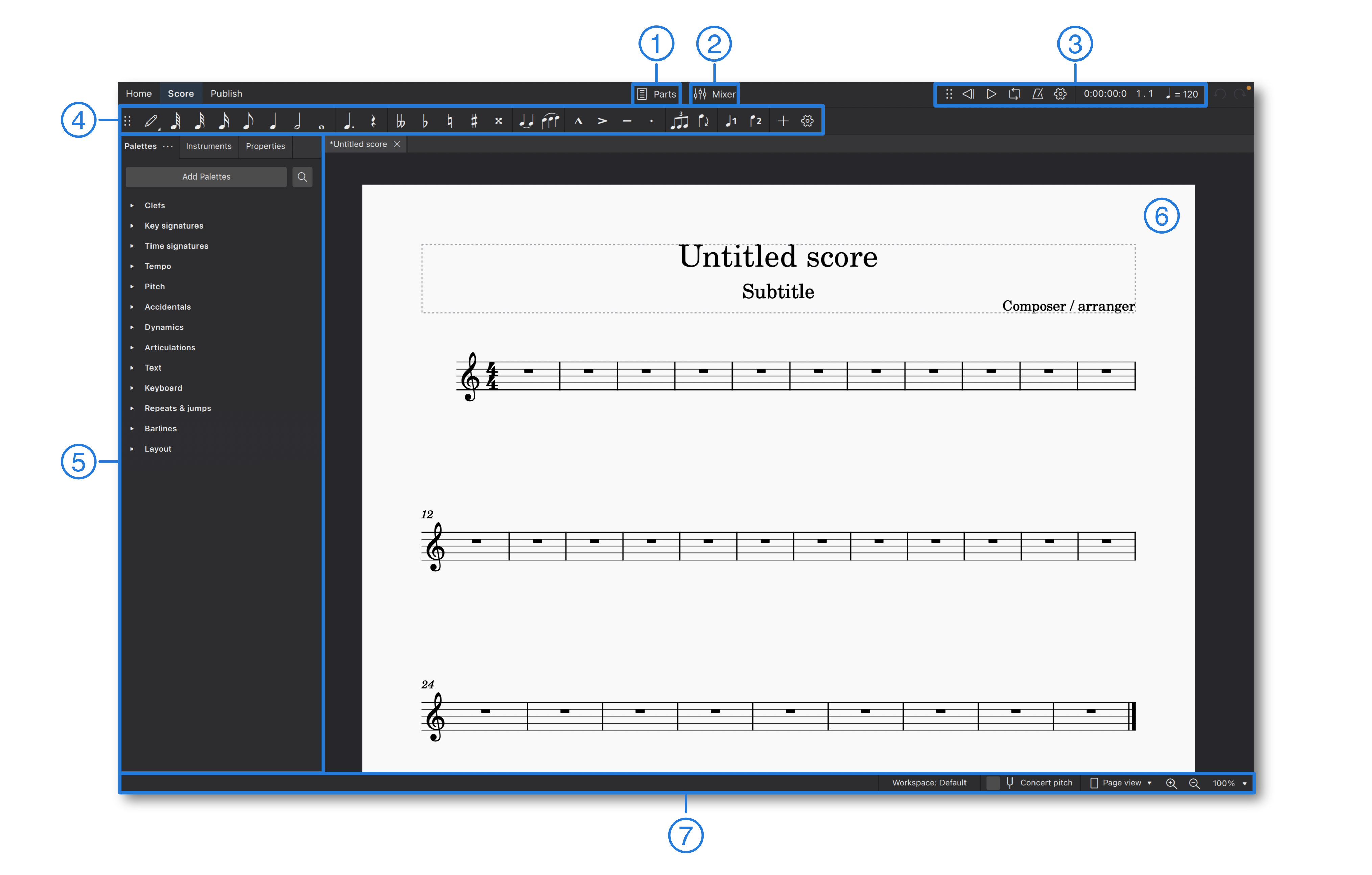
Version 4.7.6 also offers score conversion from PDFs, scans, photos, audio recordings and supported links. That online conversion service is separate from ordinary score editing: it requires a musescore.com account, audio and link conversion are beta, and the release announcement sets an initial total allowance of 200 converted scores per account. The illustrated workspace comes from the official MuseScore 4 handbook and includes its numbered annotations; it is not a newly captured macOS 4.7.6 screen.
What it offers
- Enter and edit notation directly on a page-like score, including input from a MIDI keyboard.
- Hear scores through the integrated sequencer and software synthesizer.
- Import and export MusicXML and MIDI files to exchange music with other supported software.
- Print sheet music or create PDF files for sharing.
- Use the Convert command to send supported sheet-music files, audio recordings or links for online score conversion.
Good to know
- Online score conversion requires a musescore.com account. The 4.7.6 announcement sets an initial limit of 200 conversions per account; audio and link conversion are beta. This is not a limit on local score editing.
- The publisher lists macOS 11 or higher and 8 GB RAM; MuseSounds requires additional storage, listed as 15 GB rather than the application's 500 MB.
Product images
Sources
References used for this listing. Retrieval dates do not indicate hands-on testing.
- MuseScore for Mac - Download ↗Retrieved
- Download | MuseScore ↗Retrieved
- Download MuseScore Studio for Mac | MuseScore ↗Retrieved
- MuseScore Studio 4.7.6 README ↗Retrieved
- MuseScore Studio 4.7.6 is now available | MuseScore ↗Retrieved
- The user interface | MuseScore Studio Handbook ↗Retrieved
- License | MuseScore Studio Handbook ↗Retrieved
More in multimedia & graphics
View category ↗
1by1 2.17
Play music directly from folders with 1by1, a free Windows audio player with resume, gapless playback and file tools. Formats beyond MP3 need additional decoders.
3DVista Virtual Tour Pro
Build interactive 360° virtual tours from panoramas, videos and 3D models with 3DVista Virtual Tour Pro for Windows. Commercial software with a 30-day trial.

4DDiG Video Repair
Repair corrupted or unplayable videos in batches with the Video Repair tool in 4DDiG File Repair for Windows. A free trial is available; advanced features require a paid license.