

Multimedia & graphics macOS
MusicBrainz Picard for macOS
Identify music, edit audio tags and organize albums on Mac with MusicBrainz Picard, a free, open-source tagger using MusicBrainz metadata and AcoustID fingerprints.
- Operating system
- macOS 13.0 or later
- Architecture
- arm64 (Apple silicon)
- Download package
- DMG disk image
This link is the arm64 build. The publisher separately lists a 3.0.2 x86_64 build for Intel Macs and older 2.13.3 packages for earlier macOS versions.
Link checked · Download guidance
What is MusicBrainz Picard?
MusicBrainz Picard helps organize a music collection by matching audio files to entries in the MusicBrainz database. You can group files into albums, look up existing tags or use AcoustID audio fingerprints to identify recordings when their metadata is missing. It supports formats including MP3, FLAC, OGG, M4A, WMA and WAV.
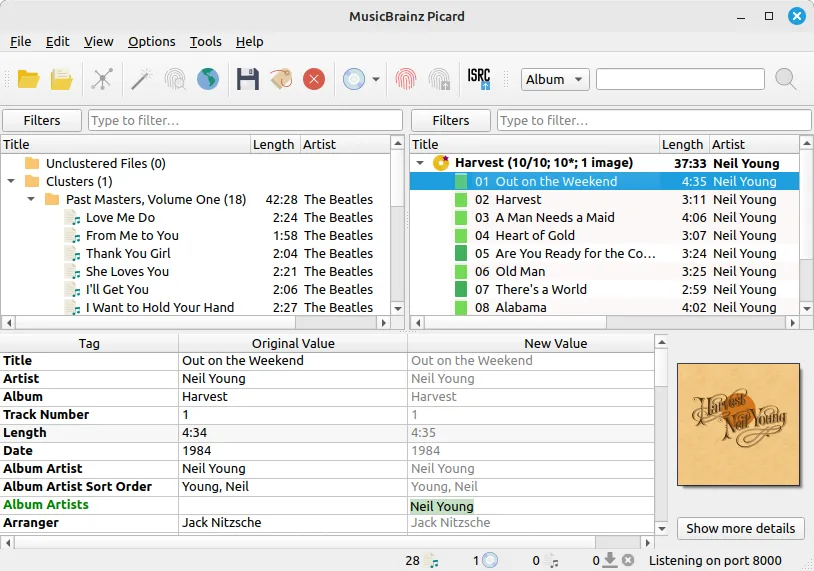
The interface lets you compare original tags with proposed values before saving. Picard can retrieve album cover art, rename files and arrange them into a folder structure; scripting and plugins provide further customization. The publisher's guide recommends checking the album and track matches rather than treating the results as automatic corrections.
This download is the Picard 3.0.2 DMG for Apple silicon Macs running macOS 13 or later. Intel Macs need the separate x86_64 package on the publisher's downloads page. The screenshot is the publisher's cross-platform interface example, not a verified capture of this macOS release.
What it offers
- Match audio files to MusicBrainz releases using existing metadata or AcoustID audio fingerprints.
- Read and edit tags in formats including MP3, FLAC, OGG, M4A, WMA and WAV.
- Compare original metadata with proposed tag values before saving matched tracks.
- Retrieve album cover art and customize file names and folder organization with scripting or plugins.
Good to know
- Matching can be incorrect; the publisher recommends comparing original and proposed metadata and correcting track assignments before saving.
- Picard is not designed as a mass single-track tag fixer; its workflow groups files into albums for matching.
- The linked DMG requires macOS 13 or later and Apple silicon; Intel Macs require the separate x86_64 download.
Product images
Sources
References used for this listing. Retrieval dates do not indicate hands-on testing.
More in multimedia & graphics
View category ↗
1by1 2.17
Play music directly from folders with 1by1, a free Windows audio player with resume, gapless playback and file tools. Formats beyond MP3 need additional decoders.
3DVista Virtual Tour Pro
Build interactive 360° virtual tours from panoramas, videos and 3D models with 3DVista Virtual Tour Pro for Windows. Commercial software with a 30-day trial.


4DDiG Video Repair
Repair corrupted or unplayable videos in batches with the Video Repair tool in 4DDiG File Repair for Windows. A free trial is available; advanced features require a paid license.