
Multimedia & graphics Windows
musikcube
Play and browse your music library in a terminal-style Windows interface with musikcube, an open-source player with playlists, keyboard controls and local-network streaming.
- Operating system
- Windows; minimum supported version not specified in the cited guides
- Architecture
- x64 (64-bit)
- Download package
- ZIP archive
Selected release asset: musikcube_3.0.5_win64.zip. A separate win32 archive is available. Extract into an empty directory and run musikcube.exe.
Link checked · Download guidance
What is musikcube?
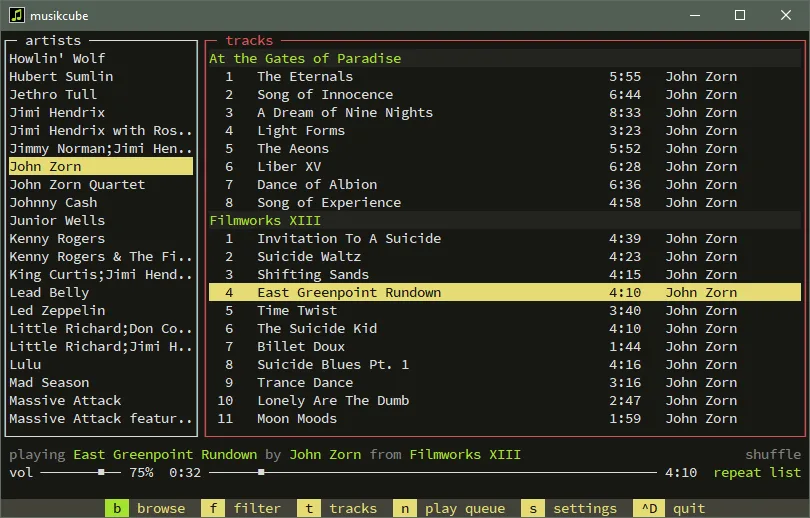
musikcube is a terminal-based music player and library browser for people who prefer keyboard navigation. Browse a collection by artist, album, genre or directory, search for tracks, and arrange a play queue or save playlists. Playback shortcuts cover shuffle, repeat, volume and the equalizer; Windows also has system-wide playback hotkeys.
This download is the Windows 64-bit ZIP for version 3.0.5. Extract it into an empty directory and run musikcube.exe. The installation guide recommends a fresh directory for each version to avoid plugin incompatibilities. Its older filename examples differ from the current release asset names, so use the identified win64 package rather than treating those templates as current filenames.
The bundled streaming server is enabled by default, but the publisher warns against exposing it directly outside a local network. It does not provide TLS and stores its password in plain text in a local settings file. Choose it for keyboard-driven library playback or a carefully configured local setup, not as an internet-facing music server out of the box.
What it offers
- Browse your music library by artist, album, genre, album artist, playlist or directory.
- Search tracks and album, artist or genre metadata.
- Create playlists, reorder the play queue and use shuffle or repeat playback.
- Control playback and the equalizer with keyboard shortcuts; use system-wide playback hotkeys on Windows.
- Stream audio to clients through the bundled server, with the publisher’s local-network security caveats.
Good to know
- The interface uses terminal-style navigation and keyboard shortcuts rather than a conventional graphical music-library layout.
- The streaming server has no built-in TLS and stores its password in plain text; the publisher warns against direct use outside a local network.
- Extract updates into a fresh directory to avoid plugin incompatibilities between versions.
Product images
Sources
References used for this listing. Retrieval dates do not indicate hands-on testing.
More in multimedia & graphics
View category ↗
1by1 2.17
Play music directly from folders with 1by1, a free Windows audio player with resume, gapless playback and file tools. Formats beyond MP3 need additional decoders.
3DVista Virtual Tour Pro
Build interactive 360° virtual tours from panoramas, videos and 3D models with 3DVista Virtual Tour Pro for Windows. Commercial software with a 30-day trial.

4DDiG Video Repair
Repair corrupted or unplayable videos in batches with the Video Repair tool in 4DDiG File Repair for Windows. A free trial is available; advanced features require a paid license.