
Multimedia & graphics macOS
NoteBurner Apple Music Converter for macOS
Convert Apple Music, iTunes audio and supported audiobooks to MP3, AAC, FLAC, WAV, AIFF or ALAC on Mac. The paid application offers a trial limited to one minute per output file.
- Operating system
- macOS 11–27, as listed by the publisher
- Architecture
- Not specified in the cited publisher requirements
- Download package
- DMG disk image
Publisher lists an Internet connection and iTunes 10 or later; local library guidance refers to iTunes/Music authorization.
Link checked · Download guidance
What is NoteBurner Apple Music Converter?
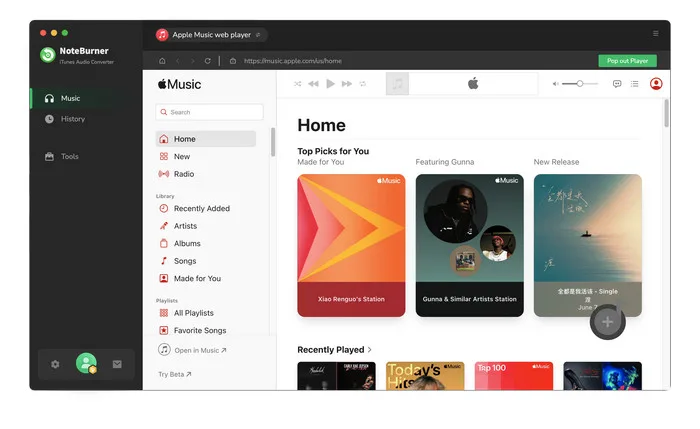
NoteBurner Apple Music Converter for Mac converts music and supported audiobooks into common audio formats. The publisher link associated with the older NoteBurner iTunes DRM Audio Converter listing now leads to this product. It targets Apple Music and iTunes/Music users who need MP3, AAC, WAV, FLAC, AIFF or ALAC output, with options to retain track metadata and organize converted files.
The publisher lists Apple Music, iTunes M4P audio, podcasts and Audible AA/AAX audiobooks among its supported sources. Additional tools convert local audio formats and edit ID3 tags. These are publisher-described capabilities, not results from an installation or conversion test.
This is commercial software, not an unrestricted free converter. The trial limits each output file to one minute; a paid license unlocks that limit. Apple Music use requires access to the relevant account and subscription. For local library conversion, the publisher advises checking that tracks play in iTunes/Music and that the computer is authorized with the same Apple ID. The Mac download is a DMG; processor architecture is not specified in the cited technical requirements.
What it offers
- Convert supported music and audiobooks to MP3, AAC (.m4a), WAV, FLAC, AIFF or ALAC.
- Preserve supported ID3 metadata such as title, artist, album, artwork and track number.
- Edit track tags and convert local audio files using the additional tools.
- Organize output files by artist, album or playlist.
Good to know
- The trial converts only one minute per output file; a paid license is required to remove the limit.
- Apple Music conversion depends on account access and an active subscription; local iTunes/Music library tracks must be playable and appropriately authorized.
Product images
Sources
References used for this listing. Retrieval dates do not indicate hands-on testing.
- NoteBurner Apple Music Converter for Mac — publisher product and screenshots ↗Retrieved
- Tech Spec of NoteBurner Apple Music Converter for Mac ↗Retrieved
- NoteBurner iTunes Audio Converter FAQs ↗Retrieved
- Buy NoteBurner Apple Music Converter for Windows & Mac ↗Retrieved
- NoteBurner iTunes DRM Audio Converter for Mac - Download ↗Retrieved
More in multimedia & graphics
View category ↗
1by1 2.17
Play music directly from folders with 1by1, a free Windows audio player with resume, gapless playback and file tools. Formats beyond MP3 need additional decoders.
3DVista Virtual Tour Pro
Build interactive 360° virtual tours from panoramas, videos and 3D models with 3DVista Virtual Tour Pro for Windows. Commercial software with a 30-day trial.

4DDiG Video Repair
Repair corrupted or unplayable videos in batches with the Video Repair tool in 4DDiG File Repair for Windows. A free trial is available; advanced features require a paid license.