
Multimedia & graphics Windows
openCanvas
Draw and paint illustrations with customizable brushes, layers and drawing-process replay in openCanvas for Windows. The publisher offers a 120-day trial.
- Operating system
- Windows 7 or later, as listed by the publisher
- Architecture
- 32-bit; publisher labels the selected download 32bit
- Download package
- EXE installer from the publisher's Japanese download catalog
Publisher requires an SSE2-capable x86-compatible processor, 500 MB RAM and a 1280×768 display; 4 GB RAM is recommended. Internet is needed for activation and automatic updates. English interface availability for this package is not established; current Windows builds were not tested.
Link checked · Download guidance
What is openCanvas?
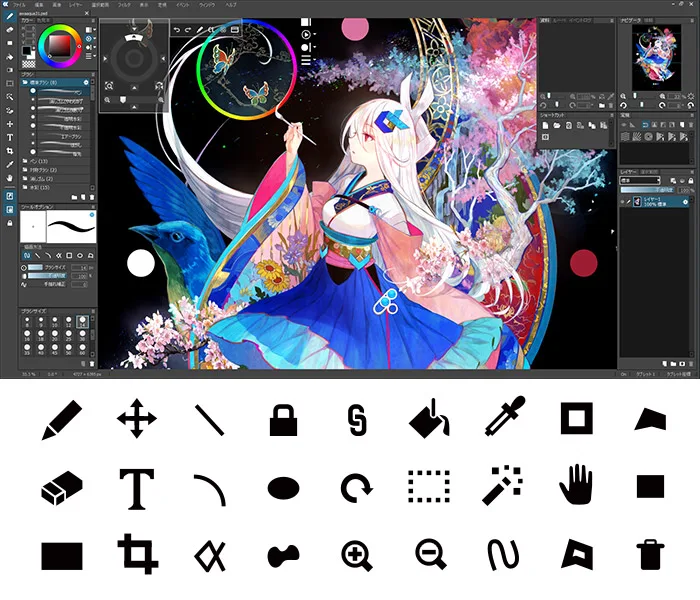
openCanvas is a Windows painting application for building illustrations with pencil, pen, watercolor and airbrush-style tools. It includes more than 150 initial brush presets, custom brush settings, layer modes and editable text layers. Dockable palettes let you arrange the workspace around the canvas, while PSD output provides a way to save work in Photoshop format.
Its distinctive event feature records the drawing procedure and tools used. You can replay that process, return to a point in an event file to add or correct artwork, or export the drawing process as a making-of GIF. The publisher also lists pen-pressure support for compatible Wacom tablets and TabletPC API devices.
This entry identifies the publisher's Japanese-catalog 32-bit EXE for version 7.0.25, dated October 15, 2019. It is not the older 4.5.09e English package described in the retained Softonic listing. Do not assume this Japanese-catalog package provides an English interface. The publisher lists Windows 7 or later, but no current Windows build was independently tested here.
The trial provides all features for 120 days from first launch; after expiry, only event-file playback remains available without activation. It is paid shareware, not permanently free painting software. New purchases moved to Steam on March 30, 2025; existing and XP-PEN bundle customers retain the publisher's account-based route. The download linked here is the identified trial installer, not a Steam purchase or an included license.
What it offers
- Paint with more than 150 initial brush presets and create or save custom brushes.
- Record and replay drawing procedures with event files, or export the process as a making-of GIF.
- Combine artwork using 22 layer modes, layer sets and editable text layers.
- Save illustrations in BMP, JPEG, PNG, PSD or the native OCI format.
- Arrange dockable palettes and use pen pressure with supported Wacom or TabletPC API devices.
Good to know
- The full-feature trial lasts 120 days from first launch; without activation, only event-file playback remains after expiry.
- The linked 32-bit package comes from the Japanese publisher catalog; an English interface is not confirmed.
- The catalog dates version 7.0.25 to 2019-10-15. Current Windows build compatibility has not been independently tested.
- New purchases use Steam under the publisher's sales policy effective March 30, 2025; downloading the trial does not include a paid license.
Product images
Sources
References used for this listing. Retrieval dates do not indicate hands-on testing.
- OpenCanvas - Download — retained discovery, not a fresh retrieval ↗Retrieved
- openCanvas — official product features and system requirements ↗Retrieved
- openCanvas — official Japanese download catalog and trial terms ↗Retrieved
- openCanvas — official purchase policy ↗Retrieved
- openCanvas — publisher user-interface illustration ↗Retrieved
More in multimedia & graphics
View category ↗
1by1 2.17
Play music directly from folders with 1by1, a free Windows audio player with resume, gapless playback and file tools. Formats beyond MP3 need additional decoders.
3DVista Virtual Tour Pro
Build interactive 360° virtual tours from panoramas, videos and 3D models with 3DVista Virtual Tour Pro for Windows. Commercial software with a 30-day trial.


4DDiG Video Repair
Repair corrupted or unplayable videos in batches with the Video Repair tool in 4DDiG File Repair for Windows. A free trial is available; advanced features require a paid license.