

Multimedia & graphics Windows
Pencil2D for Windows
Draw frame-by-frame 2D animations with Pencil2D, a free, open-source Windows application with a keyframe timeline, onion skinning and bitmap drawing tools.
- Operating system
- Windows 7 or later, as listed by the publisher
- Architecture
- x64 (64-bit)
- Download package
- ZIP archive
Extract the ZIP before opening pencil2d.exe. A separate 32-bit ZIP is available. Missing runtime DLLs may require the publisher's troubleshooting steps.
Link checked · Download guidance
What is Pencil2D?
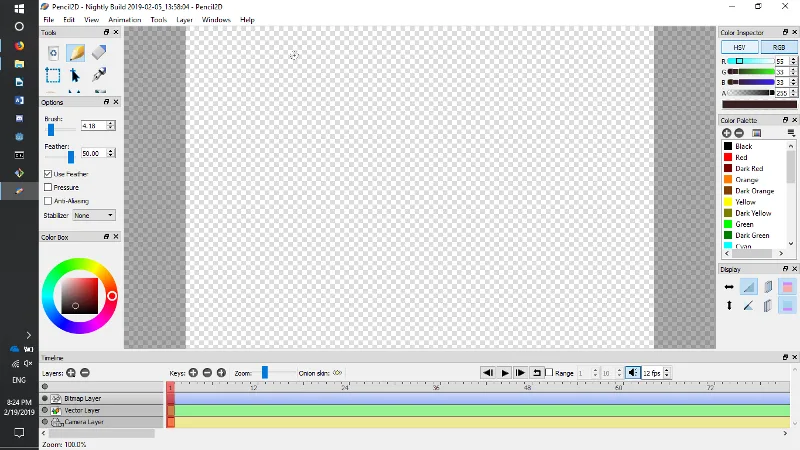
Pencil2D is for making hand-drawn 2D animation one frame at a time. Its workspace combines a drawing canvas with dockable tools, color controls and a timeline for arranging keyframes. Onion skinning shows earlier or later drawings as references, helping you judge movement between poses without leaving the canvas.
The application includes bitmap and vector workflows, but the publisher warns that the vector engine is unfinished and should not be used for serious projects. Bitmap drawing is the more appropriate focus when choosing Pencil2D for animation work. The release notes also document Windows tablet-panning problems: holding Space while dragging with the pen is the publisher's workaround.
This entry links to the publisher's Windows 64-bit ZIP for version 0.7.2, not an installer. Extract the archive before opening pencil2d.exe; the download page provides additional troubleshooting for missing runtime DLLs. The publisher also offers a separate 32-bit archive. The screenshot comes from the official manual and shows an older Windows nightly build, not a capture of version 0.7.2.
What it offers
- Draw hand-made animation frames with bitmap tools and color controls.
- Arrange, add, remove and duplicate keyframes in the timeline.
- Use onion skinning to reference previous and next drawings with adjustable transparency.
- Arrange dockable tool panels and customize keyboard shortcuts.
- Switch between raster and vector workflows, subject to the publisher's vector-engine warning.
Good to know
- The publisher describes the vector engine as unfinished and advises against using it for serious projects.
- On Windows, middle- or right-click pen dragging can cause unexpected canvas-panning behavior; the publisher recommends holding Space while dragging the pen instead.
Product images
Sources
References used for this listing. Retrieval dates do not indicate hands-on testing.
More in multimedia & graphics
View category ↗
1by1 2.17
Play music directly from folders with 1by1, a free Windows audio player with resume, gapless playback and file tools. Formats beyond MP3 need additional decoders.
3DVista Virtual Tour Pro
Build interactive 360° virtual tours from panoramas, videos and 3D models with 3DVista Virtual Tour Pro for Windows. Commercial software with a 30-day trial.

4DDiG Video Repair
Repair corrupted or unplayable videos in batches with the Video Repair tool in 4DDiG File Repair for Windows. A free trial is available; advanced features require a paid license.