

Multimedia & graphics macOS
Phoenix Slides for macOS
Browse folders of photos, run full-screen slideshows, inspect EXIF data and rotate JPEGs with Phoenix Slides for Mac. Free for non-commercial use.
- Operating system
- macOS 11.5 or later
- Architecture
- Not specified on the cited publisher product page
- Download package
- DMG disk image
This link is for version 1.6.2. Older macOS releases require a separate older package.
Link checked · Download guidance
What is Phoenix Slides?
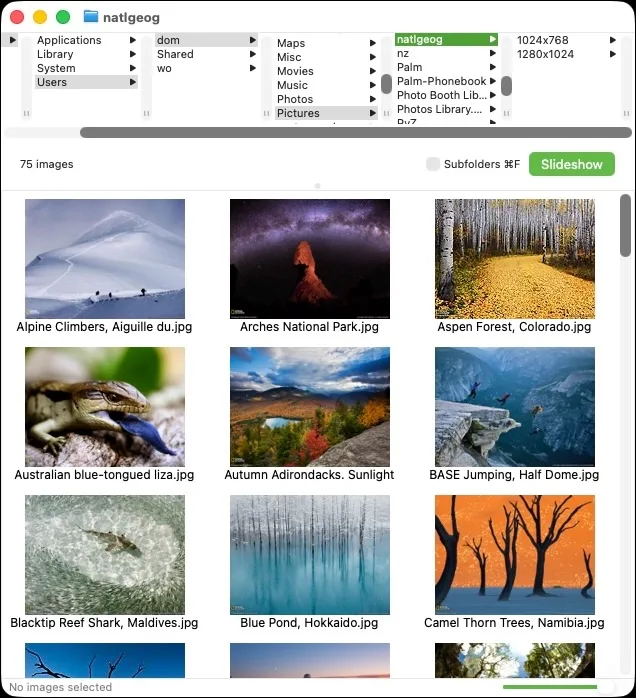
Phoenix Slides is an image browser and slideshow viewer for working through folders or disks of photos. Its thumbnail view lets you navigate directories, include subfolders and choose images for a slideshow. You can show pictures full-screen or in a window, use timed playback and zoom to inspect details.
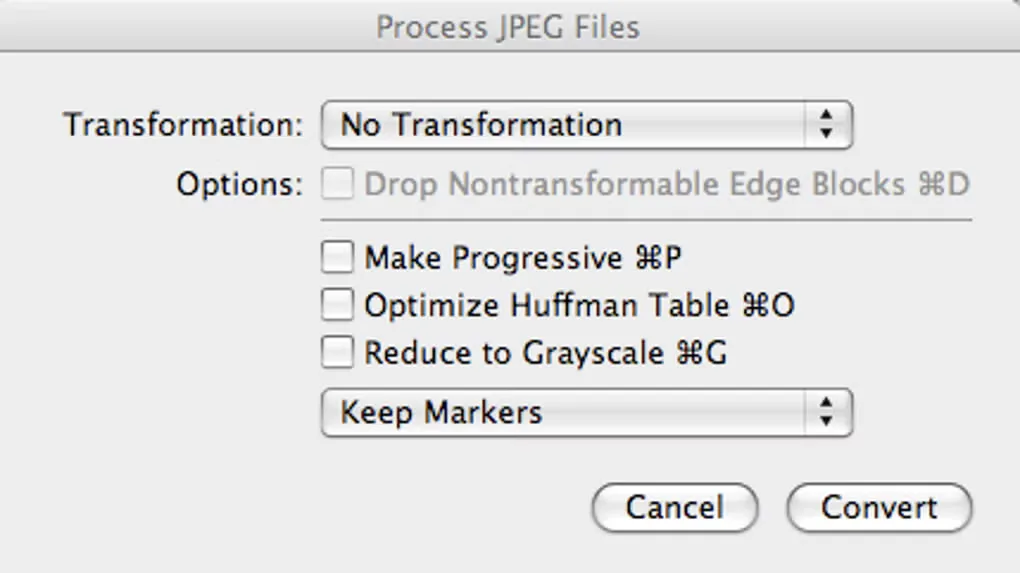
The application also displays EXIF data and JPEG comments and offers lossless JPEG transformations. These operations have an important boundary: rotation is only perfect when image dimensions align with JPEG block sizes. The optional edge-block trimming operation is irreversible.
This entry links to the publisher’s version 1.6.2 DMG, released June 17, 2026, for macOS 11.5 or later. Older macOS systems need a different release from the publisher. The software is free for non-commercial purposes under the publisher’s stated CC BY-NC-SA 4.0 terms; it is not unrestricted commercial freeware. The screenshots are source-provided examples, not evidence of the current release running on this workstation.
What it offers
- Browse image thumbnails by folder and optionally search subfolders recursively.
- Run full-screen or windowed slideshows with timed advance, pause, looping and zoom controls.
- View EXIF data and JPEG comments.
- Apply lossless JPEG transformations, with options for progressive JPEG, Huffman-table optimization, grayscale and marker handling.
- Drag files or folders into the browser and reveal selected images in Finder.
Good to know
- Version 1.6.2 requires macOS 11.5 or later; the publisher offers separate older releases for earlier systems.
- The publisher permits non-commercial use under CC BY-NC-SA 4.0; do not assume permission for commercial use.
- Lossless JPEG rotation is only perfect for images aligned to the JPEG block size; trimming nontransformable edge blocks is irreversible.
Product images
Sources
References used for this listing. Retrieval dates do not indicate hands-on testing.
More in multimedia & graphics
View category ↗
1by1 2.17
Play music directly from folders with 1by1, a free Windows audio player with resume, gapless playback and file tools. Formats beyond MP3 need additional decoders.
3DVista Virtual Tour Pro
Build interactive 360° virtual tours from panoramas, videos and 3D models with 3DVista Virtual Tour Pro for Windows. Commercial software with a 30-day trial.


4DDiG Video Repair
Repair corrupted or unplayable videos in batches with the Video Repair tool in 4DDiG File Repair for Windows. A free trial is available; advanced features require a paid license.