

Multimedia & graphics Windows
PhotoFiltre Studio for Windows
Retouch photos, combine layers and apply filters with PhotoFiltre Studio X, a 32-bit Windows image editor offered as a 30-day trial.
- Operating system
- Windows 10, Windows 8, Windows 7, Vista, Windows XP, Windows NT and Windows 2000 (publisher-listed)
- Architecture
- 32-bit (x86)
- Download package
- English EXE installer
The publisher lists these systems for Studio X; Windows 11 compatibility is not established for this edition. PhotoFiltre 11 has a separate 64-bit download.
Link checked · Download guidance
What is PhotoFiltre Studio?
PhotoFiltre Studio X edits photographs and builds layered compositions. Its adjustment tools cover brightness, contrast, saturation and gamma, while artistic filters add effects such as watercolor and pastels. Shape, lasso and polygon selections let you target part of an image instead of changing the entire picture.
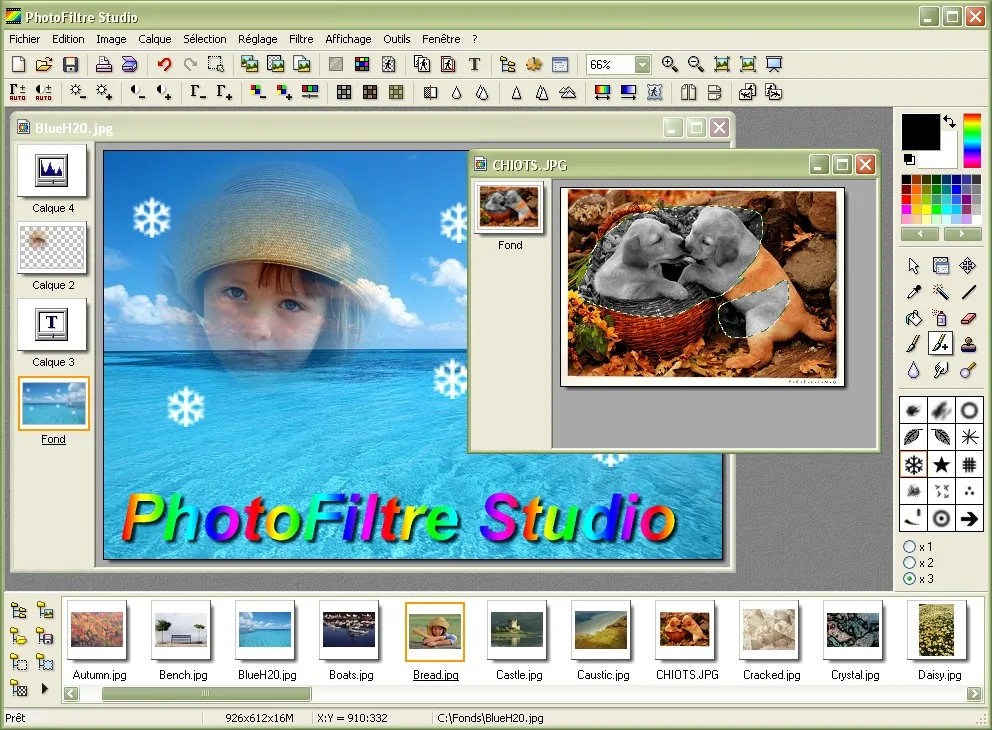
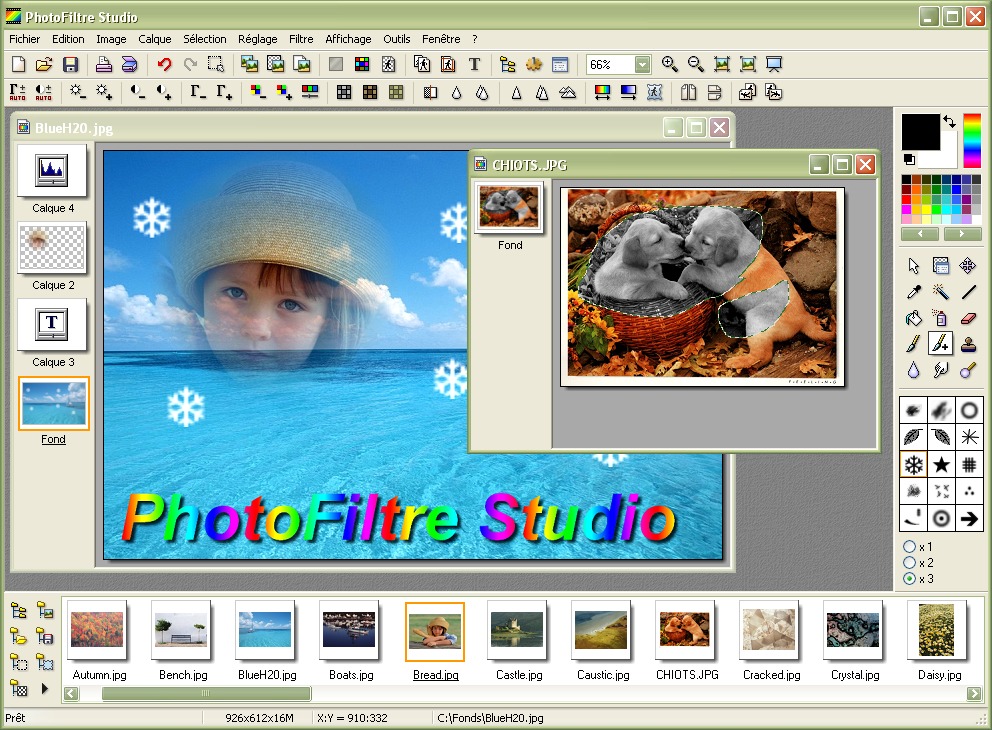
The layer manager supports bitmap, editable text, adjustment and color layers, with alpha-channel transparency. Brushes, red-eye correction, a batch module and an animated-GIF generator extend the editor beyond single-image touch-ups. The publisher's illustrative screenshot shows the Studio interface with layered artwork, a separate photo window and an image browser; it is not evidence of the exact 10.14.2 interface.
This download is the English installer for Studio X 10.14.2, the 32-bit edition. The publisher separately offers PhotoFiltre 11 as its 64-bit successor and recommends Studio X for regular use of 32-bit plugins and 32-bit 8BF filters. Studio X is shareware, not an unrestricted free edition: continued use after the 30-day trial requires a purchased registration key.
What it offers
- Adjust brightness, contrast, saturation and gamma, or apply artistic filters.
- Combine bitmap, editable text, adjustment and color layers with transparency.
- Make shape, lasso and polygon selections for targeted edits.
- Use brushes, red-eye correction and a batch-processing module.
- Generate animated GIFs from layers with delay and loop options.
Good to know
- The trial lasts 30 days; continued use requires purchasing a registration key. The publisher instructs users who do not continue to remove the program.
- Studio X is a 32-bit edition. PhotoFiltre 11 is the separate 64-bit successor, not the installer linked here.
Product images
Sources
References used for this listing. Retrieval dates do not indicate hands-on testing.
More in multimedia & graphics
View category ↗
1by1 2.17
Play music directly from folders with 1by1, a free Windows audio player with resume, gapless playback and file tools. Formats beyond MP3 need additional decoders.
3DVista Virtual Tour Pro
Build interactive 360° virtual tours from panoramas, videos and 3D models with 3DVista Virtual Tour Pro for Windows. Commercial software with a 30-day trial.

4DDiG Video Repair
Repair corrupted or unplayable videos in batches with the Video Repair tool in 4DDiG File Repair for Windows. A free trial is available; advanced features require a paid license.