
Multimedia & graphics Windows
PhotoPad for Windows
Crop, resize and retouch photos with PhotoPad for Windows. Adjust color, apply regional effects and build collages; the free edition is for non-commercial use only.
- Operating system
- Windows 7 to Windows 11, as listed by the publisher
- Architecture
- Not specified for the selected installer
- Download package
- EXE installer (ppadfreesetup.exe)
Publisher's free non-commercial Windows edition. CPU architecture and exact installer version were not established by the source page or HEAD receipt.
Link checked · Download guidance
What is PhotoPad?
PhotoPad is NCH Software's photo editor for cropping, resizing and improving digital pictures. It combines everyday adjustments such as brightness, contrast and color balance with retouching tools for red eyes and blemishes. Regional effects let you apply a filter to part of an image rather than the whole picture.
For creative projects, PhotoPad can combine photos into collages, add captions and borders, and turn images into craft patterns. Its effects and layers list lets you revisit, reorder or hide edits instead of starting again when an adjustment needs changing. The publisher lists support for opening JPG, GIF, PNG, TIFF and BMP images, among other formats.
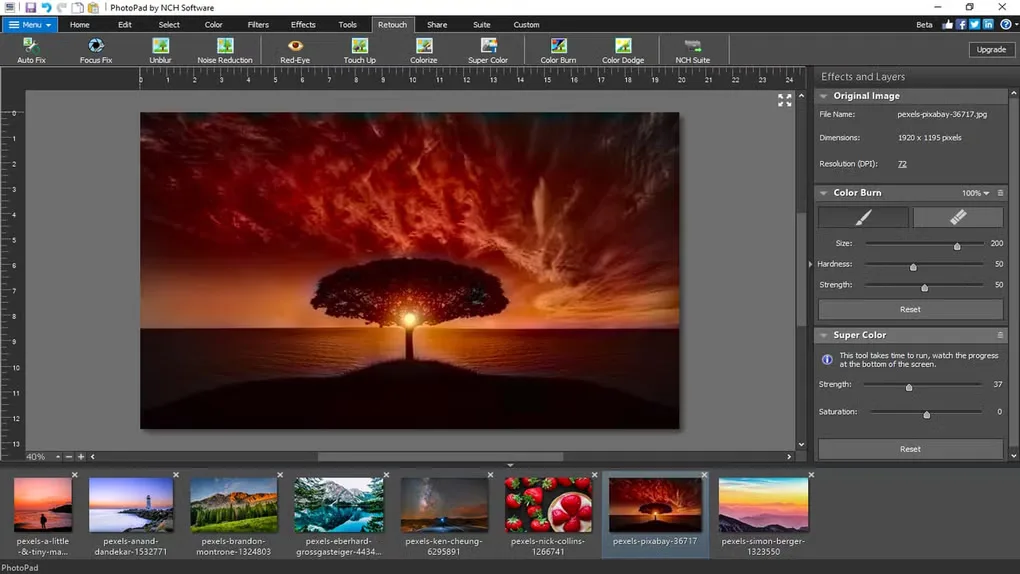
This entry links to the publisher's free Windows installer. NCH limits the free edition to non-commercial use; do not treat it as a free commercial license. The publisher also offers a paid Pro license. The screenshot illustrates the editing workspace, not a guarantee that every pictured tool is included in the free edition or that its interface matches the current installer exactly.
What it offers
- Crop, rotate, resize and flip photos for a different composition or output size.
- Adjust brightness, contrast, exposure, levels and color balance; retouch red eyes and blemishes.
- Apply effects to selected areas with regional effects and revisit edits through the effects and layers list.
- Create photo collages and add text, borders or frames.
- Open common image formats including JPG, GIF, PNG, TIFF and BMP.
Good to know
- The free edition is licensed for non-commercial use only; a free download does not provide commercial-use rights.
Product images
Sources
References used for this listing. Retrieval dates do not indicate hands-on testing.
More in multimedia & graphics
View category ↗
1by1 2.17
Play music directly from folders with 1by1, a free Windows audio player with resume, gapless playback and file tools. Formats beyond MP3 need additional decoders.
3DVista Virtual Tour Pro
Build interactive 360° virtual tours from panoramas, videos and 3D models with 3DVista Virtual Tour Pro for Windows. Commercial software with a 30-day trial.

4DDiG Video Repair
Repair corrupted or unplayable videos in batches with the Video Repair tool in 4DDiG File Repair for Windows. A free trial is available; advanced features require a paid license.