

Multimedia & graphics Windows
PhotoQt for Windows
Browse photos with a lightbox-style viewer, a thumbnail strip, Exif information and slideshows. PhotoQt is free and open source, with a publisher-provided Windows installer.
Version 5.4.1 · Direct publisher file
Link checked · Download guidance
What is PhotoQt?
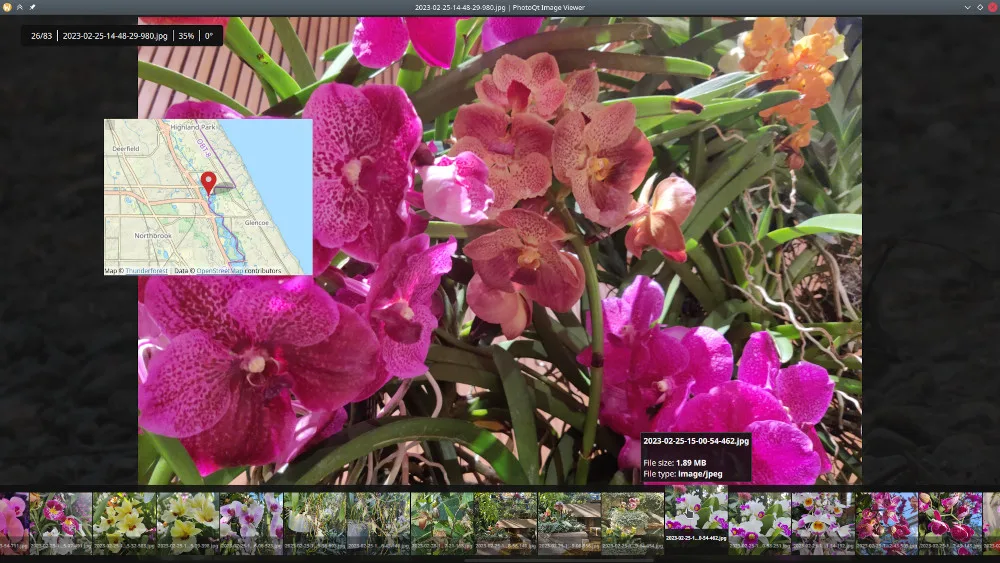
PhotoQt is an image viewer for browsing a collection without keeping a large toolbar around the picture. Its lightbox-style interface puts the photo first and brings thumbnails and other controls into view when needed. Keyboard and mouse shortcuts, Exif information and slideshows give you ways to move through and inspect images. It also provides basic image manipulation and conversion between supported formats.
Format support depends on the libraries enabled in your build and their versions. The publisher’s full format list describes possible support, not a guarantee that every listed format opens in every installation. Windows 7 is not officially supported. This entry links to the publisher’s PhotoQt 5.4.1 Windows EXE installer; the gallery image illustrates the application interface, not a verified Windows installation.
What it offers
- Browse images in a lightbox-style interface with a bottom thumbnail strip.
- Navigate using keyboard and mouse shortcuts.
- Display Exif information and present images as a slideshow.
- Apply basic image manipulations and convert between supported image formats.
Good to know
- Available file formats depend on the build configuration and installed image-library versions; the full publisher list is not guaranteed for every installation.
- Windows 7 is not officially supported.
Product images
Sources
References used for this listing. Retrieval dates do not indicate hands-on testing.
- Downloads ↗Retrieved
- Past Releases — publisher Windows link construction ↗Retrieved
- Features — PhotoQt Image Viewer ↗Retrieved
- Supported Formats ↗Retrieved
- About — PhotoQt by Lukas Spies ↗Retrieved
- FAQ — PhotoQt ↗Retrieved
- PhotoQt v5.4.1 - bug fix release ↗Retrieved
More in multimedia & graphics
View category ↗
1by1 2.17
Play music directly from folders with 1by1, a free Windows audio player with resume, gapless playback and file tools. Formats beyond MP3 need additional decoders.
3DVista Virtual Tour Pro
Build interactive 360° virtual tours from panoramas, videos and 3D models with 3DVista Virtual Tour Pro for Windows. Commercial software with a 30-day trial.

4DDiG Video Repair
Repair corrupted or unplayable videos in batches with the Video Repair tool in 4DDiG File Repair for Windows. A free trial is available; advanced features require a paid license.