
Multimedia & graphics macOS
Piano Booster
Practise reading notation with MIDI accompaniment that follows your playing. Piano Booster is free, open-source software; its Mac builds have cross-version compatibility limits and require a separate SoundFont for built-in sound.
Version 1.0.0 · Direct publisher file
Link checked · Download guidance
What is Piano Booster?
Piano Booster turns MIDI pieces into a play-along notation exercise. A scrolling stave shows the selected part while the accompaniment follows the notes you play on a MIDI keyboard. You can practise one hand while the program plays the other, slow the piece down, or repeat a difficult group of bars rather than restarting the whole song.
The publisher lists version 1.0.0 and provides two Mac disk images: one built on macOS 10.15 Catalina and another built on 10.11 El Capitan. The download here selects the Catalina-built DMG. These are build environments, not a promise of compatibility with every later macOS release. The publisher explicitly warns that a build may not work on a different macOS version; current macOS and Apple Silicon compatibility have not been established here.
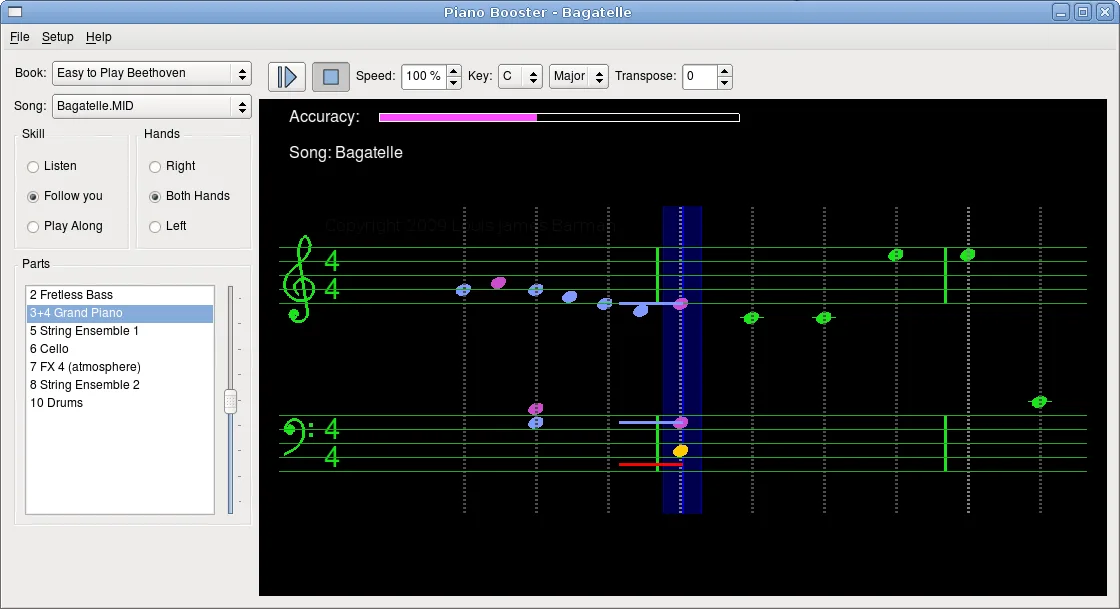
The Mac packages do not include the General MIDI SoundFont needed by the integrated FluidSynth sound generator. You must supply and load one separately. Piano Booster follows MIDI keyboard input, not the sound of an acoustic piano. The publisher screenshot below illustrates the Linux interface, not a Mac installation or a tested Mac session.
What it offers
- Follow MIDI keyboard input with accompaniment that waits when you stop playing.
- Practise either hand while the program plays the other part.
- Adjust playback speed, transpose music and choose the MIDI part to practise.
- Repeat selected bars and use timing markers to see whether notes are early or late.
Good to know
- Mac builds were made on macOS 10.15 and 10.11; the publisher warns that they may not work on another macOS version. Modern macOS and Apple Silicon support are unverified.
- Mac packages omit the General MIDI SoundFont required for the integrated FluidSynth sound generator.
- Play-following requires MIDI keyboard input; the program does not listen to an acoustic piano through a microphone.
Prepare the keyboard and sound before practising
Connect a MIDI keyboard and choose its input interface in Piano Booster's MIDI setup menu. Older keyboards without USB MIDI need a MIDI adaptor. Without a MIDI keyboard, the publisher describes a limited computer-keyboard tryout with X as middle C.
For the integrated sound generator, obtain a General MIDI SoundFont separately from the application. The publisher recommends FluidR3_GM.sf2. Open Setup/Midi Setup, select the FluidSynth tab and use its load button to choose the SoundFont. If there is no sound, the official FAQ specifically directs users to check that a SoundFont is loaded.
Work on one part or a few bars
Use the individual-part and hand controls to focus on the notes you want to learn. Lower the playback speed for a difficult passage, choose its start bar and repeat the relevant bars. The following accompaniment and timing markers support note-reading practice rather than audio recording or acoustic-piano recognition.
Product images
Sources
References used for this listing. Retrieval dates do not indicate hands-on testing.
- Piano Booster - Download — retained discovery anchor only ↗Retrieved
- PianoBooster — official overview and features ↗Retrieved
- PianoBooster Downloads — Mac builds and requirements ↗Retrieved
- PianoBooster FAQ — MIDI input and sound setup ↗Retrieved
- PianoBooster Screen Shots — publisher Linux interface illustration ↗Retrieved
More in multimedia & graphics
View category ↗
1by1 2.17
Play music directly from folders with 1by1, a free Windows audio player with resume, gapless playback and file tools. Formats beyond MP3 need additional decoders.
3DVista Virtual Tour Pro
Build interactive 360° virtual tours from panoramas, videos and 3D models with 3DVista Virtual Tour Pro for Windows. Commercial software with a 30-day trial.

4DDiG Video Repair
Repair corrupted or unplayable videos in batches with the Video Repair tool in 4DDiG File Repair for Windows. A free trial is available; advanced features require a paid license.