

Multimedia & graphics Windows
Picture Doctor for Windows
Attempt repairs on corrupted JPEG and PSD files with Picture Doctor for Windows. Batch processing handles several photos at once; the free demo saves results with a black rectangle.
- Operating system
- Windows 7, 8, 8.1, 10 and 11, as listed by the publisher
- Architecture
- Publisher lists 32-bit and 64-bit Windows support; installer architecture unconfirmed
- Download package
- EXE installer
Publisher-listed compatibility, not an installation test. Version 4.2 is listed on the publisher page; the gallery screenshot depicts 4.0.
Link checked · Download guidance
What is Picture Doctor?
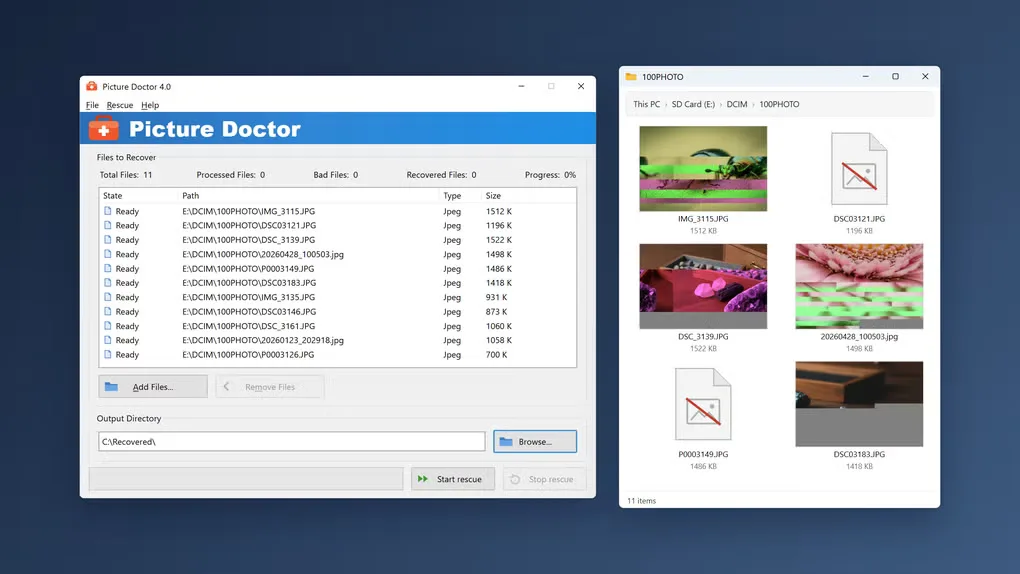
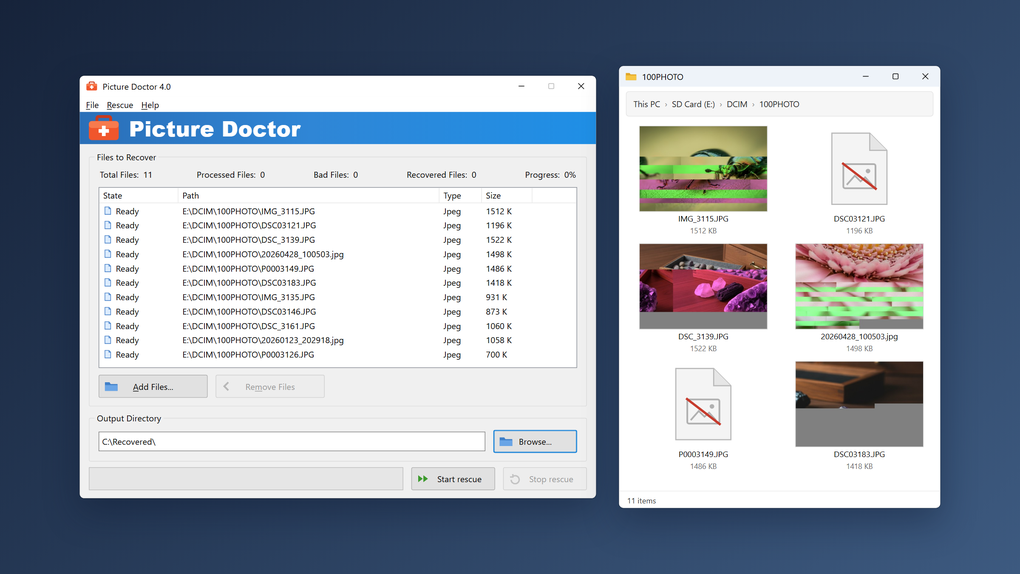
Picture Doctor repairs damaged JPEG and Photoshop PSD files that still exist on disk but will not open correctly. It suits photos left corrupted after a failed transfer or files recovered by a separate recovery tool. Add the damaged files, choose an output folder and select Start rescue to process the queue. The publisher also describes attempts to recover PSD layers, though the outcome depends on what remains in the damaged file.
This is file repair, not a way to find deleted pictures or retouch scratches on scanned prints. Missing pixel data cannot be restored by rebuilding a file's structure, and not every damaged photo can be repaired. The free demo lets you inspect a repair attempt but puts a black rectangle in saved results; a paid license is needed to remove that restriction.
The publisher lists version 4.2. The accompanying Softonic gallery screenshot shows the older 4.0 interface, including the repair queue, output directory and Start rescue control. The linked Windows EXE comes from the publisher's download host; its embedded version and architecture have not been inspected.
What it offers
- Attempt to repair corrupted JPEG files, including EXIF and JFIF variants, and damaged PSD files.
- Queue multiple photos for batch processing instead of handling each file separately.
- Choose a destination folder for repaired images.
- Attempt to recover available layer data from damaged PSD files.
Good to know
- The free demo saves repaired results with a black rectangle; removing it requires a paid license.
- Repair cannot recover missing pixel data or guarantee that every damaged file becomes viewable.
- Does not find deleted photos or retouch scratches and stains on scanned prints.
Product images
Sources
References used for this listing. Retrieval dates do not indicate hands-on testing.
More in multimedia & graphics
View category ↗
1by1 2.17
Play music directly from folders with 1by1, a free Windows audio player with resume, gapless playback and file tools. Formats beyond MP3 need additional decoders.
3DVista Virtual Tour Pro
Build interactive 360° virtual tours from panoramas, videos and 3D models with 3DVista Virtual Tour Pro for Windows. Commercial software with a 30-day trial.

4DDiG Video Repair
Repair corrupted or unplayable videos in batches with the Video Repair tool in 4DDiG File Repair for Windows. A free trial is available; advanced features require a paid license.