
Multimedia & graphics Windows
PMView Pro
View, convert and make basic edits to images with PMView Pro for Windows. The publisher offers a 31-day trial; continued use requires a paid license.
- Operating system
- Windows; publisher homepage states Windows 11 compatibility
- Architecture
- 32-bit Windows and x64; native 64-bit build included in the standard distribution
- Download package
- EXE trial installer
Windows package only. Publisher release history describes automatic native 64-bit installation on 64-bit Windows; installer contents and runtime compatibility were not tested.
Link checked · Download guidance
What is PMView Pro?
PMView Pro combines image viewing, format conversion and basic photo edits in a Windows application. Use its File Open window to select images, inspect EXIF information and convert a selection without opening each file individually. QuickScripts let you repeat operations such as rotating a batch of photos.
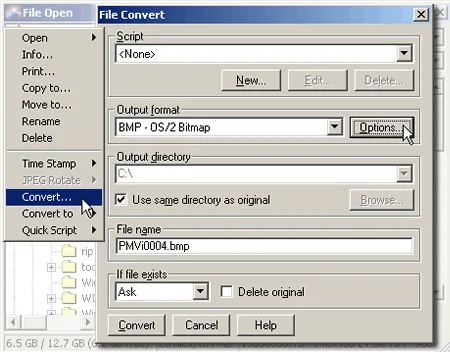
For individual edits, PMView Pro provides mirroring, rotation, resizing and filters such as blur and sharpening. Its supported read and write formats include BMP, GIF, JPEG, PNG and TIFF. The publisher's conversion screenshot shows output-format, destination and existing-file controls.
This download is the Windows trial, not the separate OS/2 package or the registered-user edition. Evaluation lasts 31 days, after which continued use requires a purchased license. The publisher's release notes identify version 3.82 dated February 24, 2020; that is a published release record, not an inspection of the installer contents. The screenshot is an older publisher illustration, not a fresh installation capture.
What it offers
- View images and inspect EXIF information from the File Open window.
- Convert selected images between supported formats, including BMP, GIF, JPEG, PNG and TIFF.
- Repeat image operations across a selection using QuickScripts.
- Mirror, rotate and resize images, or apply blur and sharpening filters.
- Choose conversion output settings and receive a confirmation before replacing existing images.
Good to know
- The trial is limited to a 31-day evaluation; continued use requires a paid user license.
- The public trial download is not the full registered-user edition, which the publisher distributes separately.
Product images
Sources
References used for this listing. Retrieval dates do not indicate hands-on testing.
- PMView Pro - Image Viewer and Converter ↗Retrieved
- Download PMView Pro image editing and viewing software ↗Retrieved
- Features and Functionality ↗Retrieved
- Change your images with PMView Pro! ↗Retrieved
- File Formats Supported by PMView Pro ↗Retrieved
- What's New with PMView Pro ↗Retrieved
More in multimedia & graphics
View category ↗
1by1 2.17
Play music directly from folders with 1by1, a free Windows audio player with resume, gapless playback and file tools. Formats beyond MP3 need additional decoders.
3DVista Virtual Tour Pro
Build interactive 360° virtual tours from panoramas, videos and 3D models with 3DVista Virtual Tour Pro for Windows. Commercial software with a 30-day trial.


4DDiG Video Repair
Repair corrupted or unplayable videos in batches with the Video Repair tool in 4DDiG File Repair for Windows. A free trial is available; advanced features require a paid license.