
Multimedia & graphics Windows
PosteRazor
Turn an image into a multipage PDF poster with PosteRazor for Windows. Choose paper size, tile overlap and final dimensions, then print and assemble the sheets.
- Operating system
- Windows; Softonic lists Windows 98. Modern Windows compatibility unverified.
- Architecture
- Win32 (32-bit)
- Download package
- EXE installer
Selected package: PosteRazor-1.5.2-Win32-Installer.exe, dated 2008-07-26. No installation or Windows 10/11 runtime check was performed. Screenshot depicts the older 1.4 interface.
Link checked · Download guidance
What is PosteRazor?
PosteRazor prepares a large poster from a raster image by splitting it across pages in a PDF. It is useful when you want to assemble a picture from ordinary printed sheets rather than send one oversized page to a large-format printer. The desktop application uses a five-step wizard and is free, open-source software.
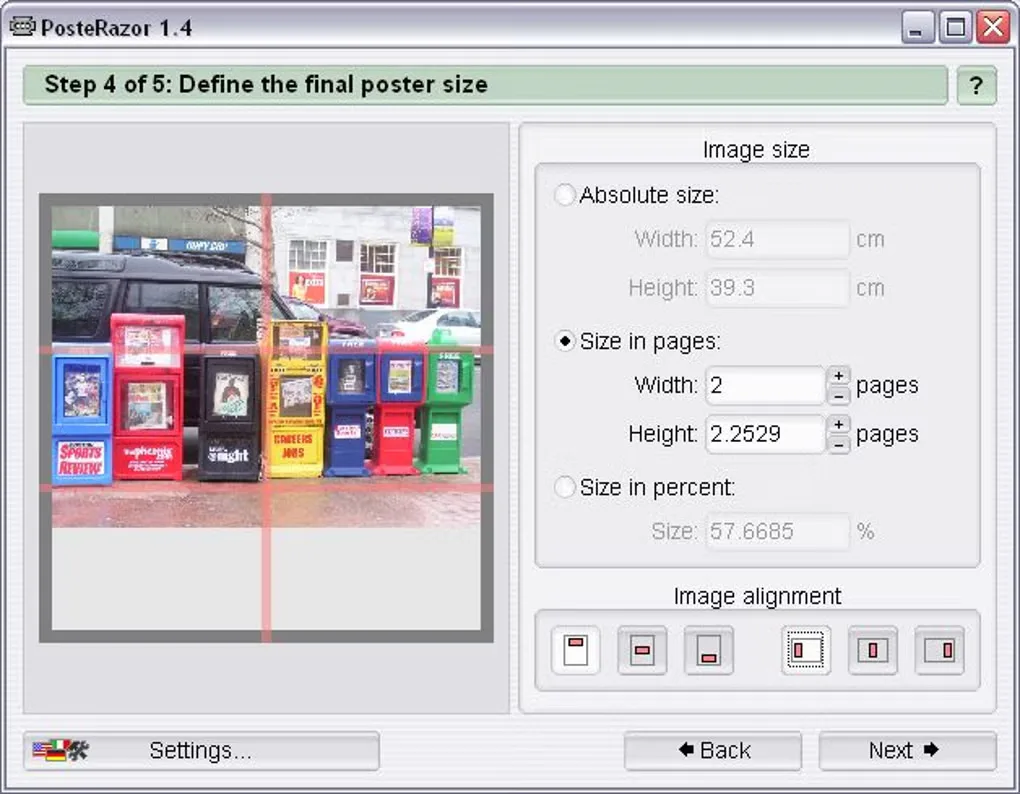
Choose the printer paper size and orientation, set the overlap between adjacent image tiles, and define the finished poster by physical dimensions, page count or a percentage of the input image size. Presets include A4, A3, Letter, Legal and Tabloid; custom page sizes and image alignment are also supported. The output is a multipage PDF to print and assemble, not a finished physical poster.
The publisher documents several practical limits: there are no cut lines or cutting aids, JPEG-CMYK and 16-bit grayscale input are unsupported, and embedded ICC profiles are not carried into the PDF. RGBA transparency is merged onto a white background. These restrictions matter when preparing artwork with transparency or a color-managed print workflow.
This entry links to the publisher's Windows Win32 installer for version 1.5.2, dated July 26, 2008. Modern Windows compatibility has not been verified. Softonic lists version 1.5 and Windows 98; its October 2025 listing update is not the release date of this installer. The gallery illustration shows an older 1.4 interface. The publisher's separately advertised browser version is not the desktop package linked here.
What it offers
- Split a raster image into a multipage PDF for printing and assembling as a poster.
- Use a five-step wizard to prepare the output.
- Choose preset or custom paper sizes and page orientation.
- Set the poster size by physical dimensions, page count or percentage scaling.
- Adjust tile overlap and image alignment.
Good to know
- The Windows installer is version 1.5.2 from 2008; modern Windows compatibility is unverified.
- No cut lines or cutting aids are provided.
- JPEG-CMYK and 16-bit grayscale images are unsupported; embedded ICC profiles are not included in the output PDF.
- RGBA transparency is flattened against a white background.
Product images
Sources
References used for this listing. Retrieval dates do not indicate hands-on testing.
More in multimedia & graphics
View category ↗
1by1 2.17
Play music directly from folders with 1by1, a free Windows audio player with resume, gapless playback and file tools. Formats beyond MP3 need additional decoders.
3DVista Virtual Tour Pro
Build interactive 360° virtual tours from panoramas, videos and 3D models with 3DVista Virtual Tour Pro for Windows. Commercial software with a 30-day trial.

4DDiG Video Repair
Repair corrupted or unplayable videos in batches with the Video Repair tool in 4DDiG File Repair for Windows. A free trial is available; advanced features require a paid license.