
Multimedia & graphics Windows
ProPoster (RonyaSoft Poster Printer)
Split a photo or image across ordinary printer pages to make a large poster with ProPoster, now presented by its publisher as RonyaSoft Poster Printer.
- Operating system
- Publisher banner: Windows XP, Vista, 7, 8, 10 and 11
- Architecture
- Package architecture not established
- Download package
- Publisher ZIP download
Detailed publisher requirements list 32-/64-bit Windows XP through 10 and 512 MB RAM; the banner also lists Windows 11. Compatibility was not tested.
Link checked · Download guidance
What is ProPoster (RonyaSoft Poster Printer)?
ProPoster is a Windows utility for turning an existing picture into a poster, banner or wall mural printed on multiple sheets. The publisher now presents the product as RonyaSoft Poster Printer at the same ProPoster product address. Choose an image, set the finished dimensions and select a printer; the software divides the image into page-sized sections. Assemble the printed sheets with tape or glue rather than using a large-format printer.
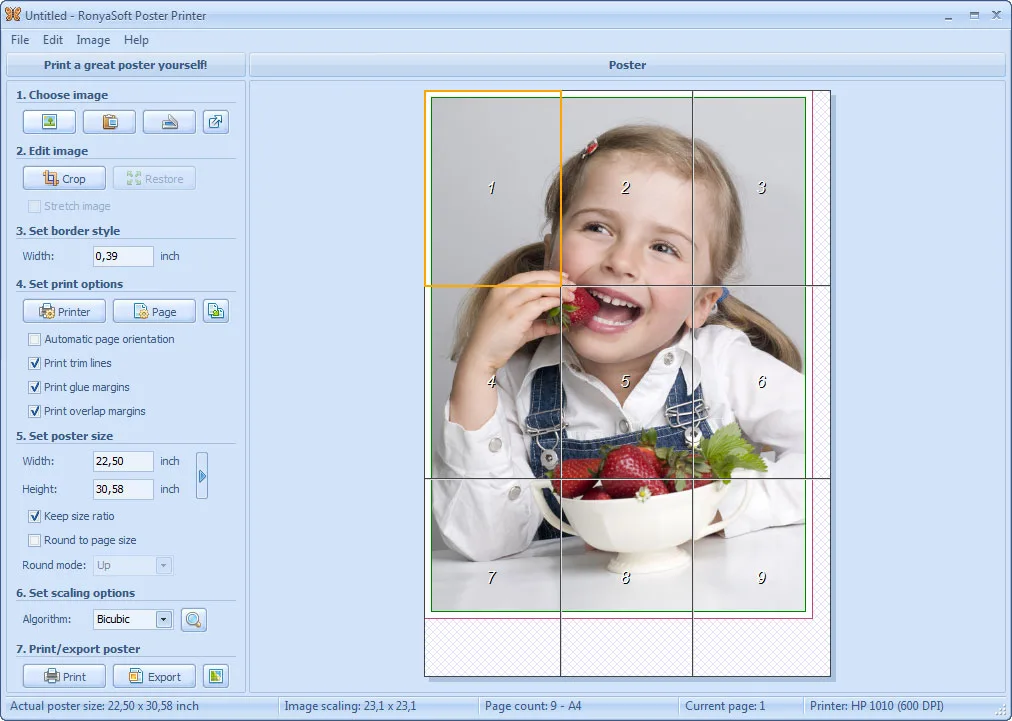
The workflow centers on preparing an image for tiled printing: import an image file, paste clipboard content or use a TWAIN source, then adjust the poster size and printing options. The publisher lists predefined sizes, metric and imperial measurements, partial printing, saved poster projects, and export to PDF, JPG, PNG or TIFF. Its main-window screenshot shows a numbered nine-page preview alongside crop, border, glue-margin and scaling controls.
This is a commercial product with a free trial, not freeware. The linked download is the publisher’s ZIP package; the archive contents and application were not downloaded or run. The publisher’s banner includes Windows 11, but its detailed 32-/64-bit requirements stop at Windows 10. Neither the current package version nor its processor architecture was independently established.
What it offers
- Split an image into numbered pages for a poster printed on ordinary paper.
- Set poster dimensions with predefined sizes and metric or imperial units; publisher lists sizes up to 10 × 10 m.
- Import supported image formats, paste clipboard content or acquire an image from a TWAIN source.
- Save poster projects and export to PDF, JPG, PNG or TIFF.
- Use partial printing and the pictured crop, border, glue-margin and scaling controls.
Good to know
- Commercial software offered as a free trial; specific trial restrictions were not established.
- Multi-sheet posters require physical assembly with tape or glue after printing.
- Windows 11 appears in the publisher banner but not in its detailed requirements; current package version and architecture remain unconfirmed.
Product images
Sources
References used for this listing. Retrieval dates do not indicate hands-on testing.
More in multimedia & graphics
View category ↗
1by1 2.17
Play music directly from folders with 1by1, a free Windows audio player with resume, gapless playback and file tools. Formats beyond MP3 need additional decoders.
3DVista Virtual Tour Pro
Build interactive 360° virtual tours from panoramas, videos and 3D models with 3DVista Virtual Tour Pro for Windows. Commercial software with a 30-day trial.

4DDiG Video Repair
Repair corrupted or unplayable videos in batches with the Video Repair tool in 4DDiG File Repair for Windows. A free trial is available; advanced features require a paid license.