
Multimedia & graphics Windows
Proxima Controller
Play MIDI devices with your mouse or computer keyboard using Proxima Controller, a free Windows virtual keyboard with five octaves and channel, bank and patch controls.
Version 1.11 · Direct publisher file
Link checked · Download guidance
What is Proxima Controller?
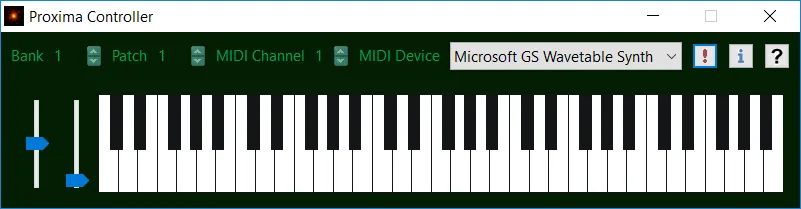
Proxima Controller turns a mouse and computer keyboard into controls for MIDI instruments. Use it to send notes to an external synthesizer or tone generator, or to an internal device that responds to MIDI messages, such as Microsoft's GS Wavetable synth. It is a MIDI controller, not a sound-generating instrument: the selected receiving device must produce the audio.
Each row of a standard computer keyboard controls a different octave on the virtual keyboard. The application provides five octaves of control, MIDI channels 1–16, bank and patch changes, and pitch and modulation sliders. Its device selector lets you choose the MIDI destination.
Zeta Centauri lists version 1.11 as freeware for Windows 11, 10, 8 and 7. The linked download is the publisher's EXE setup package. CPU architecture and a release date are not specified on the product page; the Windows support list is the publisher's statement, not the result of local compatibility testing.
What it offers
- Send notes to external MIDI synthesizers and tone generators using a mouse or computer keyboard.
- Control internal devices that accept MIDI messages, including the Microsoft GS Wavetable synth named by the publisher.
- Use five octaves of virtual keyboard control, with computer-keyboard rows mapped to different octaves.
- Select MIDI channels 1–16 and change banks and patches.
- Adjust pitch and modulation using sliders.
Good to know
- Produces no sound of its own; a receiving MIDI device must generate the audio.
- The publisher lists Windows 11, 10, 8 and 7 but does not specify CPU architecture on the product page.
Product images
Sources
References used for this listing. Retrieval dates do not indicate hands-on testing.
More in multimedia & graphics
View category ↗
1by1 2.17
Play music directly from folders with 1by1, a free Windows audio player with resume, gapless playback and file tools. Formats beyond MP3 need additional decoders.
3DVista Virtual Tour Pro
Build interactive 360° virtual tours from panoramas, videos and 3D models with 3DVista Virtual Tour Pro for Windows. Commercial software with a 30-day trial.

4DDiG Video Repair
Repair corrupted or unplayable videos in batches with the Video Repair tool in 4DDiG File Repair for Windows. A free trial is available; advanced features require a paid license.