
Multimedia & graphics Windows
Quick Picture Viewer
View photos, crop or rotate images, and keep drawing references visible with Quick Picture Viewer, a free, open-source Windows image viewer.
- Operating system
- Windows; .NET Framework 4.8 required
- Architecture
- Release installer architecture not confirmed
- Download package
- EXE installer
Publisher-tagged runtime configuration specifies .NET Framework 4.8. Softonic gives conflicting Windows minimums; no exact minimum or Windows 11 test is claimed.
Link checked · Download guidance
What is Quick Picture Viewer?
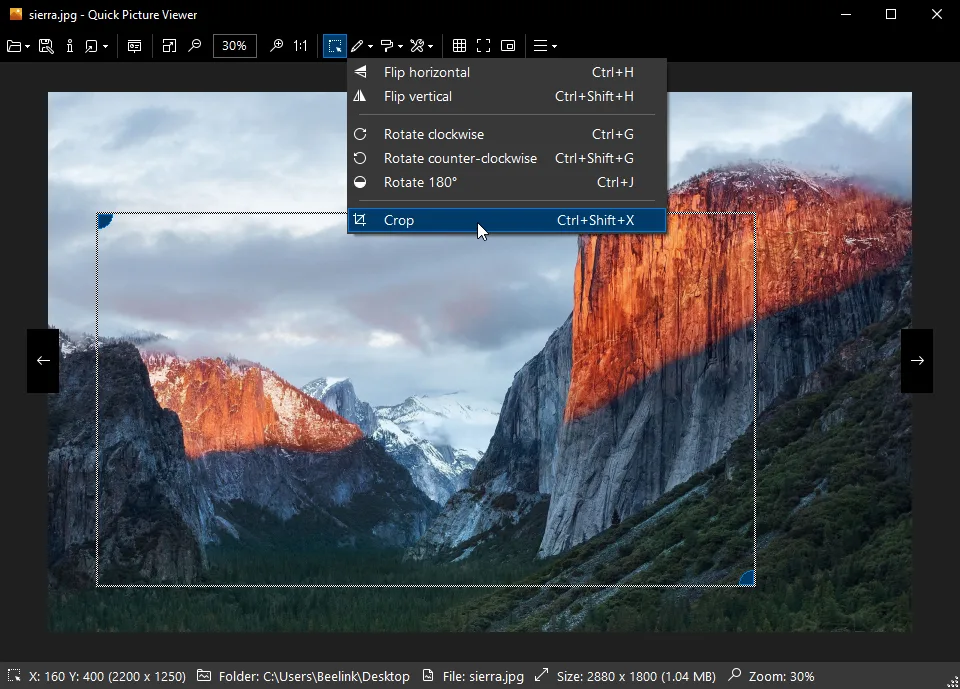
Quick Picture Viewer combines everyday image browsing with small edits in a Windows desktop application. It opens formats including JPEG, PNG, GIF, WebP, SVG and PSD, with rotate, flip, crop and file-type conversion tools for quick adjustments. A slideshow and dark mode offer other ways to browse, while image details and print or PDF export cover basic inspection and output tasks.
Picture-in-Picture and always-on-top modes make it useful for keeping a reference image beside a drawing or another application. The publisher also lists a built-in plugin manager for extending its tools. These are documented features, not results of an installation or performance test.
The linked EXE is the publisher’s stable 3.1.4 release, dated May 9, 2021. Its tagged runtime configuration requires .NET Framework 4.8; an exact minimum Windows version and the release installer’s CPU architecture are not established by the sources checked here. CR2 support also has a specific restriction: the 3.1.4 release notes say only one CR2 file can be open across all application instances.
What it offers
- Open common image formats including JPEG, PNG, GIF, WebP, SVG and PSD.
- Rotate, flip, crop and change image file type.
- Keep a reference visible with Picture-in-Picture and always-on-top modes.
- Browse with a slideshow or dark mode, and inspect image details.
- Print images or export to PDF, with additional tools available through plugins.
Good to know
- Version 3.1.4 permits only one CR2 file open across all application instances, according to its release notes.
- The selected release dates to May 2021 and targets .NET Framework 4.8; exact minimum Windows version and installer architecture are unconfirmed.
Product images
Sources
References used for this listing. Retrieval dates do not indicate hands-on testing.
- Quick Picture Viewer - Download ↗Retrieved
- Quick Picture Viewer - Lightweight, versatile desktop image viewer for Windows ↗Retrieved
- ModuleArt/quick-picture-viewer — publisher README ↗Retrieved
- Official GitHub release metadata — Patch v3.1.4 ↗Retrieved
- Quick Picture Viewer v3.1.4 — application runtime configuration ↗Retrieved
- Quick Picture Viewer v3.1.4 — GNU General Public License ↗Retrieved
More in multimedia & graphics
View category ↗
1by1 2.17
Play music directly from folders with 1by1, a free Windows audio player with resume, gapless playback and file tools. Formats beyond MP3 need additional decoders.
3DVista Virtual Tour Pro
Build interactive 360° virtual tours from panoramas, videos and 3D models with 3DVista Virtual Tour Pro for Windows. Commercial software with a 30-day trial.


4DDiG Video Repair
Repair corrupted or unplayable videos in batches with the Video Repair tool in 4DDiG File Repair for Windows. A free trial is available; advanced features require a paid license.