

Multimedia & graphics macOS
qView for macOS
View photos and animated GIFs in a minimal window with qView, a free, open-source image viewer for Mac with rotation, mirroring and configurable controls.
- Operating system
- macOS 12 Monterey or later (Homebrew metadata for this DMG)
- Architecture
- Universal: Intel x86_64 and Apple Silicon arm64
- Download package
- DMG disk image
Non-legacy qView-7.1.dmg. Homebrew reports fails_gatekeeper_check and disables its cask; this is not a locally tested installation.
Link checked · Download guidance
What is qView?
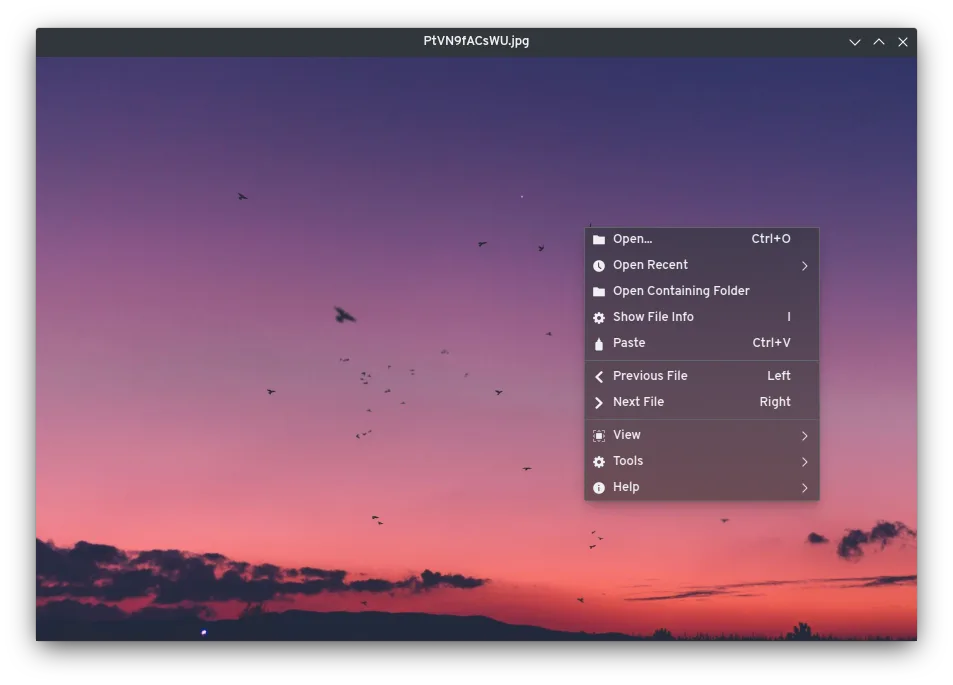
qView puts the image ahead of the interface: its viewing window leaves out toolbars and uses a context menu for commands. It opens common image formats including BMP, GIF, JPG, PNG, TIFF and WebP. Animated GIF controls, recent-file history and image preloading support browsing a folder without a large photo-management interface.
Preferences let you adjust the viewing experience, while rotation and mirroring provide basic image-viewing tools. Version 7.1 adds an option to force trackpad scroll or zoom behavior instead of relying entirely on automatic detection.
This entry links to the publisher’s non-legacy qView 7.1 DMG. Homebrew metadata specifies macOS 12 or later for this package and currently disables its qView cask for failing a Gatekeeper check. That is a distribution warning, not an installation result from this author; successful launch, signing and notarization have not been verified here. The screenshot is the publisher’s cross-platform UI example, not a captured macOS session.
What it offers
- Open BMP, GIF, JPG, PNG, TIFF and WebP images.
- Control animated GIF playback.
- Rotate or mirror an image while viewing.
- Return to recent files and use multithreaded image preloading.
- Configure preferences, including the trackpad scroll/zoom override added in 7.1.
Good to know
- Homebrew disables its qView cask with reason fails_gatekeeper_check; installation and launch on macOS have not been verified here.
- The selected non-legacy DMG is listed for macOS 12 or later by Homebrew; a separate legacy release asset exists for older systems.
Product images
Sources
References used for this listing. Retrieval dates do not indicate hands-on testing.
- qView for Mac - Download ↗Retrieved
- qView - Practical and Minimal Image Viewer ↗Retrieved
- Release qView 7.1 · jurplel/qView ↗Retrieved
- qView 7.1 — publisher release assets ↗Retrieved
- qView 7.1 — tagged build workflow ↗Retrieved
- Homebrew qView cask metadata ↗Retrieved
More in multimedia & graphics
View category ↗
1by1 2.17
Play music directly from folders with 1by1, a free Windows audio player with resume, gapless playback and file tools. Formats beyond MP3 need additional decoders.
3DVista Virtual Tour Pro
Build interactive 360° virtual tours from panoramas, videos and 3D models with 3DVista Virtual Tour Pro for Windows. Commercial software with a 30-day trial.


4DDiG Video Repair
Repair corrupted or unplayable videos in batches with the Video Repair tool in 4DDiG File Repair for Windows. A free trial is available; advanced features require a paid license.