
Multimedia & graphics Windows
RealWorld Icon Editor
Create Windows icons from pictures, layered drawings or 3D models with RealWorld Icon Editor, a commercial icon tool with image conversion and library editing.
- Operating system
- Windows 2000, Windows XP, Windows Vista and Windows 7 (publisher's 2010.1 list)
- Architecture
- 32-bit selected; separate native 64-bit edition available
- Download package
- MSI installer
Publisher notes minor look-and-feel limitations on Windows 2000. Windows 10 and 11 compatibility was not established by the sources read. Portable and preview packages are separate downloads.
Link checked · Download guidance
What is RealWorld Icon Editor?
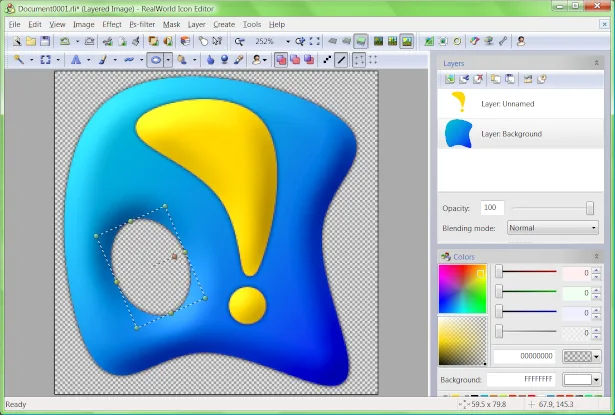
RealWorld Icon Editor combines image-to-icon conversion, layered drawing and a built-in 3D editor. Start with a photograph or other image, paint an icon from scratch, assemble premade parts, or render a 3D model. The converter can generate multiple image sizes together, with per-image sharpening and shadow settings. Icon-library editing provides a way to maintain collections rather than working only on individual files.
The publisher still offers the stable 2010.1 release, dated July 12, 2010. Its documented application support covers Windows 2000, XP, Vista and 7; the sources read here do not establish Windows 10 or 11 compatibility. This entry selects the 32-bit MSI installer, not the separate 64-bit, portable or preview packages. The download is available for evaluation, but the publisher requires a valid commercial license for other use.
What it offers
- Convert JPG, PNG, PSD, BMP and GIF images into icons, generating multiple sizes with configurable sharpening and shadows.
- Draw with layers, layer effects, selections and tools such as Brush, Ellipse, Lasso and Text.
- Build 3D models from basic shapes or NURBS surfaces and save snapshots with lighting and camera settings.
- Assemble icons from premade components and add, remove, edit, import or export icons in ICL libraries.
Good to know
- Commercial software: a valid license is required beyond evaluation; the publisher's gallery specifies a Professional license for batch processing.
- The stable 2010.1 release is from 2010. Publisher documentation lists Windows 2000, XP, Vista and 7, not verified Windows 10 or 11 support.
- The release notes report that attempting to open 63 windows simultaneously hangs the application.
Product images
Sources
References used for this listing. Retrieval dates do not indicate hands-on testing.
More in multimedia & graphics
View category ↗
1by1 2.17
Play music directly from folders with 1by1, a free Windows audio player with resume, gapless playback and file tools. Formats beyond MP3 need additional decoders.
3DVista Virtual Tour Pro
Build interactive 360° virtual tours from panoramas, videos and 3D models with 3DVista Virtual Tour Pro for Windows. Commercial software with a 30-day trial.

4DDiG Video Repair
Repair corrupted or unplayable videos in batches with the Video Repair tool in 4DDiG File Repair for Windows. A free trial is available; advanced features require a paid license.