
Multimedia & graphics Windows
Recomposit
Cut subjects out of photos and compose them on new backgrounds with Recomposit, a Windows photo-masking editor with a 30-day trial.
- Operating system
- Windows Vista, 7, 8, 10 and 11
- Architecture
- Not specified by the publisher on the product page
- Download package
- EXE installer — standard Recomposit trial
Publisher lists 2 GB RAM. Version 8 is the product-page version; the installer was not downloaded or inspected, so its embedded version and architecture are unverified.
Link checked · Download guidance
What is Recomposit?
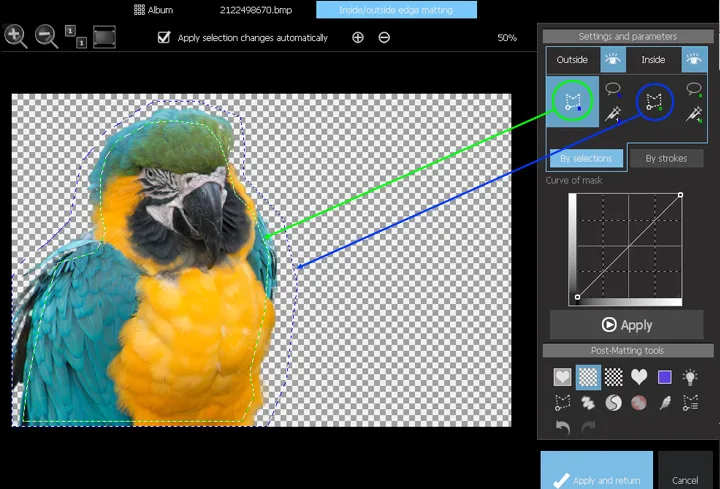
Recomposit is Stepok Image Lab's photo-masking and compositing software for Windows. It separates a subject from its background using chromakey, stroke-based or inside/outside edge masking, with manual tools for refining the result. After masking, you can replace the background or move the cut-out subject onto a separate layer for further editing. The publisher also provides a Photoshop masking plug-in in .8bf format.
The masking method matters. Chromakey is intended for a solid, saturated background whose colour is absent from the subject; inside/outside masking lets you mark foreground and background regions instead. Stepok's help warns that similar foreground and background colours can produce errors, so difficult edges may need manual correction. This entry links to the standard Recomposit trial, not the separate Pro package. The publisher advertises a 30-day trial and a paid license for continued use.
What it offers
- Choose chromakey, stroke-based or inside/outside edge masking to separate a subject from its background.
- Refine masks with polygon selection, paint, local re-matting and feather tools.
- Replace a masked subject's background or duplicate the subject to a new layer.
- Compose images with layers, opacity controls and blending modes.
- Use the publisher's .8bf Photoshop plug-in for masking workflows.
Good to know
- The free trial lasts 30 days; continued use requires a paid license.
- Chromakey needs a solid, saturated background colour that is not present in the foreground subject.
- Similar foreground and background colours can cause masking defects that require manual refinement.
Product images
Sources
References used for this listing. Retrieval dates do not indicate hands-on testing.
- Recomposit | Stepok Image Lab — product, trial and system requirements ↗Retrieved
- Recomposit/Light Developer - Online Help — Inside/Outside edge matting ↗Retrieved
- Recomposit/Light Developer - Online Help — Chromakey matting ↗Retrieved
- Recomposit/Light Developer - Online Help — Matting tools ↗Retrieved
- Recomposit/Light Developer - Online Help — Layers ↗Retrieved
- Recomposit/Light Developer - Online Help — After matting ↗Retrieved
- Recomposit/Light Developer - Online Help — Quick Start in 9 Steps ↗Retrieved
More in multimedia & graphics
View category ↗
1by1 2.17
Play music directly from folders with 1by1, a free Windows audio player with resume, gapless playback and file tools. Formats beyond MP3 need additional decoders.
3DVista Virtual Tour Pro
Build interactive 360° virtual tours from panoramas, videos and 3D models with 3DVista Virtual Tour Pro for Windows. Commercial software with a 30-day trial.


4DDiG Video Repair
Repair corrupted or unplayable videos in batches with the Video Repair tool in 4DDiG File Repair for Windows. A free trial is available; advanced features require a paid license.