

Multimedia & graphics Windows
Ruffle for Windows
Open SWF games and animations on Windows with Ruffle, a free, open-source Flash Player emulator that runs as a desktop application.
- Operating system
- Windows; minimum Windows version not established by the cited download catalog
- Architecture
- x86_64 (64-bit)
- Download package
- ZIP archive
Extract the archive and open ruffle.exe. The publisher lists a separate 32-bit package; this link selects 64-bit Windows.
Link checked · Download guidance
What is Ruffle?
Ruffle plays Flash content without requiring the original Adobe Flash Player. Its Windows desktop application opens SWF files from your computer, making it useful for revisiting saved games, animations and other Flash projects. Extract the Windows ZIP package, open ruffle.exe and choose an SWF file; the content file is needed separately.
The desktop interface includes bookmarks, a recently opened files menu and saved preferences for settings such as the rendering backend. You can also open an SWF from the command line. This entry links to the publisher's 64-bit Windows desktop package for version 0.7.1, not its browser extension or website integration package.
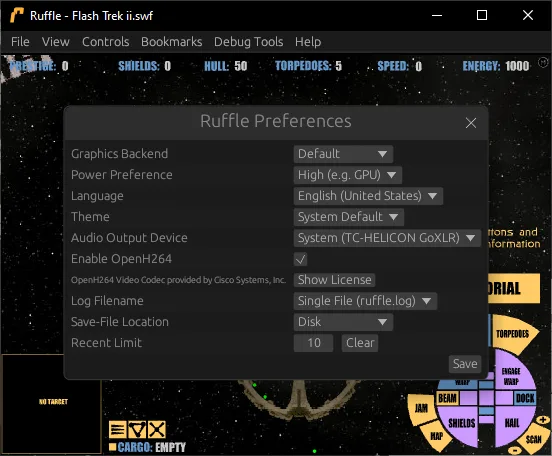
Compatibility is not complete. The project supports ActionScript 1, 2 and 3 but explicitly says implementation is unfinished, so a particular game or animation may have missing features or playback problems. The screenshot is a publisher example of the Windows desktop preferences from September 2024, not a capture of this download or an installation test.
What it offers
- Open local SWF games and animations in a standalone desktop player.
- Keep bookmarks and revisit recently opened files.
- Save desktop preferences, including the rendering backend.
- Launch an SWF by passing its filename on the command line.
Good to know
- Flash compatibility is unfinished; ActionScript 1, 2 or 3 content may not behave exactly as it did in Adobe Flash Player.
- You need an SWF content file separately; the emulator download is not a collection of Flash games.
Product images
Sources
References used for this listing. Retrieval dates do not indicate hands-on testing.
- Ruffle — official Flash emulator homepage ↗Retrieved
- Ruffle — official downloads and desktop release catalog ↗Retrieved
- Ruffle official repository — project status ↗Retrieved
- Using Ruffle — official desktop instructions ↗Retrieved
- Optimisations, Text Input, Tab Focusing and More! — Ruffle, Dinnerbone, September 12, 2024 ↗Retrieved
More in multimedia & graphics
View category ↗
1by1 2.17
Play music directly from folders with 1by1, a free Windows audio player with resume, gapless playback and file tools. Formats beyond MP3 need additional decoders.
3DVista Virtual Tour Pro
Build interactive 360° virtual tours from panoramas, videos and 3D models with 3DVista Virtual Tour Pro for Windows. Commercial software with a 30-day trial.

4DDiG Video Repair
Repair corrupted or unplayable videos in batches with the Video Repair tool in 4DDiG File Repair for Windows. A free trial is available; advanced features require a paid license.