
Multimedia & graphics Windows
Schism Tracker for Windows
Compose sample-based music in an Impulse Tracker-style pattern editor with Schism Tracker, a free, open-source music tracker for Windows.
- Operating system
- Windows; minimum version for this x86_64 package not established by the cited pages
- Architecture
- x86_64 (64-bit x86)
- Download package
- ZIP archive
Selected publisher package is Windows x86_64; separate i386, ARMv7 and AArch64 downloads are listed. No installation or runtime test performed.
Link checked · Download guidance
What is Schism Tracker?
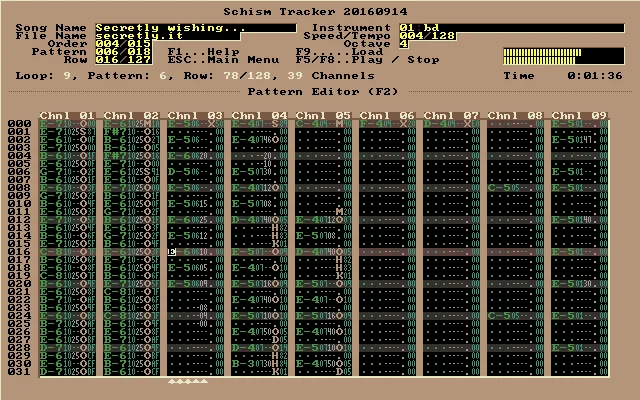
Schism Tracker is a sample-based music composition tool that recreates the Impulse Tracker workflow on Windows and other platforms. Its pattern editor arranges notes and effects in channel columns, making it a fit for musicians who want the IT-style approach to writing tracked music. The playback engine is based on a modified version of ModPlug with changes aimed at improving Impulse Tracker playback.
The interface has its own keyboard conventions. The project's FAQ warns that familiar shortcuts such as Ctrl-C and Ctrl-V do not behave as users of other applications may expect, so learning the tracker controls is part of getting started. The publisher screenshot shown here is a historical example labeled Schism Tracker 20160914, not a capture of the linked 20260524 Windows release.
This entry links to the publisher's Windows x86_64 ZIP archive for version 20260524. Separate packages are available for 32-bit x86 and ARM systems. The link was checked with HEAD requests only; the archive was not downloaded or run.
What it offers
- Compose sample-based music using an Impulse Tracker-style workflow.
- Edit notes and effects in the pattern editor's channel columns.
- Play tracked music through a modified ModPlug-based engine with Impulse Tracker playback improvements.
- Use native Windows builds rather than the original Impulse Tracker's MS-DOS environment.
Good to know
- The IT-style interface uses nonstandard keyboard shortcuts; the publisher FAQ specifically warns that Ctrl-C and Ctrl-V do not behave as users of other applications may expect.
Product images
Sources
References used for this listing. Retrieval dates do not indicate hands-on testing.
More in multimedia & graphics
View category ↗
1by1 2.17
Play music directly from folders with 1by1, a free Windows audio player with resume, gapless playback and file tools. Formats beyond MP3 need additional decoders.
3DVista Virtual Tour Pro
Build interactive 360° virtual tours from panoramas, videos and 3D models with 3DVista Virtual Tour Pro for Windows. Commercial software with a 30-day trial.


4DDiG Video Repair
Repair corrupted or unplayable videos in batches with the Video Repair tool in 4DDiG File Repair for Windows. A free trial is available; advanced features require a paid license.