

Multimedia & graphics macOS
Scribus for macOS
Lay out print and PDF documents with Scribus, a free, open-source desktop publishing application for Mac. This download is the stable Apple Silicon DMG.
- Operating system
- macOS 13 Ventura or later, following the publisher downloads page
- Architecture
- Apple Silicon (ARM64)
- Download package
- DMG disk image
Apple Silicon download only. Intel DMG is separate. The release wiki lists macOS 11+ for Apple Silicon, conflicting with the downloads page's macOS 13+ guidance; support below 13 was not verified.
Link checked · Download guidance
What is Scribus?
Scribus is a page-layout application for combining text, images and vector artwork in documents intended for print or PDF distribution. Its color-management tools support CMYK and spot colors, while PDF/X export provides output options for commercial printing. An open XML document format and Python scripting give users access to their project data and ways to automate layout work.
This entry links to Scribus 1.6.7 from the stable 1.6.x branch, not the separate 1.7.x development series. The selected DMG is for Apple Silicon; Intel Macs need the separate Intel package on the publisher's downloads page. The publisher gives conflicting minimum macOS versions for Apple Silicon: its downloads page says macOS 13 Ventura or later, while the 1.6.7 release wiki says macOS 11 or later. Follow the more conservative downloads-page guidance unless the publisher clarifies support for your system.
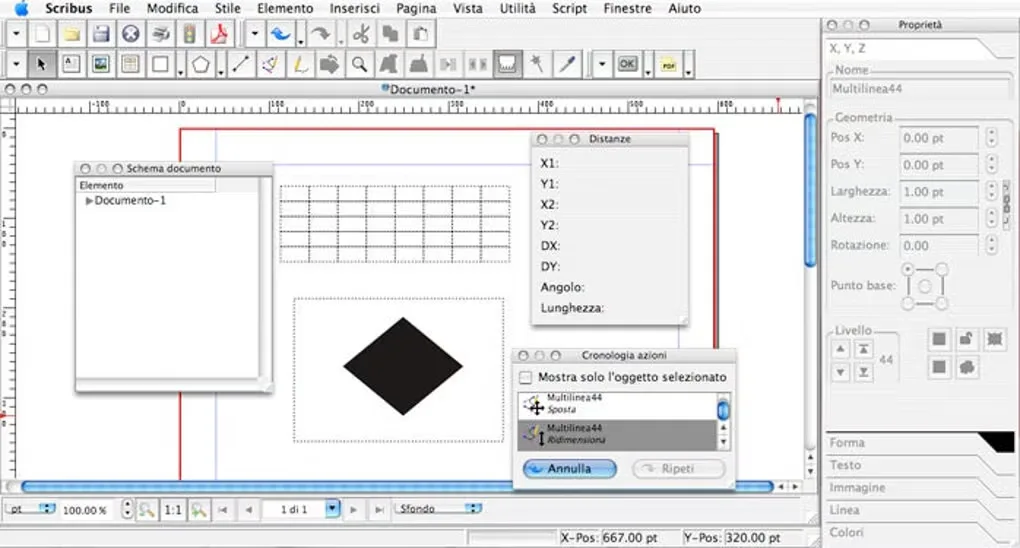
The screenshot is an older Mac interface example from the Softonic gallery, with Italian menus; it is not a capture of version 1.6.7. New desktop-publishing users should also expect a learning curve rather than a simple word-processor workflow.
What it offers
- Arrange text, images and vector artwork in page layouts for print and PDF output.
- Work with RGB, CMYK and spot colors using color-management tools.
- Export PDF/X-1a, PDF/X-3 and PDF/X-4 documents, alongside PDF forms and presentations.
- Store documents in an open XML-based format and automate tasks with Python scripting.
- Preview how color choices appear to people with color-vision deficiencies.
Good to know
- The linked DMG is for Apple Silicon, not Intel Macs; the publisher supplies a separate Intel package.
- Minimum macOS guidance conflicts: the downloads page lists macOS 13 or later for Apple Silicon, but the 1.6.7 release wiki lists macOS 11 or later. Compatibility below macOS 13 is not confirmed here.
- Softonic's Mac review identifies a steep learning curve for users new to desktop publishing.
Product images
Sources
References used for this listing. Retrieval dates do not indicate hands-on testing.
- Get Scribus — stable branch and platform downloads ↗Retrieved
- Scribus — Open Source Desktop Publishing ↗Retrieved
- About — Scribus ↗Retrieved
- Scribus 1.6.7 files — publisher-linked SourceForge directory ↗Retrieved
- 1.6.7 Release — Scribus Wiki ↗Retrieved
- Scribus for Mac - Download ↗Retrieved
More in multimedia & graphics
View category ↗
1by1 2.17
Play music directly from folders with 1by1, a free Windows audio player with resume, gapless playback and file tools. Formats beyond MP3 need additional decoders.
3DVista Virtual Tour Pro
Build interactive 360° virtual tours from panoramas, videos and 3D models with 3DVista Virtual Tour Pro for Windows. Commercial software with a 30-day trial.

4DDiG Video Repair
Repair corrupted or unplayable videos in batches with the Video Repair tool in 4DDiG File Repair for Windows. A free trial is available; advanced features require a paid license.