
Multimedia & graphics Windows
Shape Collage
Arrange photos into hearts, letters or custom shapes with Shape Collage for Windows. The free personal-use edition adds a watermark; Pro unlocks watermark removal and project saving.
Version 3.1 · Direct publisher file
Link checked · Download guidance
What is Shape Collage?
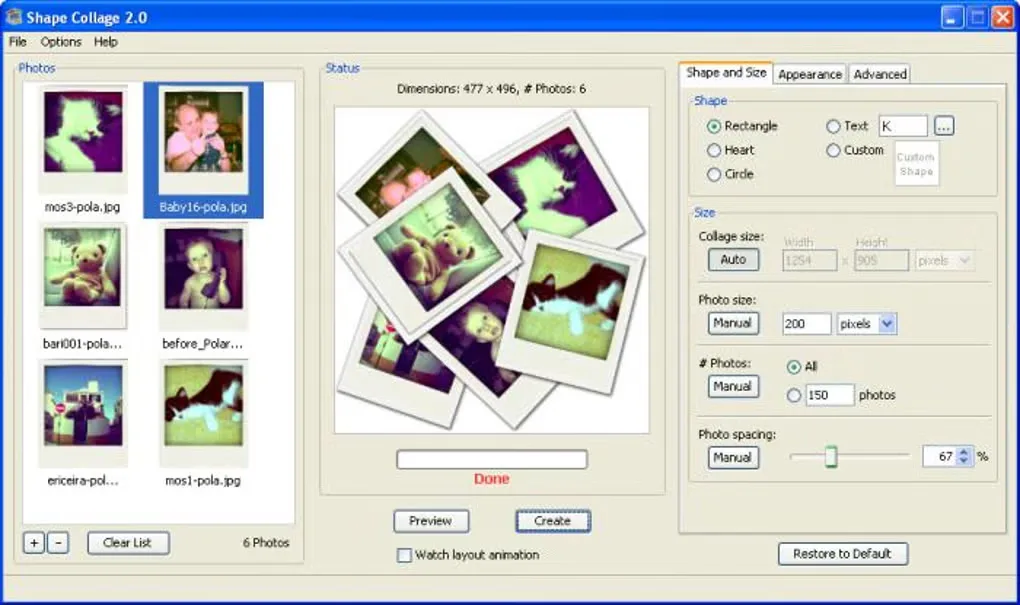
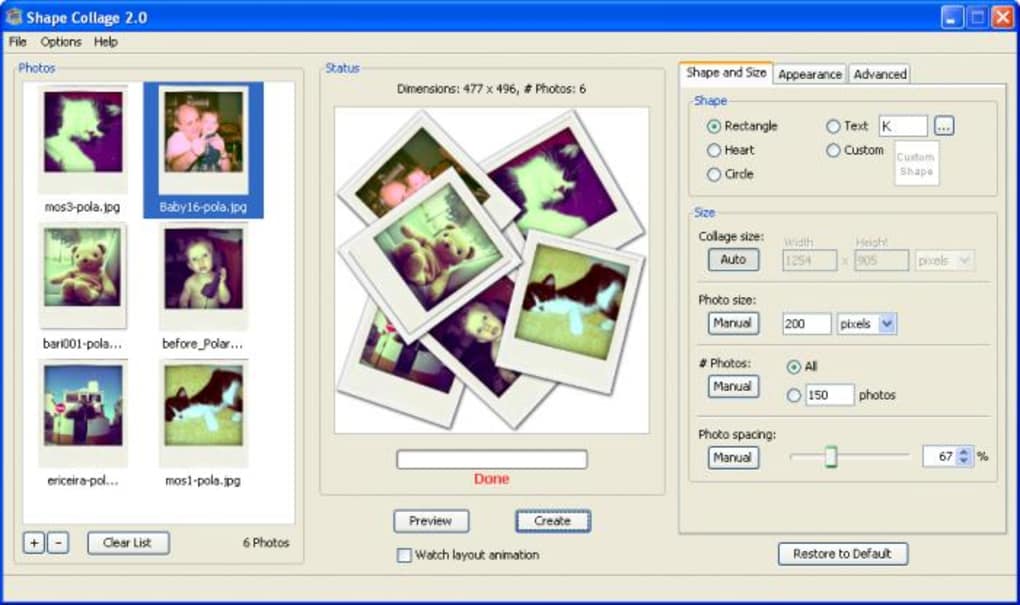
Shape Collage automatically arranges a collection of photos into a chosen outline rather than asking you to position every image individually. Use a rectangle, heart, circle, letters or a shape you draw yourself, then adjust the collage size, photo size, number of photos and spacing. Background and border controls help change the appearance before exporting a JPEG or PNG.
It is suited to personal photo collections where the overall shape matters more than precise manual placement. The publisher's Windows catalog offers version 3.1, with native dialogs, live previews and non-overlapping rectangular grid collages. The gallery image shown here is historical: its title bar reads Shape Collage 2.0, so it illustrates the older workflow rather than proving the appearance of version 3.1.
The free edition is for personal use and leaves a watermark. Removing the watermark, saving and reopening projects, and exporting layered Photoshop PSD files require Pro; commercial use requires the commercial Pro license. The publisher's FAQ says printing is done from the exported picture in another application, not within Shape Collage. This entry identifies the publisher's Windows installer but does not claim an installation, security assessment or independent compatibility test.
What it offers
- Automatically arrange photos into rectangles, hearts, circles, letters or custom-drawn shapes.
- Adjust collage size, photo size, photo count and spacing.
- Customize backgrounds and photo borders, then export JPEG or PNG images.
- Version 3.1 adds live previews and rectangular grid collages with non-overlapping photos.
Good to know
- The free personal-use edition adds a watermark; removing it requires Pro.
- Saved projects and layered Photoshop PSD export require Pro; commercial use requires the commercial Pro license.
- The publisher's FAQ directs users to print the exported image from another application.
- The included screenshot shows version 2.0, not the linked version 3.1 installer. The software was not installed or independently tested for this entry.
Product images
Sources
References used for this listing. Retrieval dates do not indicate hands-on testing.
- Download Shape Collage - Free Photo Collage Maker for Windows, Mac & Linux ↗Retrieved
- Shape Collage vs Shape Collage Pro - Free and Pro Compared ↗Retrieved
- Shape Collage Features - Automatic Photo Collages in Any Shape ↗Retrieved
- Shape Collage - Download ↗Retrieved
- Shape Collage FAQ - Frequently Asked Questions ↗Retrieved
More in multimedia & graphics
View category ↗
1by1 2.17
Play music directly from folders with 1by1, a free Windows audio player with resume, gapless playback and file tools. Formats beyond MP3 need additional decoders.
3DVista Virtual Tour Pro
Build interactive 360° virtual tours from panoramas, videos and 3D models with 3DVista Virtual Tour Pro for Windows. Commercial software with a 30-day trial.

4DDiG Video Repair
Repair corrupted or unplayable videos in batches with the Video Repair tool in 4DDiG File Repair for Windows. A free trial is available; advanced features require a paid license.