
Multimedia & graphics Windows
ShiftN
Straighten converging verticals in building photos with ShiftN, a free Windows perspective-correction tool with automatic line detection and manual adjustments.
- Operating system
- Windows 10 and Windows 11
- Architecture
- 64-bit
- Download package
- EXE installer
This link is the publisher's ShiftN 5.0 package. Separate older 32-bit ShiftN 4.0 packages have different Windows requirements. Publisher lists German, English, French and Spanish.
Link checked · Download guidance
What is ShiftN?
ShiftN corrects the leaning verticals that appear when a camera is tilted upward toward a building. It detects likely architectural edges and calculates a perspective correction, with an option to correct camera rotation too. The publisher's ShiftN 5.0 package is a 64-bit Windows 10/11 installer, offered as freeware under the LGPL.
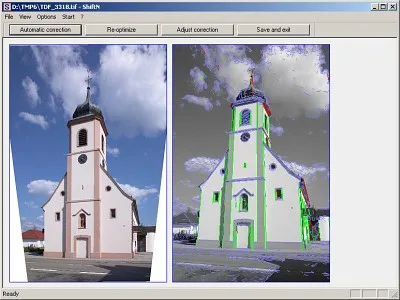
Open a photograph through File | Open or drag it into the window, then choose Automatic correction. Page Up and Page Down switch between the original and corrected views. If an unrelated edge affects the result, exclude that line in the right-hand line display and choose Re-optimize. Adjust correction provides manual controls for shift, rotation, distortion and horizontal shortening when the automatic result needs refinement.
ShiftN reads JPEG, TIFF, PNG and BMP images and saves JPEG, BMP or TIFF. File | Batch processing handles multiple selected photos and asks for an output folder. The separate Batch processing parameter reuses the current image's shift and rotation rather than detecting lines afresh in every photo, so check that setting before processing unrelated views.
Perspective correction leaves empty areas around the transformed picture. Automatic trimming removes those areas but can crop important details or change the aspect ratio; a manual selection gives more control. Save results normally adds _ShiftN to the filename. Keep a nonempty suffix or use Save as if you want to preserve the original: clearing the suffix makes Save results overwrite it.
The publisher's illustration shows the photo workspace beside a detected-line view. Its application build is not identified, so it should not be treated as proof of the exact appearance of version 5.0. This description is based on publisher documentation, not an installation or hands-on test.
What it offers
- Detect likely vertical architectural edges and calculate perspective correction automatically.
- Exclude unsuitable detected lines and recalculate with Re-optimize.
- Adjust shift, rotation, lens distortion and horizontal shortening manually.
- Open JPEG, TIFF, PNG and BMP; save corrected images as JPEG, BMP or TIFF.
- Process selected photos in a batch with a separate output folder.
Good to know
- Automatic detection can use unrelated edges and produce an incorrect correction; inspect the result and exclude unsuitable lines when needed.
- Automatic trimming can remove important details and change the image's aspect ratio.
- PNG is supported as input but is not among the documented output formats.
- The selected version 5.0 installer requires 64-bit Windows 10 or 11; older Windows support belongs to separate version 4.0 packages.
Product images
Sources
References used for this listing. Retrieval dates do not indicate hands-on testing.
More in multimedia & graphics
View category ↗
1by1 2.17
Play music directly from folders with 1by1, a free Windows audio player with resume, gapless playback and file tools. Formats beyond MP3 need additional decoders.
3DVista Virtual Tour Pro
Build interactive 360° virtual tours from panoramas, videos and 3D models with 3DVista Virtual Tour Pro for Windows. Commercial software with a 30-day trial.

4DDiG Video Repair
Repair corrupted or unplayable videos in batches with the Video Repair tool in 4DDiG File Repair for Windows. A free trial is available; advanced features require a paid license.