
Multimedia & graphics Windows
Similarity
Find duplicate music and similar images with Similarity for Windows. Compare audio by content or tags, review quality information and edit music tags; advanced tools require Premium.
- Operating system
- Windows; current supported Windows versions not established by the cited pages
- Architecture
- 64-bit
- Download package
- MSI installer
Selected publisher link is labeled Windows (64-bit). A separate 32-bit MSI is listed. No installation or Windows 10/11 compatibility test performed.
Link checked · Download guidance
What is Similarity?
Similarity helps organize a local music collection by finding duplicate or similar recordings, including files stored in different supported audio formats. It offers tag-based and content-based comparison, audio quality analysis and a built-in MP3/WMA tag editor. Image comparison is also available for photo collections.
The free basic functions and paid Premium tools are not interchangeable. The publisher reserves the precise acoustic-fingerprint algorithm, automatic file marking, saved results, spectrum and sonogram views, and OpenCL acceleration for Premium. Use the results to decide which files to keep rather than treating a similarity score as an instruction to delete them.
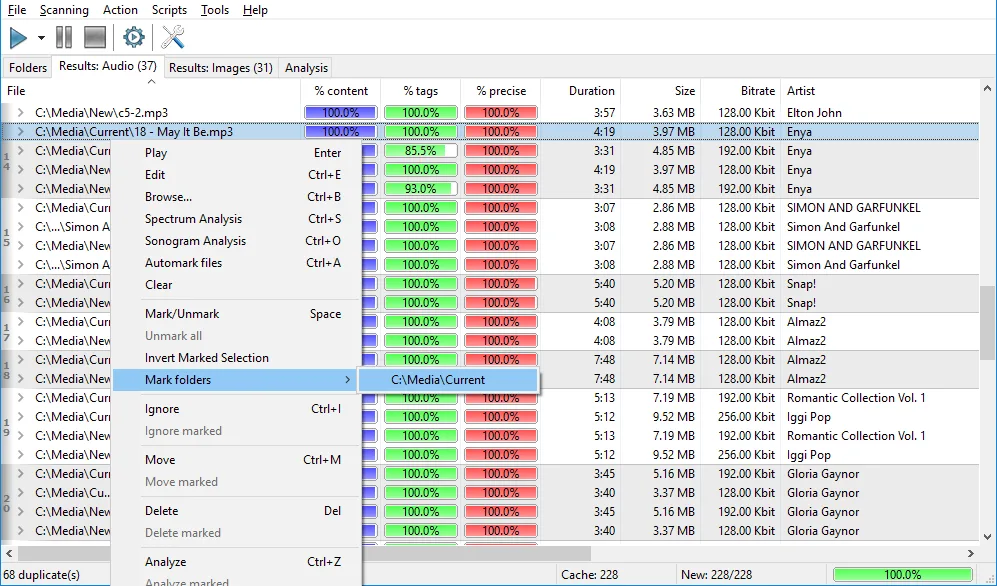
This entry links to the publisher's Windows 64-bit MSI for version 2.5.1, announced on November 17, 2021. The source pages do not establish current Windows 10 or 11 compatibility, and the installer has not been run here. The screenshot is a publisher-provided illustration; its exact application version and edition are not specified.
What it offers
- Compare music files using tags or audio content, with a separate precise comparison algorithm in Premium.
- Work with formats including MP3, AAC, M4A, WMA, OGG, WAV, FLAC, APE, WV, MPC, OPUS and TTA.
- Review audio quality information based on technical parameters such as bitrate and frequency.
- Edit MP3 and WMA tags and convert file names and tags.
- Find similar images using the application's image comparison tools.
Good to know
- Precise comparison, automatic marking, saved results, spectrum/sonogram graphs and OpenCL acceleration require paid Premium access.
- The publisher lists version 2.5.1 with a November 17, 2021 release announcement; current Windows 10/11 compatibility and installation behavior are not verified.
Product images
Sources
References used for this listing. Retrieval dates do not indicate hands-on testing.
More in multimedia & graphics
View category ↗
1by1 2.17
Play music directly from folders with 1by1, a free Windows audio player with resume, gapless playback and file tools. Formats beyond MP3 need additional decoders.
3DVista Virtual Tour Pro
Build interactive 360° virtual tours from panoramas, videos and 3D models with 3DVista Virtual Tour Pro for Windows. Commercial software with a 30-day trial.

4DDiG Video Repair
Repair corrupted or unplayable videos in batches with the Video Repair tool in 4DDiG File Repair for Windows. A free trial is available; advanced features require a paid license.