
Multimedia & graphics Windows
SkinFiner
Smooth portrait skin, even skin tone and process batches with SkinFiner for Windows, a standalone editor and Photoshop/Lightroom plugin available as a paid product with a free trial.
- Operating system
- Windows 10 or later; DirectX 11.1 or later
- Architecture
- x86_64 (64-bit)
- Download package
- EXE installer
Standalone application or plugin. Publisher lists Photoshop 8.0 (CS)+ and Lightroom 2.0+ for plugin workflows; current Windows line does not support 32-bit systems.
Link checked · Download guidance
What is SkinFiner?
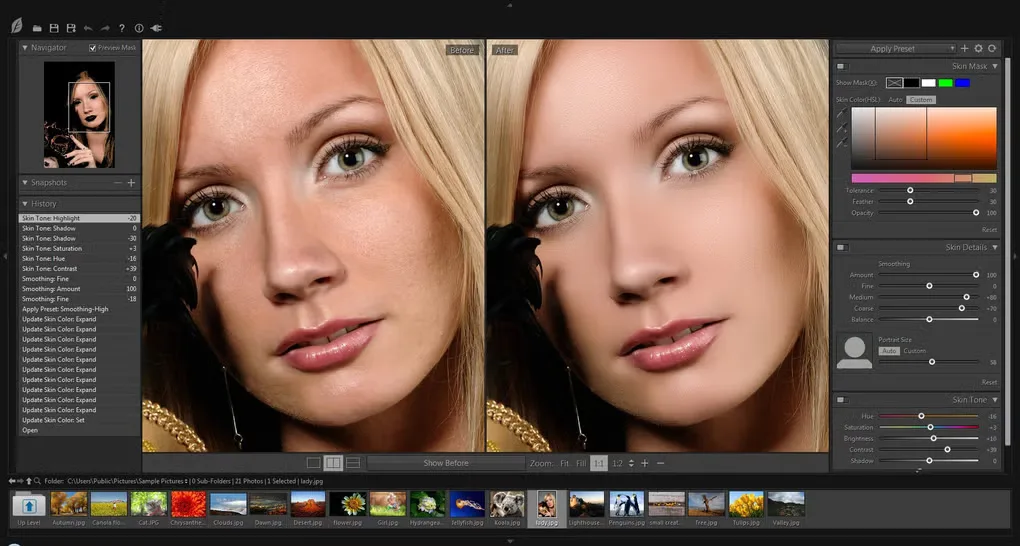
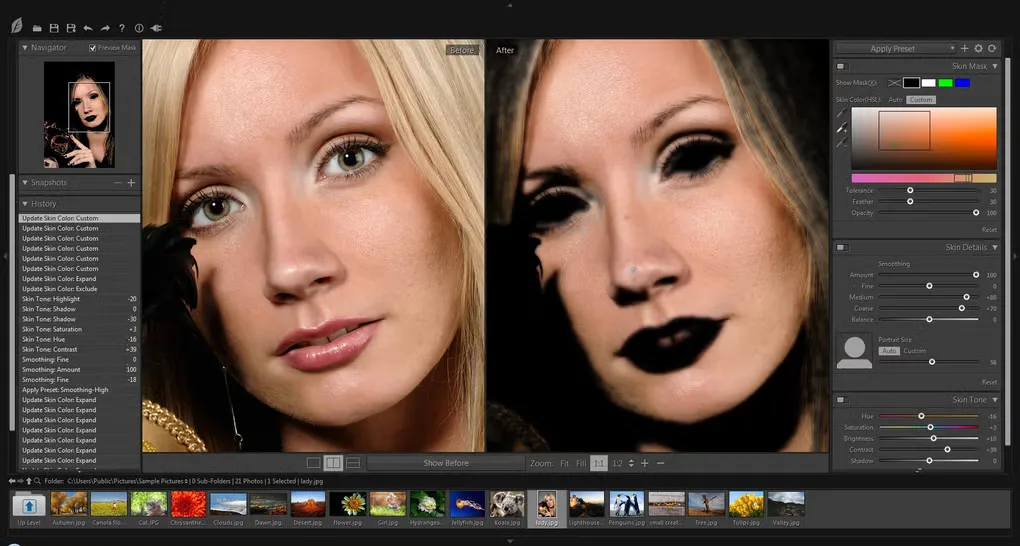
SkinFiner focuses on skin retouching in portrait photos. Its automatic skin mask selects areas for smoothing, with manual refinement when the selection needs adjustment. Skin-tone controls address redness and yellow areas, while separate adjustments change brightness, contrast, shadows and highlights. An eye-bag reduction control is also available.
Use it as a standalone application or within a supported Photoshop or Lightroom workflow. Built-in and custom presets help repeat adjustments, and batch processing applies a workflow to multiple photos. The publisher also lists color-profile conversion and color-managed editing.
The Windows download is a 64-bit EXE for Windows 10 or later and requires DirectX 11.1 or later; the publisher no longer supports 32-bit Windows in the current line. SkinFiner is not freeware: a free trial is offered, while the Home license is restricted to non-commercial personal use. Commercial work needs the Commercial license. The gallery images illustrate the interface and do not establish the appearance of version 5.8.
What it offers
- Automatic skin selection with manual mask refinement and skin-smoothing controls.
- Adjust uneven skin tone, redness, brightness, contrast, shadows and highlights.
- Reduce the appearance of eye bags with a dedicated adjustment.
- Work as a standalone editor or a Photoshop/Lightroom plugin.
- Use built-in or custom presets, batch processing and color-profile conversion.
Good to know
- The current Windows version requires Windows 10 or later, DirectX 11.1 or later and x86_64; 32-bit Windows is no longer supported.
- The Home license excludes commercial use; commercial work requires a Commercial license.
Product images
Sources
References used for this listing. Retrieval dates do not indicate hands-on testing.
- SkinFiner - Official Homepage - Fast portrait skin retouching software & plugin ↗Retrieved
- Download SkinFiner — publisher requirements and release notes ↗Retrieved
- Photo-Toolbox static download URL mapping (not executed) ↗Retrieved
- Purchase SkinFiner — Home and Commercial licenses ↗Retrieved
- SkinFiner License Agreement ↗Retrieved
- SkinFiner - Download — normal browser observation ↗Retrieved
- Photo-Toolbox.com — Term of Use ↗Retrieved
More in multimedia & graphics
View category ↗
1by1 2.17
Play music directly from folders with 1by1, a free Windows audio player with resume, gapless playback and file tools. Formats beyond MP3 need additional decoders.
3DVista Virtual Tour Pro
Build interactive 360° virtual tours from panoramas, videos and 3D models with 3DVista Virtual Tour Pro for Windows. Commercial software with a 30-day trial.

4DDiG Video Repair
Repair corrupted or unplayable videos in batches with the Video Repair tool in 4DDiG File Repair for Windows. A free trial is available; advanced features require a paid license.