

Multimedia & graphics macOS
Sonic Pi for macOS
Compose and perform music with live code in Sonic Pi for Mac, a free, open-source environment with synths, samples, effects and a built-in tutorial.
- Operating system
- macOS 13 Ventura or later
- Architecture
- arm64 (Apple silicon)
- Download package
- DMG disk image
Selected download is for M-series Macs. The publisher offers a separate Intel x64 DMG and points users of macOS 12 or earlier to older releases.
Link checked · Download guidance
What is Sonic Pi?
Sonic Pi turns code into music. Write notes, trigger samples and combine repeating live loops to build a composition, then change the code while it plays. It suits musicians exploring algorithmic performance and learners who want to practice programming through sound. The desktop app works offline and includes a tutorial, examples and reference help for its synths, samples, effects and functions.
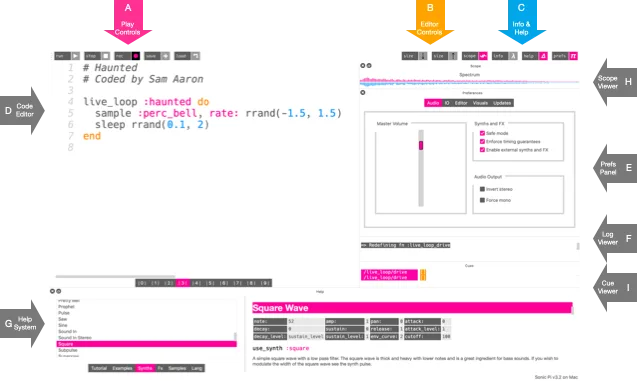
The Mac app also supports audio input and output, MIDI, OSC and Ableton Link for working with other music software and equipment. This download is the version 5.0.0 DMG for Apple silicon Macs running macOS 13 Ventura or later. Intel Macs need the separate x64 package on the publisher's site; macOS 12 and earlier require an older release. The illustrated screenshot comes from the publisher's annotated interface tutorial, not a capture of version 5.0.0.
Timing still has to fit the computer's capacity: the tutorial notes that a loop with too little sleep time can stop with an error if the computer cannot keep up. Start with the tutorial's examples and adjust the timing when experimenting with faster loops.
What it offers
- Create music with live loops, synths, samples and effects, modifying code during playback.
- Use the built-in tutorial, examples and reference help to learn music coding.
- Work offline in the desktop app and record the sound playing to a WAV file.
- Connect through audio input/output, MIDI, OSC and Ableton Link.
Good to know
- Version 5.0.0 requires macOS 13 Ventura or later; macOS 12 and earlier need an older release.
- The linked arm64 DMG is for Apple silicon; Intel Macs require the separate x64 download.
- Very short loop sleep times can cause an error when the computer cannot keep up, as described in the official tutorial.
Product images
Sources
References used for this listing. Retrieval dates do not indicate hands-on testing.
More in multimedia & graphics
View category ↗
1by1 2.17
Play music directly from folders with 1by1, a free Windows audio player with resume, gapless playback and file tools. Formats beyond MP3 need additional decoders.
3DVista Virtual Tour Pro
Build interactive 360° virtual tours from panoramas, videos and 3D models with 3DVista Virtual Tour Pro for Windows. Commercial software with a 30-day trial.

4DDiG Video Repair
Repair corrupted or unplayable videos in batches with the Video Repair tool in 4DDiG File Repair for Windows. A free trial is available; advanced features require a paid license.