

Multimedia & graphics macOS
Sound Byte for macOS
Cue sound effects, announcements and music from on-screen carts with Sound Byte for Mac, a paid audio playback tool with a trial download.
- Operating system
- macOS 10.13 or later, as listed by the publisher
- Architecture
- 64-bit Intel; Rosetta 2 required on Apple silicon
- Download package
- ZIP archive
Publisher advises evaluating before purchase. Version 5 omits older output-channel mapping and graphical cut-time selection; multiple racks can encounter macOS open-file limits.
Link checked · Download guidance
What is Sound Byte?
Sound Byte turns audio files into clickable carts for radio shows, podcasts, theater cues and sports announcements. Arrange recordings in racks, assign hotkeys and trigger more than one recording at a time. Playlists put clips in a chosen sequence, while timed playlists schedule sounds for a particular time. You supply the audio files; the publisher's illustrated tracks are not included.
The linked Mac ZIP is version 5.1.0, dated October 13, 2021 on the publisher's platform-specific download page, rather than the older 4.7.6 label on its product homepage. The publisher lists macOS 10.13 or later and a 64-bit Intel application; Apple silicon Macs need Rosetta 2. A separate 5.2.0b2 beta is not the download selected here.
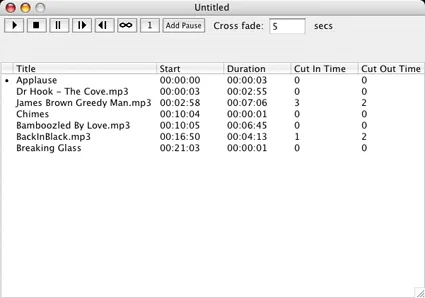
Registration selects Lite, regular or Pro from the same platform download. Until registration, the app operates as Lite, which has one rack of up to 75 carts; regular supports five racks and Pro supports fifty. Version 5 omits some older features, including output-channel mapping and graphical cut-in/out selection. The screenshot is a historical publisher illustration of the Mac playlist interface, not a capture of version 5.1.0.
What it offers
- Arrange up to 75 audio carts in each rack and trigger recordings by clicking a cart or using its assigned hotkey.
- Play multiple recordings simultaneously for layered cues and sound effects.
- Sequence clips in playlists or use timed playlists for scheduled playback.
- Choose a registration tier: Lite has one rack, regular has five and Pro has fifty.
Good to know
- Version 5 lacks output-channel mapping and graphical cut-in/out selection available in older versions.
- This is an Intel application; Apple silicon Macs require Rosetta 2, not a native Apple silicon build.
- The publisher warns that macOS open-file limits can cause problems, including crashes, when multiple racks are open.
- Paid registration is required for the purchased tier; the unregistered download operates as Lite. Illustrated audio files are not included.
Product images
Sources
References used for this listing. Retrieval dates do not indicate hands-on testing.
More in multimedia & graphics
View category ↗
1by1 2.17
Play music directly from folders with 1by1, a free Windows audio player with resume, gapless playback and file tools. Formats beyond MP3 need additional decoders.
3DVista Virtual Tour Pro
Build interactive 360° virtual tours from panoramas, videos and 3D models with 3DVista Virtual Tour Pro for Windows. Commercial software with a 30-day trial.

4DDiG Video Repair
Repair corrupted or unplayable videos in batches with the Video Repair tool in 4DDiG File Repair for Windows. A free trial is available; advanced features require a paid license.