
Multimedia & graphics macOS
SoundDesk
Mix and route audio on a Mac with SoundDesk, an Audio Unit host and virtual mixing console with multitrack recording and a 15-day trial.
- Operating system
- macOS 10.15 or later
- Architecture
- 64-bit Intel or Apple Silicon
- Download package
- DMG disk image
Publisher requires 4GB RAM and 100MB free disk space. All-in-One application-audio capture requires macOS 14.5 or later.
Link checked · Download guidance
What is SoundDesk?
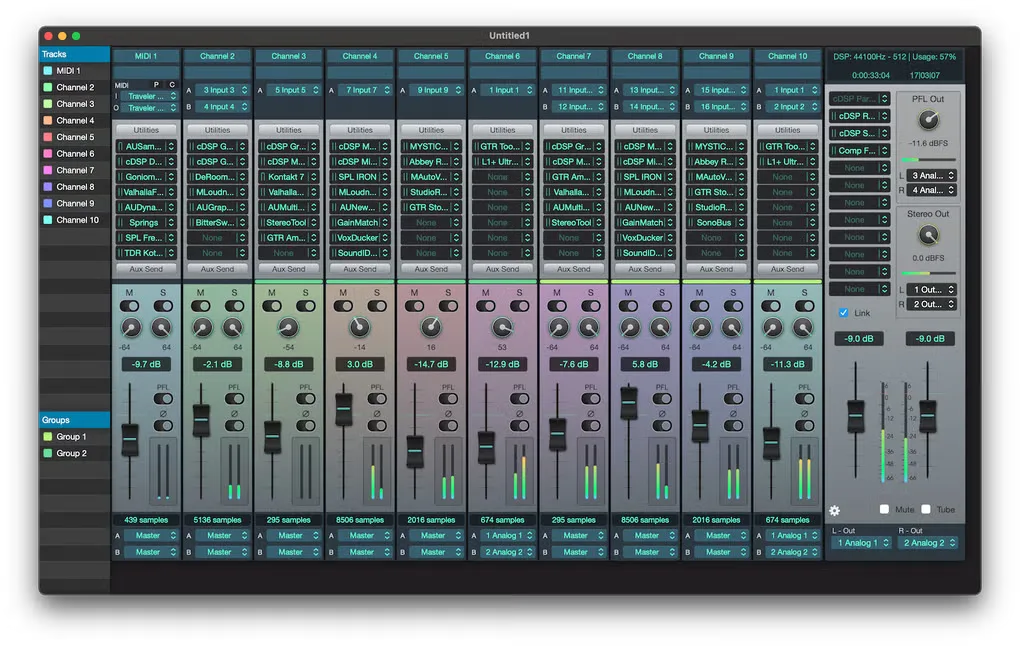
SoundDesk turns a Mac into a virtual audio mixing desk for combining sources, routing signals and recording performances. Its channel strips can handle mono or stereo audio, auxiliary returns and MIDI instruments. Audio Unit effects and instruments can run inside the mixer, alongside built-in processing and metering tools.
Use it to prepare a mixed feed for a broadcast, record multiple tracks from a live session or control a desk from a compatible MIDI surface. The All-in-One window brings audio devices together; capturing other applications directly through that window requires macOS 14.5 or later. SoundDesk's separate Virtual Devices add-on provides additional inter-application audio connections and is not the main application download linked here.
The publisher offers a fully working 15-day trial rather than a permanently free edition. The linked macOS disk image is the SoundDesk application installer; the publisher lists version 5.3.0. Base requirements are macOS 10.15 or later, a 64-bit Intel or Apple Silicon processor, 4GB of memory and 100MB of available disk space.
What it offers
- Route channel inputs to outputs, auxiliary sends, I/O buses and the master section.
- Host up to eight Audio Unit or cDSP plug-ins per channel and twelve on the master channel.
- Record individual tracks and the master input or output; export to formats including WAVE, AIFF and FLAC.
- Combine audio devices in the All-in-One window; capture application audio directly on macOS 14.5 or later.
- Control the mixer with Mackie Control, HUI or MIDI Continuous Controller devices.
Good to know
- The free trial lasts 15 days; ongoing use requires a paid license.
- Direct application-audio capture in All-in-One requires macOS 14.5 or later, even though the base app supports macOS 10.15.
- SoundDesk Virtual Devices is a separate add-on installer, not included in this main application download.
Product images
Sources
References used for this listing. Retrieval dates do not indicate hands-on testing.
More in multimedia & graphics
View category ↗
1by1 2.17
Play music directly from folders with 1by1, a free Windows audio player with resume, gapless playback and file tools. Formats beyond MP3 need additional decoders.
3DVista Virtual Tour Pro
Build interactive 360° virtual tours from panoramas, videos and 3D models with 3DVista Virtual Tour Pro for Windows. Commercial software with a 30-day trial.

4DDiG Video Repair
Repair corrupted or unplayable videos in batches with the Video Repair tool in 4DDiG File Repair for Windows. A free trial is available; advanced features require a paid license.