
Multimedia & graphics Windows
Soundplant
Trigger samples, sound effects and backing tracks from your computer keyboard with Soundplant for Windows, a standalone soundboard with a trial of paid features.
- Operating system
- Windows 10 and Windows 11
- Architecture
- x64 (64-bit)
- Download package
- EXE installer
Publisher also documents ARM64 use through Prism x64 emulation, not a native ARM64 package. Paid features are included as a trial.
Link checked · Download guidance
What is Soundplant?
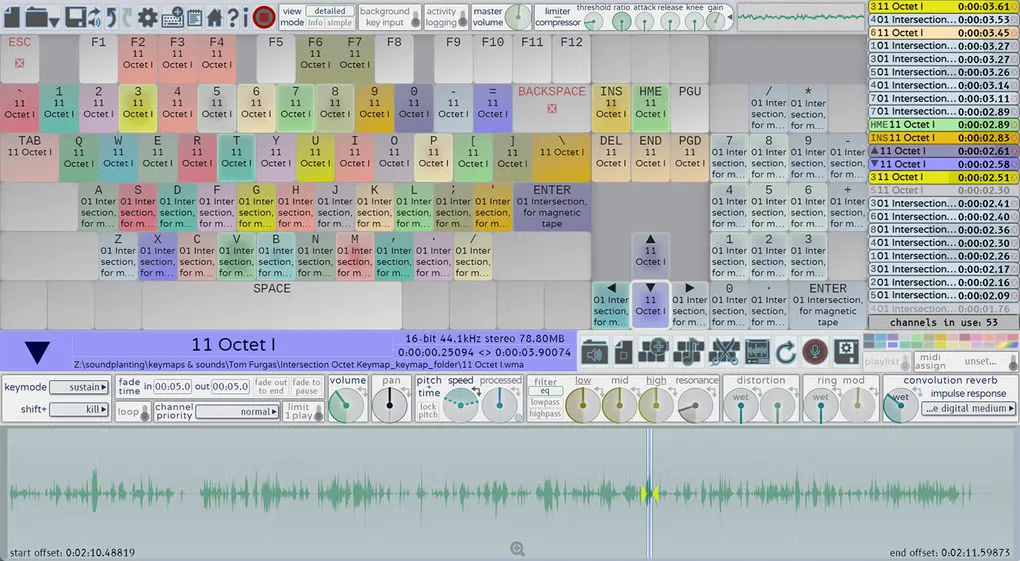
Soundplant turns a computer keyboard into a sample player for live cues, drum pads and custom soundboards. Drag audio files onto the onscreen keys, then use the corresponding physical keys to play them. It suits triggering effects during a show, mixing backing tracks or building a playable collection of your own samples without a separate controller.
Each key can have its own playback behavior and effects, while playlists let one key trigger a sequence or group of sounds. The registered feature set adds MIDI input, recording and background keyboard input, so sounds can be triggered while another application has focus.
The free download includes a 25-launch trial of paid features; free non-commercial use does not mean every feature remains unlocked. Soundplant is a standalone sample trigger, not a synthesizer, plugin, audio editor or sequencer. This entry links to the publisher’s 59.5.2 Windows installer, rather than the older 59.0.9 version listed on Softonic.
What it offers
- Assign your own audio files to 88 keyboard keys using drag and drop.
- Configure overlapping playback, restarting, fading, muting or pausing for individual keys.
- Queue playlists to play sounds in sequence, shuffled or together from one key.
- Adjust per-key volume, panning, pitch, filters and other realtime effects.
- Use MIDI, recording and background key input with the registered features or their trial.
Good to know
- Paid features have a 25-launch trial; continued access to MIDI, recording, expanded format support and background key input requires a license.
- A standalone sample player, not a synthesizer, plugin, audio editor or sequencer.
- This installer targets 64-bit Windows 10 or 11; older Windows releases require older Soundplant versions.
Product images
Sources
References used for this listing. Retrieval dates do not indicate hands-on testing.
More in multimedia & graphics
View category ↗
1by1 2.17
Play music directly from folders with 1by1, a free Windows audio player with resume, gapless playback and file tools. Formats beyond MP3 need additional decoders.
3DVista Virtual Tour Pro
Build interactive 360° virtual tours from panoramas, videos and 3D models with 3DVista Virtual Tour Pro for Windows. Commercial software with a 30-day trial.

4DDiG Video Repair
Repair corrupted or unplayable videos in batches with the Video Repair tool in 4DDiG File Repair for Windows. A free trial is available; advanced features require a paid license.