

Multimedia & graphics Windows
Spicetify for Windows
Customize the Spotify desktop client with themes, extensions and custom apps using Spicetify, a free, open-source command-line toolkit for Windows.
- Operating system
- Windows; Spotify for Windows/Microsoft Store 1.2.14 through 1.3.7 listed for this release
- Architecture
- x64
- Download package
- ZIP archive
Selected publisher asset is the Windows x64 ZIP. Separate x32 and ARM64 archives are listed. A compatible Spotify desktop installation is required.
Link checked · Download guidance
What is Spicetify?
Spicetify changes the appearance and behavior of the official Spotify desktop client. Use themes to change colors and layouts, inject CSS for finer adjustments, or add extensions and custom apps. The optional Spicetify Marketplace adds a tab inside Spotify for browsing themes, extensions and snippets. It is a customization toolkit for an existing Spotify installation, not a replacement music player.
This download is the publisher’s Windows x64 ZIP archive for version 2.46.4. The publisher also documents PowerShell and package-manager installation options. Setup and maintenance involve command-line tools; consult the official Getting Started guide for the installation method that fits your system.
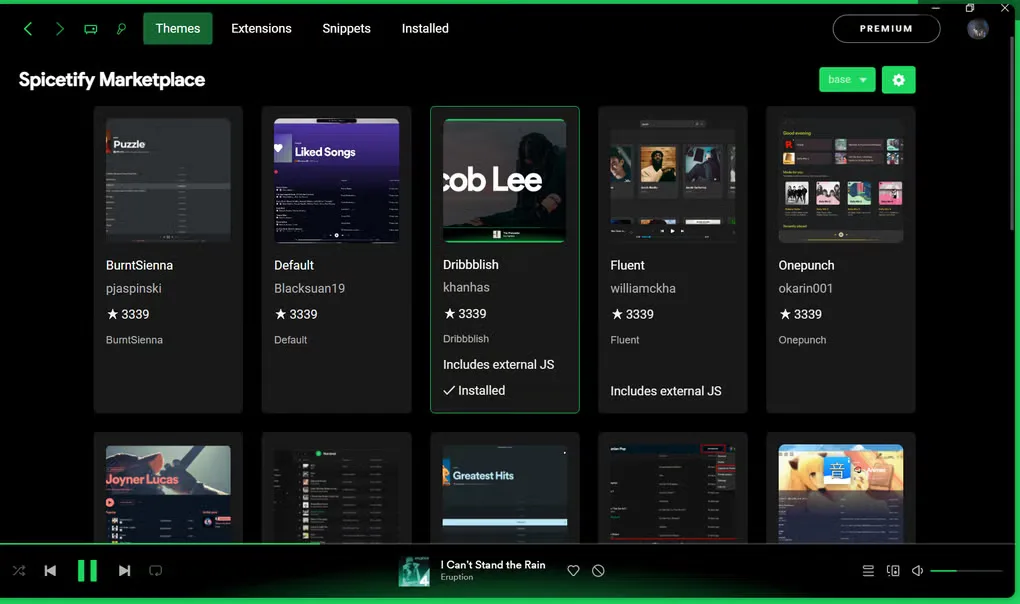
Spotify updates can require re-applying Spicetify or updating Spicetify itself. The 2.46.4 release lists compatibility with Spotify for Windows/Microsoft Store versions 1.2.14 through 1.3.7 and warns that the Microsoft Store edition may need Spicetify applied each time it is closed. The screenshot shows the Marketplace interface from the source gallery, not a verified capture of this particular release.
What it offers
- Change Spotify interface colors and layouts with themes.
- Inject CSS for advanced interface customization.
- Add extensions that modify the interface and player controls.
- Inject custom apps into Spotify.
- Browse themes, extensions and snippets through the optional Spicetify Marketplace.
Good to know
- Requires the official Spotify desktop client; Spicetify is not a standalone music player.
- Spotify updates can require re-applying Spicetify or waiting for a compatible Spicetify update.
- The 2.46.4 release warns that the Microsoft Store edition of Spotify may need Spicetify applied after each close.
Product images
Sources
References used for this listing. Retrieval dates do not indicate hands-on testing.
- Spicetify - Download (Windows) ↗Retrieved
- Spicetify — official customization toolkit ↗Retrieved
- spicetify/cli — official repository ↗Retrieved
- Getting Started | Spicetify ↗Retrieved
- Release v2.46.4 (2026-10-26) · spicetify/cli ↗Retrieved
- Spicetify 2.46.4 — publisher release assets ↗Retrieved
More in multimedia & graphics
View category ↗
1by1 2.17
Play music directly from folders with 1by1, a free Windows audio player with resume, gapless playback and file tools. Formats beyond MP3 need additional decoders.
3DVista Virtual Tour Pro
Build interactive 360° virtual tours from panoramas, videos and 3D models with 3DVista Virtual Tour Pro for Windows. Commercial software with a 30-day trial.

4DDiG Video Repair
Repair corrupted or unplayable videos in batches with the Video Repair tool in 4DDiG File Repair for Windows. A free trial is available; advanced features require a paid license.