
Multimedia & graphics Windows
Stykz
Create frame-by-frame stick-figure animations with Stykz, a free Windows animator with onion skins, editable figures and animated GIF export. This legacy release has no built-in sound support.
- Operating system
- Publisher lists Windows 2000 SP4 minimum; Windows Vista/Windows 7 recommended
- Architecture
- Not specified in the consulted publisher pages
- Download package
- Windows ZIP package
Publisher minimum: 1GHz CPU and 1GB RAM; recommended: 2GHz+ CPU and 2GB+ RAM. Legacy requirements do not confirm Windows 10/11 support. Package contents were not downloaded or inspected.
Link checked · Download guidance
What is Stykz?
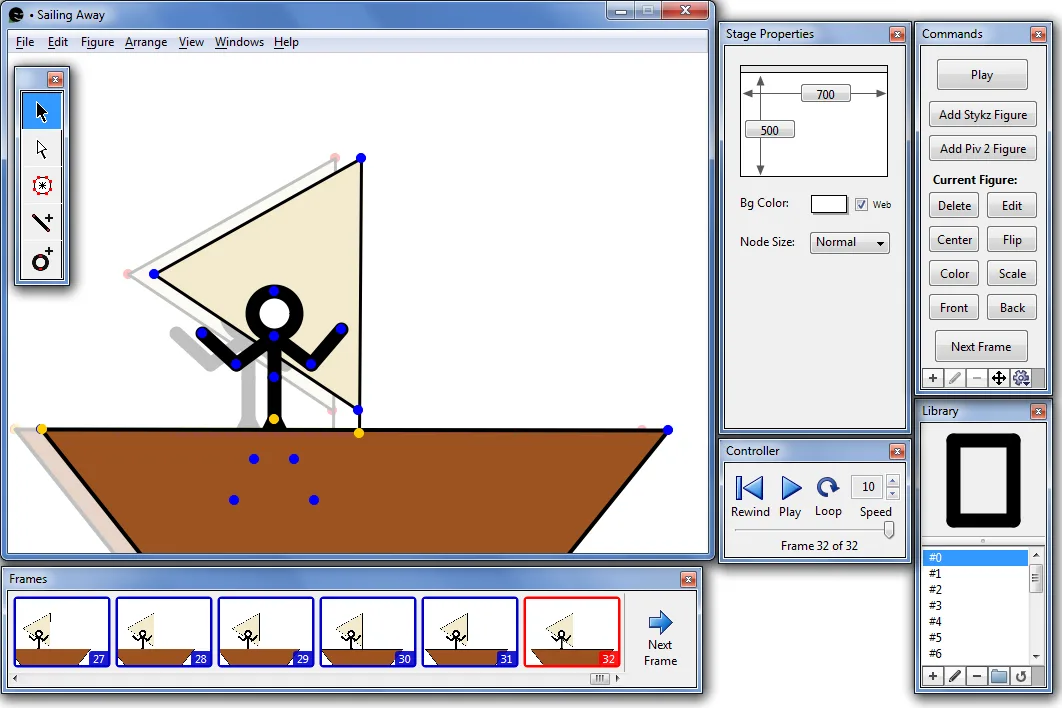
Stykz is a stick-figure animation editor for building movement one frame at a time. Position a figure on the stage, adjust its joints and create the next frame; onion skins show the previous pose as a reference. Figures can be edited directly on the stage rather than in a separate figure-editing window. Line, circle and PolyFill tools let you build and color your own shapes.
The figure library stores reusable characters and objects, while the Frames and Controller palettes organize frames and preview playback. Stykz imports Pivot 2 and Pivot 3 .stk figures and exports animations as animated GIFs or image sequences. Importing a figure is not the same as opening a complete Pivot animation: the publisher does not document .piv animation import as an available feature.
The publisher lists version 1.0.2 Build 222, released in January 2011. Its Windows requirements refer to Windows 2000 SP4, Vista and Windows 7; Windows 10 and 11 compatibility has not been established here. Sound and bitmap-image import are not supported in this release. The linked Windows ZIP is served from the accessible publisher host; only its HTTP headers were checked, not its contents or execution.
What it offers
- Create individual animation frames with onion-skin reference poses and playback controls.
- Edit joints and segments directly on the stage, including rotation, scaling and colored PolyFill regions.
- Store reusable figures in the library and import Pivot 2 or Pivot 3 .stk files.
- Export animated GIFs or image sequences; configure automatic saving and backups.
Good to know
- No built-in sound or bitmap-image import in the documented 1.0 release line.
- Pivot .stk figure import does not establish support for importing complete .piv animations.
- The publisher's Windows requirements are legacy specifications; Windows 10 and 11 compatibility is unverified.
Product images
Sources
References used for this listing. Retrieval dates do not indicate hands-on testing.
- Stykz • Home ↗Retrieved
- Stykz • Stykz Info — Features and Screenshots ↗Retrieved
- Stykz • Frequently Asked Questions ↗Retrieved
- Stykz • Downloads • Windows ↗Retrieved
- Stykz • Release Notes ↗Retrieved
- Windows package — publisher-host HEAD verification ↗Retrieved
More in multimedia & graphics
View category ↗
1by1 2.17
Play music directly from folders with 1by1, a free Windows audio player with resume, gapless playback and file tools. Formats beyond MP3 need additional decoders.
3DVista Virtual Tour Pro
Build interactive 360° virtual tours from panoramas, videos and 3D models with 3DVista Virtual Tour Pro for Windows. Commercial software with a 30-day trial.


4DDiG Video Repair
Repair corrupted or unplayable videos in batches with the Video Repair tool in 4DDiG File Repair for Windows. A free trial is available; advanced features require a paid license.