
Multimedia & graphics macOS
SuperCollider
Write sound-synthesis code and algorithmic compositions with SuperCollider for Mac, a free environment combining an audio server, programming language and integrated editor.
- Operating system
- macOS 11 or later
- Architecture
- Universal x64 and arm64
- Download package
- DMG disk image
Selected package: 3.14.1 macOS universal. Publisher separately lists a legacy x64 build for macOS 10.15+.
Link checked · Download guidance
What is SuperCollider?
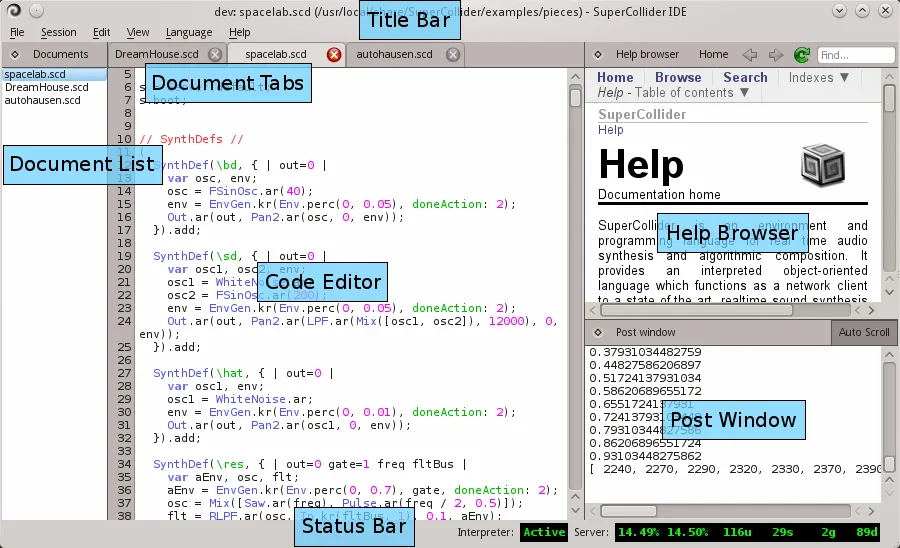
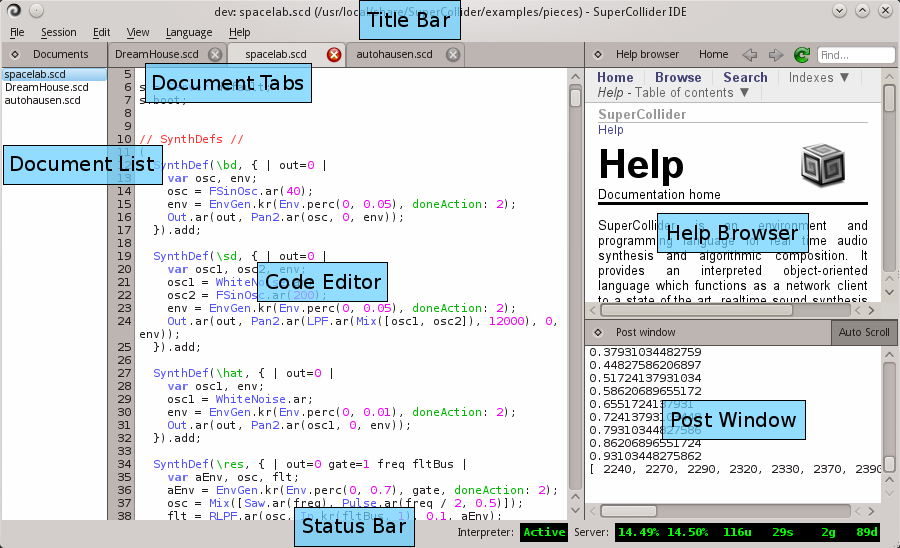
SuperCollider is a code-based environment for creating sound and composing music through programmed processes. Its sclang language controls the real-time scsynth audio server, while the included IDE provides a code editor, help browser and post window for interpreter output. It suits musicians, sound artists and researchers who want to define synthesis and musical behavior in code.
The language includes tools for live coding, musical patterns and custom graphical interfaces, with MIDI and Open Sound Control support for communicating with other software or hardware. The client and audio server can run on the same computer or communicate across a network.
This entry links to the publisher's SuperCollider 3.14.1 universal DMG for macOS 11 or later. A separate legacy x64 build is listed for macOS 10.15 or later; it is not the selected download. The workflow requires writing and evaluating code, and launching the IDE does not automatically start the audio server. The screenshot is an older annotated cross-platform IDE illustration from the official documentation, not a capture of the current Mac release.
What it offers
- Create real-time audio synthesis with the scsynth server controlled by the sclang programming language.
- Edit and evaluate code in the included IDE with integrated documentation and interpreter output.
- Build musical patterns, live-coding processes and custom graphical interfaces.
- Connect to software and hardware through MIDI and Open Sound Control.
- Run the language client and audio server locally or on separate networked computers.
Good to know
- The selected universal build requires macOS 11 or later; the separate legacy x64 package has different requirements.
- Making sound requires starting the audio server as well as evaluating code; the IDE does not start the audio server automatically.
- The main workflow is programming-based. The introductory tutorial assumes basic familiarity with acoustics and digital audio.
Product images
Sources
References used for this listing. Retrieval dates do not indicate hands-on testing.
- Downloads | SuperCollider ↗Retrieved
- index | SuperCollider ↗Retrieved
- SuperCollider 3.14.1 Help ↗Retrieved
- 01. Introductory Remarks | SuperCollider 3.14.1 Help ↗Retrieved
- SuperCollider IDE | SuperCollider 3.14.1 Help ↗Retrieved
- SuperCollider documentation licensing ↗Retrieved
More in multimedia & graphics
View category ↗
1by1 2.17
Play music directly from folders with 1by1, a free Windows audio player with resume, gapless playback and file tools. Formats beyond MP3 need additional decoders.
3DVista Virtual Tour Pro
Build interactive 360° virtual tours from panoramas, videos and 3D models with 3DVista Virtual Tour Pro for Windows. Commercial software with a 30-day trial.

4DDiG Video Repair
Repair corrupted or unplayable videos in batches with the Video Repair tool in 4DDiG File Repair for Windows. A free trial is available; advanced features require a paid license.