

Multimedia & graphics Windows
Synfig Studio for Windows
Create 2D animation from vector and bitmap artwork with Synfig Studio, a free, open-source tool with automatic tweening, layers and bone controls.
- Operating system
- Windows 7 or above, as listed by the publisher
- Architecture
- 64-bit (win64)
- Download package
- EXE installer
Publisher lists a dual-core 2 GHz CPU and at least 2 GB RAM. Separate 32-bit and portable packages are available. Requirements are publisher statements, not installation-test results.
Link checked · Download guidance
What is Synfig Studio?
Synfig Studio turns vector shapes and bitmap artwork into 2D animation. Set key positions and let the software calculate the in-between frames, rather than drawing every intermediate image manually. Its layer types cover geometry, gradients, filters, distortions and transformations, while bone controls support cutout characters and deformation of bitmap artwork. Linked layer parameters and mathematical expressions provide additional control over character rigs.
This entry links to the official project's Windows 64-bit EXE installer for stable version 1.4.5, released on May 19, 2024. The publisher also maintains a separate development branch; a higher development version number is not the same as a newer stable release. Synfig is available without payment under GNU GPL v3, even though the publisher's download page also offers a paid contribution option.
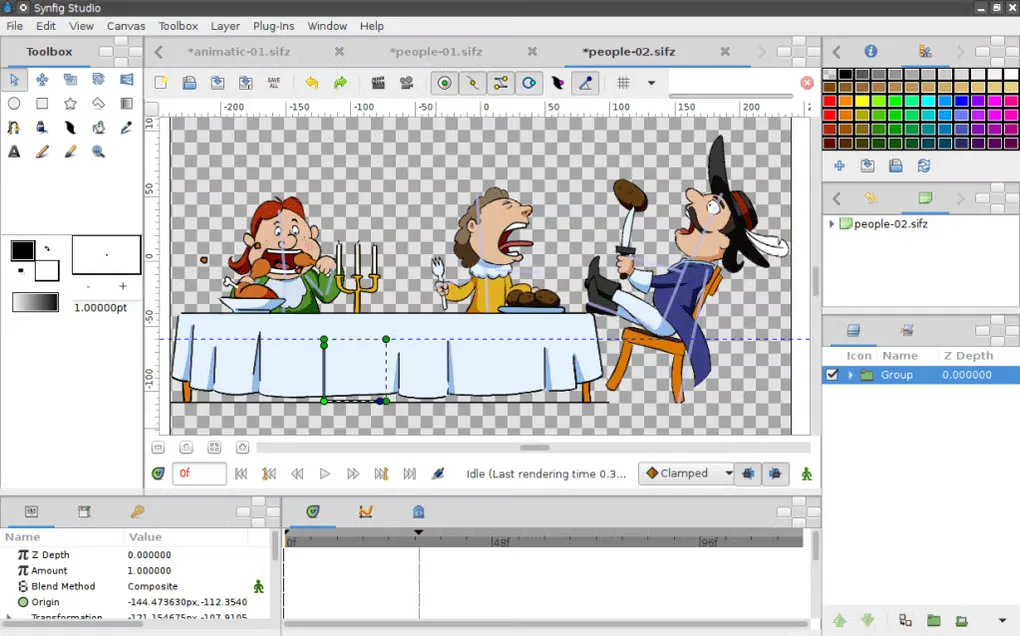
The animation workflow takes practice: independent source descriptions note a steep learning curve. Expect to learn the timeline, layers and controls before attempting complex character animation. The screenshot illustrates a Synfig workspace from the source gallery, not a verified capture of this Windows installer or version.
What it offers
- Calculate intermediate frames automatically between key positions in vector artwork.
- Combine geometric, gradient, filter, distortion and transformation layers.
- Use bones for cutout animation and deform bitmap artwork with a Skeleton Distortion layer.
- Link layer parameters directly or through mathematical expressions for character controls.
Good to know
- The layer and animation workflow has a steep learning curve; consult the documentation before attempting complex projects.
- This download is the 64-bit Windows stable installer, not the separate 32-bit, portable or development builds.
Product images
Sources
References used for this listing. Retrieval dates do not indicate hands-on testing.
- Synfig — official features, license and system requirements ↗Retrieved
- Download stable version — official download and payment terms ↗Retrieved
- Synfig Studio 1.4.5 released — stable release announcement ↗Retrieved
- Official Synfig repository — v1.4.5 release asset metadata ↗Retrieved
- Synfig Studio - Download — normal browser Windows page and gallery ↗Retrieved
- Synfig — publisher-linked host overview ↗Retrieved
More in multimedia & graphics
View category ↗
1by1 2.17
Play music directly from folders with 1by1, a free Windows audio player with resume, gapless playback and file tools. Formats beyond MP3 need additional decoders.
3DVista Virtual Tour Pro
Build interactive 360° virtual tours from panoramas, videos and 3D models with 3DVista Virtual Tour Pro for Windows. Commercial software with a 30-day trial.

4DDiG Video Repair
Repair corrupted or unplayable videos in batches with the Video Repair tool in 4DDiG File Repair for Windows. A free trial is available; advanced features require a paid license.