
Multimedia & graphics Windows
Tag&Rename
Edit music tags in batches and rename audio files from their metadata with Tag&Rename for Windows, a commercial editor with a 30-day trial.
- Operating system
- Windows XP, Vista, 7, 8, 8.1 and 10 (publisher-listed)
- Architecture
- 32-bit and 64-bit Windows support listed by publisher
- Download package
- EXE installer
Executable architecture was not inspected. Windows 11 support is unverified; no installation or runtime test was performed.
Link checked · Download guidance
What is Tag&Rename?
Tag&Rename organizes local music collections by editing audio metadata and bringing file names into line with it. Use batch tag editing to update shared album details across selected tracks, build tags from file names and folder structures, or rename files and folders from existing tags. It supports formats including MP3, FLAC, Ogg Vorbis, WMA and MP4/M4A, so a mixed-format library can be managed in one editor.
Beyond artist, album and track information, the editor supports lyrics, cover art, album artist and other extended fields. It can also export file information to XLS, CSV and HTML, and import tags from XLS. Unicode support helps when a collection includes names in different writing systems.
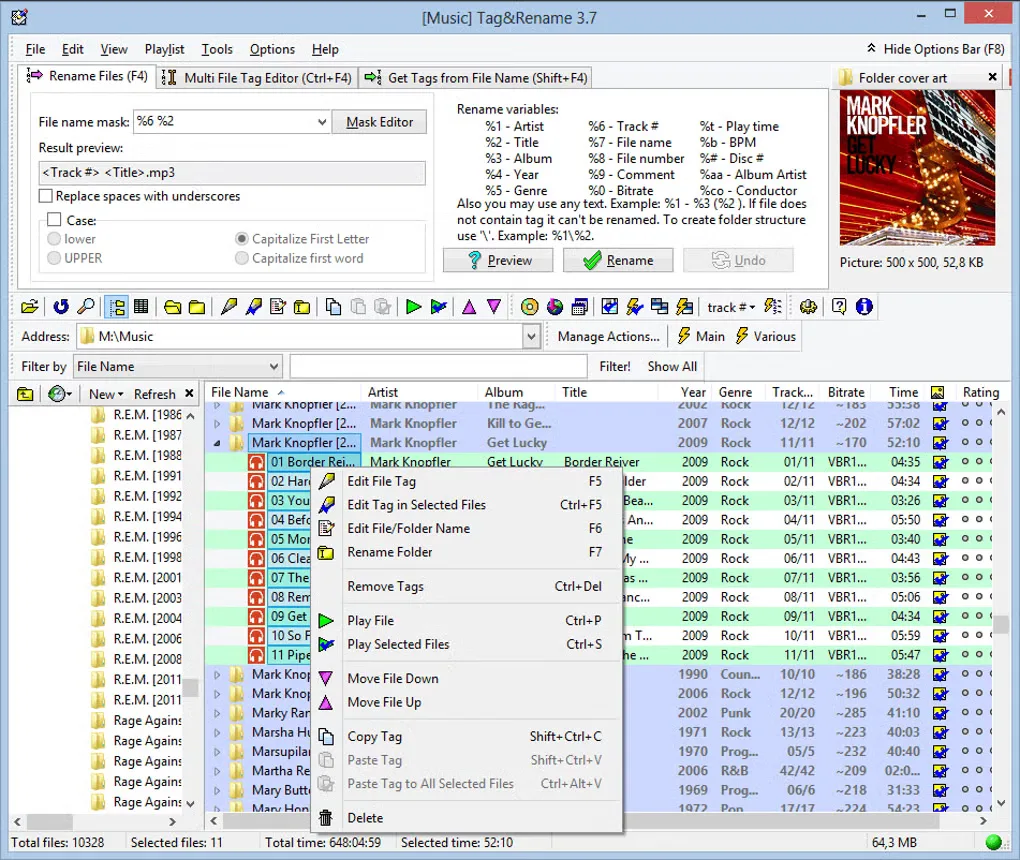
This is paid software: the publisher limits the trial to 30 days and displays a reminder screen. Some older online lookup features are no longer available; the 3.9.15 notes specifically remove Amazon France and Japan imports. The included source-gallery screenshot shows Tag&Rename 3.7, not a verified view of 3.9.15. Windows compatibility follows the publisher's XP-through-10 list; Windows 11 support has not been established here.
What it offers
- Edit tags manually or apply shared metadata to multiple music files in a batch.
- Generate tags from file names and folder structures, or rename files and folders from tags.
- Work with MP3/ID3, FLAC, Ogg Vorbis, WMA, MP4/M4A and other publisher-listed audio formats.
- Manage lyrics, cover art, album artist and other extended fields with Unicode support.
- Export file information to XLS, CSV or HTML and import tags from XLS.
Good to know
- The commercial trial lasts 30 days and includes a reminder screen; continued use requires paid registration.
- Amazon France and Japan web imports were removed in 3.9.15 because they no longer worked; other legacy online services were not verified.
- The publisher lists Windows XP through Windows 10, not Windows 11; the gallery screenshot depicts the older 3.7 interface.
Product images
Sources
References used for this listing. Retrieval dates do not indicate hands-on testing.
More in multimedia & graphics
View category ↗
1by1 2.17
Play music directly from folders with 1by1, a free Windows audio player with resume, gapless playback and file tools. Formats beyond MP3 need additional decoders.
3DVista Virtual Tour Pro
Build interactive 360° virtual tours from panoramas, videos and 3D models with 3DVista Virtual Tour Pro for Windows. Commercial software with a 30-day trial.


4DDiG Video Repair
Repair corrupted or unplayable videos in batches with the Video Repair tool in 4DDiG File Repair for Windows. A free trial is available; advanced features require a paid license.