

Multimedia & graphics Windows
TagScanner for Windows
Edit music tags in batches, rename audio files from their metadata and organize album artwork with TagScanner for Windows.
- Operating system
- Windows 7 / 8 / 8.1 / 10 / 11
- Architecture
- x64
- Download package
- EXE installer
Selected download is the x64 installer. The publisher separately lists portable ZIP packages. Online features need internet access.
Link checked · Download guidance
What is TagScanner?
TagScanner organizes a music collection by editing the information stored in audio files. Use its multiple-file tag editor to change artist, album and track fields across a selection, generate tags from filenames or rename files using their existing metadata. It supports formats including MP3, FLAC, OGG, AAC, WMA and MP4, with ID3, Vorbis Comments, APE and other tag types.
For albums with missing information, TagScanner can import metadata and cover art from services such as Discogs and MusicBrainz. Text replacement, case conversion and field formatting help make names consistent. A built-in audio player, playlist creation and collection-data exports complement the tagging tools.
Online lookups require an internet connection, and automatically retrieved tags can be inaccurate; check the returned album and track information before saving it. This entry links to the publisher's Windows x64 EXE installer for version 6.1.21. The publisher also offers portable ZIP packages separately. The gallery image shows an older TagScanner 6.1.0 interface, not a verified screenshot of version 6.1.21.
What it offers
- Edit tags across multiple audio files, including MP3, FLAC, OGG, AAC, WMA and MP4 formats.
- Rename files from tag information or generate tags from file and folder names.
- Import album information and cover art from Discogs or MusicBrainz.
- Apply text replacements, case conversion and tag-field formatting.
- Create playlists, export collection information and preview audio with the built-in player.
Good to know
- Online metadata and cover lookups require an internet connection.
- Automatically retrieved tag information is not always accurate; check matches before saving.
Product images
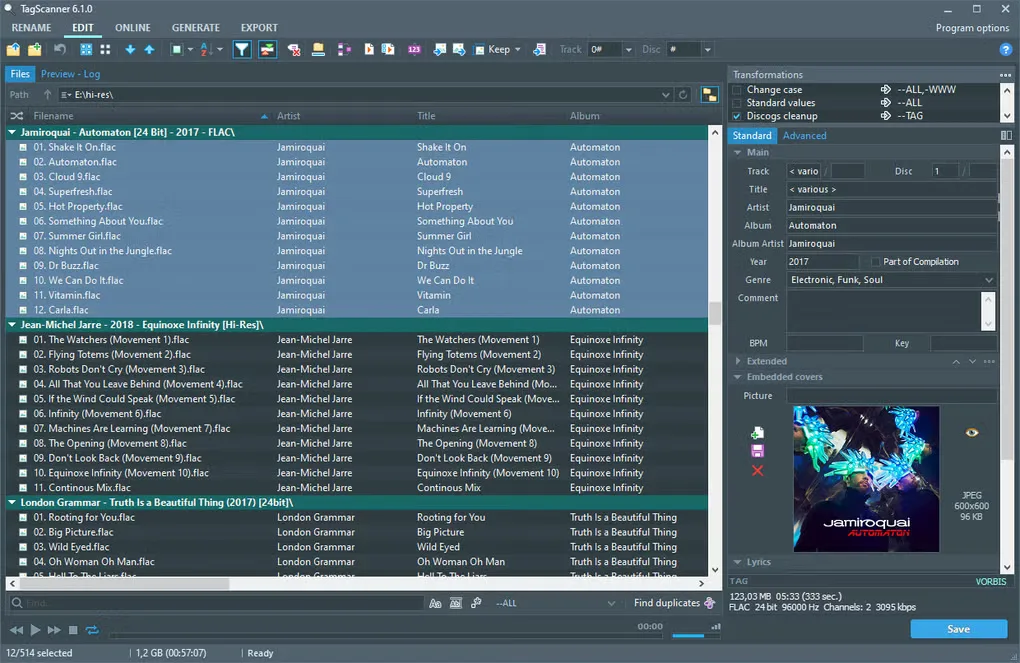
Sources
References used for this listing. Retrieval dates do not indicate hands-on testing.
- TagScanner - The Ultimate Tag Editor ↗Retrieved
- TagScanner - Download ↗Retrieved
- TagScanner - Download ↗Retrieved
More in multimedia & graphics
View category ↗
1by1 2.17
Play music directly from folders with 1by1, a free Windows audio player with resume, gapless playback and file tools. Formats beyond MP3 need additional decoders.
3DVista Virtual Tour Pro
Build interactive 360° virtual tours from panoramas, videos and 3D models with 3DVista Virtual Tour Pro for Windows. Commercial software with a 30-day trial.

4DDiG Video Repair
Repair corrupted or unplayable videos in batches with the Video Repair tool in 4DDiG File Repair for Windows. A free trial is available; advanced features require a paid license.