
Multimedia & graphics Windows
ThunderSoft Free Audio Recorder
Record computer sound, microphone input or both with ThunderSoft Free Audio Recorder for Windows. The publisher limits this free personal-use edition to two minutes.
- Operating system
- Windows 11, 10, 8.1, 8, 7, Vista and XP, as listed by the publisher
- Architecture
- Not specified by the publisher
- Download package
- ZIP archive
Version 10.2 is advertised on the publisher page; Softonic lists 10.0. Archive contents, architecture and installed compatibility were not inspected.
Link checked · Download guidance
What is ThunderSoft Free Audio Recorder?
ThunderSoft Free Audio Recorder captures sound playing on a Windows computer and audio from a microphone, with an option to record both together. It provides Record, Pause and Stop controls, output-format settings and recording plans for automatic capture. It can be useful for short personal voice notes or brief captures of computer audio.
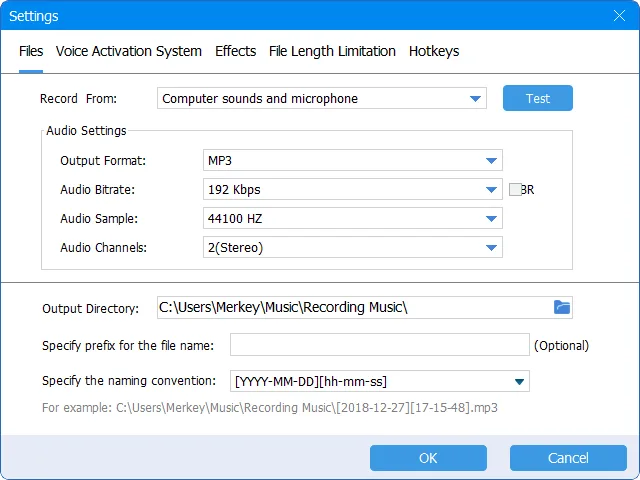
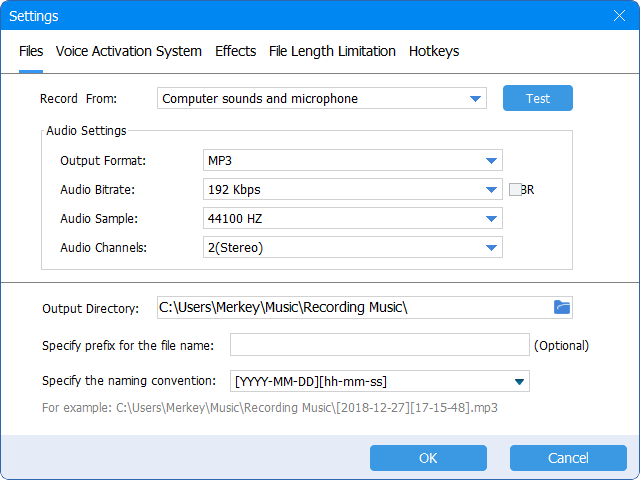
The publisher lists MP3, OGG, AAC, AC3, FLAC, M4A, MKA, WAV and WMA output. Audio settings let you choose the recording source and adjust output parameters; the supplied publisher screenshot shows format, bitrate, sample rate, channel and output-folder controls.
Despite the name, the publisher describes this as a home edition for personal use only with a two-minute limitation. Its separate claim of long-time recording does not establish unlimited recording in the free edition. The linked ZIP is the package offered on the publisher's page, which advertises version 10.2; the archive contents and installed behavior have not been inspected.
What it offers
- Capture computer audio and microphone input together or select a recording source.
- Save recordings in formats including MP3, WAV, FLAC, OGG, AAC and WMA.
- Create recording plans for automatic recording.
- Adjust audio output parameters and choose an output directory.
- Use separate Record, Pause and Stop controls.
Good to know
- The publisher restricts this free home edition to personal use and states a two-minute limitation.
- The publisher's long-time recording claim conflicts with its free-edition time limit; unlimited recording is not established.
Product images
Sources
References used for this listing. Retrieval dates do not indicate hands-on testing.
More in multimedia & graphics
View category ↗
1by1 2.17
Play music directly from folders with 1by1, a free Windows audio player with resume, gapless playback and file tools. Formats beyond MP3 need additional decoders.
3DVista Virtual Tour Pro
Build interactive 360° virtual tours from panoramas, videos and 3D models with 3DVista Virtual Tour Pro for Windows. Commercial software with a 30-day trial.

4DDiG Video Repair
Repair corrupted or unplayable videos in batches with the Video Repair tool in 4DDiG File Repair for Windows. A free trial is available; advanced features require a paid license.