
Multimedia & graphics Windows
ThunderSoft GIF Converter
Convert GIFs to video or image sequences, reverse animations, join files and make GIFs from pictures with this six-tool Windows suite. A paid license is offered alongside a trial download.
- Operating system
- Windows 11, 10, 8.1, 8, 7, Vista and XP (publisher-listed)
- Architecture
- Not specified by the publisher product page
- Download package
- ZIP trial archive (GCSetup_trial.zip)
Publisher lists an English interface. Exact Windows build requirements and CPU architecture are not stated; software was not installed or run.
Link checked · Download guidance
What is ThunderSoft GIF Converter?
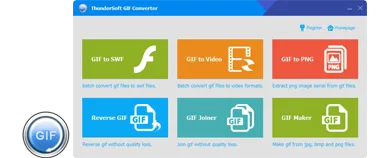
ThunderSoft GIF Converter combines six GIF tools in one Windows application: GIF to SWF, GIF to Video, GIF to PNG, Reverse GIF, GIF Joiner and GIF Maker. It suits work that moves between animated GIFs, video files and individual frames rather than only creating a new animation from pictures. The publisher lists batch conversion across the suite.
Choose GIF to Video for outputs such as MP4, AVI, WMV, MKV, FLV, MOV or MPEG, with background music and frame-rate or bitrate settings. GIF to PNG previews an animation frame by frame and extracts PNG, BMP or JPEG image sequences. For animation assembly, GIF Maker accepts JPG, BMP and PNG pictures with per-frame durations; GIF Joiner combines GIFs and supported still images. Reverse GIF offers reverse and forward/reverse sequences with speed controls.
This is the standard six-tool edition, not the separate nine-tool Pro edition. The publisher offers a paid license and labels the linked ZIP as a trial; the product page does not specify the trial's duration or output restrictions. Its listed Windows versions and version number are publisher claims, not results of an installation or compatibility test.
What it offers
- Convert animated GIFs to video formats including MP4, AVI, WMV, MKV, FLV, MOV and MPEG; adjust output settings and add background music.
- Preview GIF frames and extract PNG, BMP or JPEG image sequences.
- Reverse animations, choose forward/reverse sequences and adjust playback speed.
- Join GIF, JPG, PNG and BMP files, or create GIFs from JPG, BMP and PNG pictures with individual frame durations.
- Batch conversion across the suite; command-line conversion is specifically listed for GIF to Video. GIF to SWF also provides output settings and background music.
Good to know
- The download is a trial of paid software. The product page does not state the trial duration or exact output restrictions.
- The standard edition contains six tools; the publisher's separate Pro edition contains nine. Do not assume Pro-only tools are included here.
Product images
Sources
References used for this listing. Retrieval dates do not indicate hands-on testing.
More in multimedia & graphics
View category ↗
1by1 2.17
Play music directly from folders with 1by1, a free Windows audio player with resume, gapless playback and file tools. Formats beyond MP3 need additional decoders.
3DVista Virtual Tour Pro
Build interactive 360° virtual tours from panoramas, videos and 3D models with 3DVista Virtual Tour Pro for Windows. Commercial software with a 30-day trial.

4DDiG Video Repair
Repair corrupted or unplayable videos in batches with the Video Repair tool in 4DDiG File Repair for Windows. A free trial is available; advanced features require a paid license.