
Multimedia & graphics Windows
Tipard Video Converter Ultimate
Convert video and audio, trim clips and rip DVDs with Tipard Video Converter Ultimate for Windows. Commercial software with a trial download.
- Operating system
- Windows 11, 10, 8.1, 8 and 7
- Architecture
- Publisher lists 32-bit and 64-bit Windows; EXE machine type not inspected
- Download package
- EXE installer
Publisher minimums: 1 GHz Intel/AMD CPU, 2 GB RAM and 1024×768 display; 2 GB extra disk space recommended. Compatibility is publisher-stated, not tested here.
Link checked · Download guidance
What is Tipard Video Converter Ultimate?
Tipard Video Converter Ultimate combines video and audio conversion with clip editing and DVD ripping in one Windows application. It suits preparing files for a different player or device, extracting an audio track, or processing a batch of clips without switching between separate conversion and trimming tools. Supported output choices include MP4, MKV, MOV, MP3, FLAC and WAV.
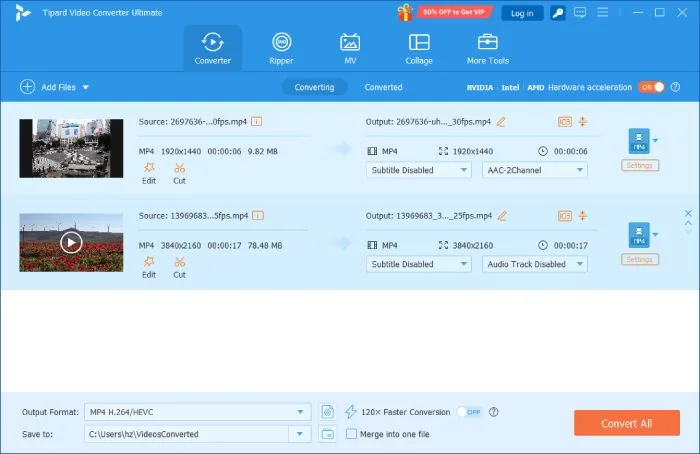
The publisher’s documented conversion workflow starts with Add Files or drag-and-drop. Choose a Video, Audio or Device preset under Output Format, adjust the profile when needed, select a destination under Save to and use Convert All to process the queue. Custom profiles expose codec, bitrate, resolution and frame-rate controls. Editing tools cover trimming, cropping, rotation, merging, filters and text or image watermarks; MV and collage modes handle themed videos and split-screen arrangements.
The Ripper workflow accepts DVD discs, ISO images and DVD folders. One specific constraint matters when combining ripping with editing: the guide says movie-effect editing requires a format other than MPG Lossless.
This is commercial software, not unrestricted freeware. Tipard offers a trial before purchase, monthly subscriptions and lifetime licenses. The monthly license renews automatically; the purchase page also promotes a separate Screen Capture trial with its own paid renewal, so check the selected extras before checkout. Windows and Mac licenses are not interchangeable.
The linked EXE is the publisher’s Windows download, with retained HEAD-only availability evidence. It has not been downloaded, installed or benchmarked here. That receipt does not establish the full offline payload, and no conversion-speed, output-quality or safety guarantee is claimed.
What it offers
- Batch-convert video and audio to formats including MP4, MKV, MOV, MP3, FLAC and WAV.
- Choose device presets or customize codec, bitrate, resolution and frame rate.
- Trim, crop, rotate and merge clips; add filters and text or image watermarks.
- Convert DVD discs, ISO images and DVD folders through the Ripper workflow.
- Create themed music videos and split-screen video or photo collages.
Good to know
- Commercial license required for registered use; a free trial download does not establish unrestricted free use. Exact trial conversion caps were not established from the inspected pages.
- The one-month license auto-renews. The purchase page also promotes a separate Screen Capture trial with a subsequent paid renewal.
- Windows and Mac licenses are platform-specific and cannot be transferred between the two versions.
- The publisher’s guide requires an output format other than MPG Lossless to edit DVD movie effects.
Product images
Sources
References used for this listing. Retrieval dates do not indicate hands-on testing.
More in multimedia & graphics
View category ↗
1by1 2.17
Play music directly from folders with 1by1, a free Windows audio player with resume, gapless playback and file tools. Formats beyond MP3 need additional decoders.
3DVista Virtual Tour Pro
Build interactive 360° virtual tours from panoramas, videos and 3D models with 3DVista Virtual Tour Pro for Windows. Commercial software with a 30-day trial.

4DDiG Video Repair
Repair corrupted or unplayable videos in batches with the Video Repair tool in 4DDiG File Repair for Windows. A free trial is available; advanced features require a paid license.