

Multimedia & graphics macOS
Topaz Video AI for macOS
Upscale and enhance existing video on a Mac with Topaz Video AI. This discontinued application offers frame interpolation, stabilization and preview controls; the publisher still provides a legacy installer.
- Operating system
- macOS 11 Big Sur or later; Rhea, Hyperion and Aion require macOS 13 Ventura or later
- Architecture
- Apple M-series per publisher requirements; package architecture not independently inspected
- Download package
- DMG installer; publisher endpoint resolved to TopazVideoAI-7.1.5.dmg
16 GB RAM listed for Apple M-series Macs. Intel Mac support ends at 6.0.3, below this linked version. Starlight Mini cannot render locally on macOS.
Link checked · Download guidance
What is Topaz Video AI?
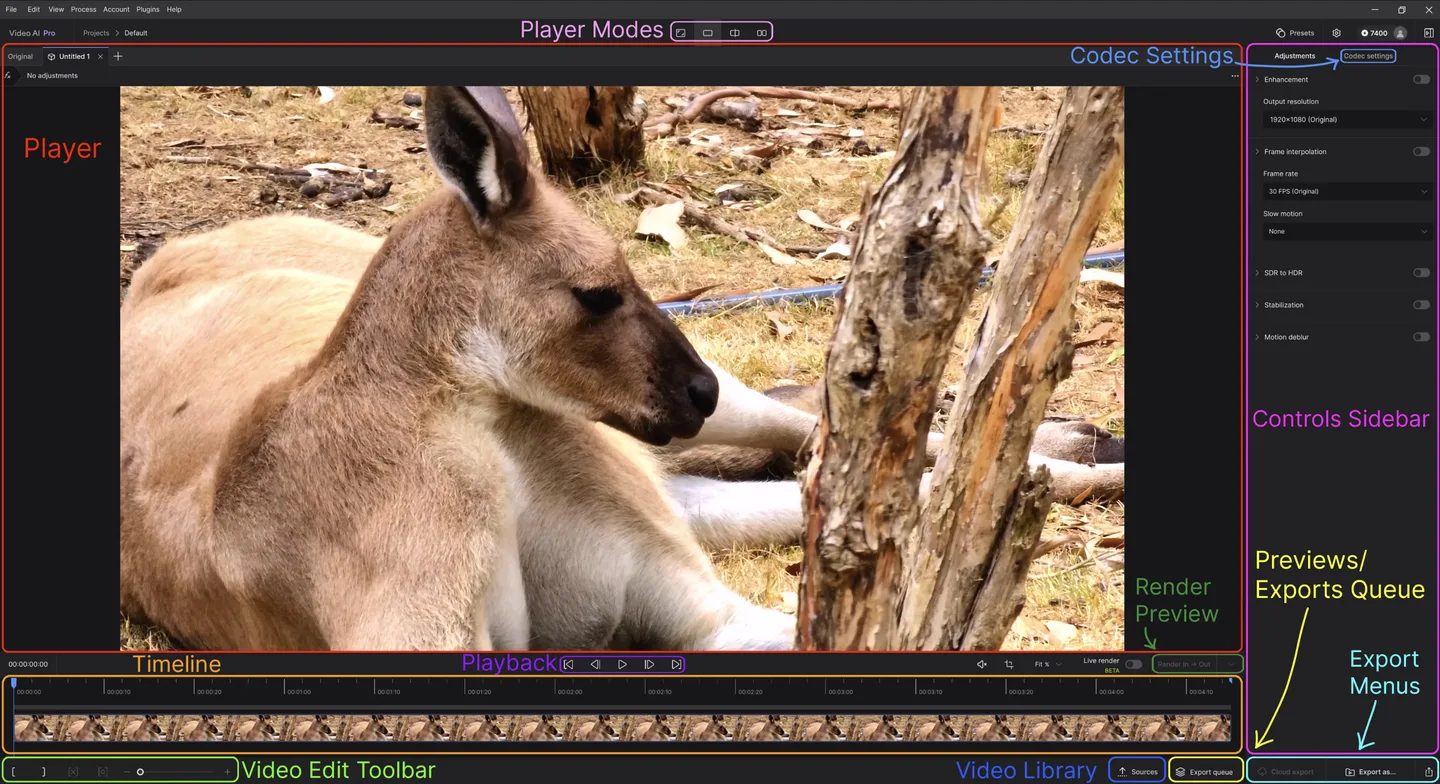
Topaz Video AI processes existing footage with AI enhancement filters. You can change output resolution, adjust frame rate or create slow motion, reduce camera shake and compare previews before exporting. Presets provide a starting point, while the controls sidebar lets you choose filters and output settings for each clip. It is a video-enhancement workflow, not a text-to-video generator.
Import a video or an ordered image sequence, select enhancements, render a short preview and inspect the result before committing to a full export. Encoder, container and audio options are available in Codec Settings. The publisher recommends using no more than two filters per file for faster processing.
This is the discontinued perpetual-license product, not the newer Topaz Video application. Topaz Labs no longer develops or sells Video AI and warns that support is increasingly limited as operating systems and hardware change. Legacy installers run as trial software by default; existing owners should use a version covered by their license.
The linked Mac endpoint resolved to a 7.1.5 DMG during a HEAD-only check. The publisher's legacy requirements list Apple M-series Macs with macOS 11 Big Sur or later and 16 GB of memory; Rhea, Hyperion and Aion require macOS 13 Ventura or later. Intel Macs are not officially supported beyond 6.0.3, so this linked 7.1.5 package is not the supported choice for an Intel Mac. The gallery uses publisher documentation screenshots, including an annotated Windows workspace reference; it does not show a Mac installation performed for this entry.
What it offers
- Upscale existing footage and select task-specific enhancement filters, including deinterlacing.
- Adjust output frame rate and create slow-motion output with frame interpolation.
- Apply stabilization and motion-deblur filters to footage.
- Start from presets, render short previews and compare results before export.
- Choose export encoder, container and audio settings; import videos or consecutively ordered image sequences.
Good to know
- Discontinued and no longer sold or developed; future operating-system and hardware changes may prevent it from working, and publisher support is increasingly limited.
- The supplied 7.1.5 Mac download is beyond the last officially supported Intel Mac release, 6.0.3. Existing owners need a version covered by their license.
- The legacy Apple M-series requirements specify 16 GB RAM; Rhea, Hyperion and Aion require macOS 13 or later. Starlight Mini local rendering is not supported on macOS.
Product images
Sources
References used for this listing. Retrieval dates do not indicate hands-on testing.
- Topaz Video AI for AI Video Generator: review, features & use cases ↗Retrieved
- Legacy Applications | Other Apps ↗Retrieved
- Download and Install (Legacy) | Topaz Video ↗Retrieved
- System Requirements (Legacy) | Topaz Video ↗Retrieved
- Quick Start (Legacy) | Topaz Video ↗Retrieved
- Filters (Legacy) | Topaz Video ↗Retrieved
More in multimedia & graphics
View category ↗
1by1 2.17
Play music directly from folders with 1by1, a free Windows audio player with resume, gapless playback and file tools. Formats beyond MP3 need additional decoders.
3DVista Virtual Tour Pro
Build interactive 360° virtual tours from panoramas, videos and 3D models with 3DVista Virtual Tour Pro for Windows. Commercial software with a 30-day trial.

4DDiG Video Repair
Repair corrupted or unplayable videos in batches with the Video Repair tool in 4DDiG File Repair for Windows. A free trial is available; advanced features require a paid license.